






先开发一个姓名维护的界面,输入学生的姓名,每行录入一个学生姓名,点击保存的时候将学生的姓名保存到一个txt文件中。
再开发一个点名的程序,从维护好的txt文件中,随机读取一个学生的姓名显示出来,表示该学生已被点名。
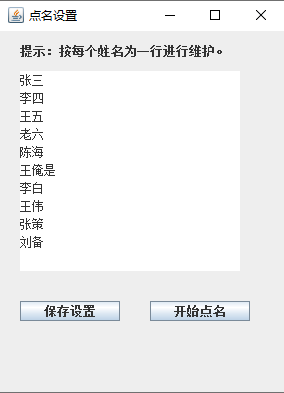
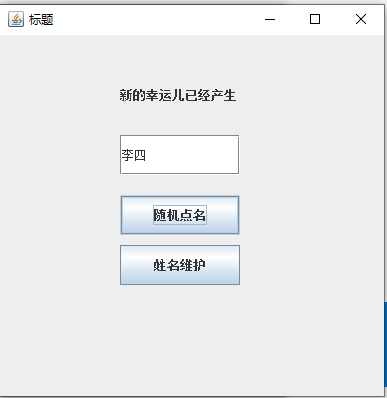
CallNamePage.java
//GUI界面
package CallName;
import java.awt.Toolkit;
import java.awt.event.*;

import javax.swing.*;
//点名程序
public class CallNamePage extends JFrame {
	JTextField txt11 = new JTextField();
	JButton btn = new JButton("随机点名");
	JButton btn2 = new JButton("姓名维护");

	public CallNamePage() {
		super("标题");
		final JLabel lab = new JLabel("点名中....");
		lab.setBounds(120, 40, 120, 40);
		txt11.setBounds(120, 100, 120, 40);
		btn.setBounds(120, 160, 120, 40);
		btn2.setBounds(120, 210, 120, 40);
		//事件
		btn.addActionListener(new ActionListener() {
			public void actionPerformed(ActionEvent ee) {
				lab.setText("新的幸运儿已经产生");
				CallNameTool tool  =new CallNameTool();
				try{
					txt11.setText(tool.DoCallName());
				}
				catch(Exception ex)
				{
					JOptionPane.showMessageDialog(null, "点名失败");
				}
			}
		});
		btn2.addActionListener(new ActionListener() {
			public void actionPerformed(ActionEvent ee) {
				CallNameSetting st=new CallNameSetting();
				st.CenterPanel();
			}
		});

		// 将控件添加到容器
		JPanel p = new JPanel();
		p.setLayout(null);
		// 布局标题
		p.add(lab);
		p.add(txt11);
		p.add(btn);
		p.add(btn2);
		getContentPane().add(p);
		setSize(400, 400);
		setDefaultCloseOperation(JFrame.EXIT_ON_CLOSE);
		setVisible(true);

	}

	// 将界面开始位置显示到屏幕中间
	public void CenterPanel() {
		int width = Toolkit.getDefaultToolkit().getScreenSize().width;
		int height = Toolkit.getDefaultToolkit().getScreenSize().height;
		this.setLocation(width / 2, height / 4);
	}

}
CallNameSetting.java
//游戏主界面
package CallName;
import java.awt.Toolkit;
import java.awt.event.*;

import javax.swing.*;

//点名设置界面
public class CallNameSetting extends JFrame {
	// 输入用户列表
	JLabel tip=new JLabel("提示:按每个姓名为一行进行维护。");
	JTextArea txt11=new JTextArea();
	// 功能按钮
	JButton btnSave = new JButton("保存设置");
	JButton btnBegin = new JButton("开始点名");

	public CallNameSetting() {
		super("点名设置");
		tip.setBounds(20, 10, 220, 20);
		txt11.setBounds(20, 40, 220, 200);

		btnSave.setBounds(20, 270, 100, 20);
		btnBegin.setBounds(150, 270, 100, 20);

		btnSave.addActionListener(new ActionListener() {
			public void actionPerformed(ActionEvent ee) {
				CallNameTool tool=new CallNameTool();
				try{
					tool.SaveCallName(txt11.getText());
					JOptionPane.showMessageDialog(null, "已保存!");
				}
				catch(Exception ex)
				{
					//
					JOptionPane.showMessageDialog(null, "保存失败");
				}
			}
		});

		btnBegin.addActionListener(new ActionListener() {
			public void actionPerformed(ActionEvent ee) {
				CallNamePage cp=new CallNamePage();
				cp.CenterPanel();
			}
		});

		// 将控件添加到容器
		JPanel p = new JPanel();
		p.setLayout(null);
		p.add(tip);
		p.add(txt11);

		p.add(btnSave);
		p.add(btnBegin);

		getContentPane().add(p);
		setSize(300, 400);
		setDefaultCloseOperation(JFrame.EXIT_ON_CLOSE);
		setVisible(true);

		//初始化姓名列表
		CallNameTool tool=new CallNameTool();
		try{
			String result=tool.GetCallName();
			txt11.setText(result);
		}
		catch(Exception ex)
		{
			//
			JOptionPane.showMessageDialog(null, "读取用户配置文件失败");
		}


	}

	// 程序入口
	public static void main(String[] args) {
		CallNameSetting s = new CallNameSetting();
		s.CenterPanel();
	}

	// 将界面开始位置显示到屏幕中间
	public void CenterPanel() {
		int width = Toolkit.getDefaultToolkit().getScreenSize().width;
		int height = Toolkit.getDefaultToolkit().getScreenSize().height;
		this.setLocation(width / 2, height / 4);
	}
}
CallNameTool.java
package CallName;
import java.io.BufferedReader;
import java.io.File;
import java.io.FileOutputStream;
import java.io.FileReader;
import java.io.IOException;
import java.util.ArrayList;
import java.util.Random;
//实现点名功能
public class CallNameTool {
	//随机读取一个姓名
    public static String DoCallName() throws IOException {
        BufferedReader br=new BufferedReader(new FileReader("name.txt"));
        ArrayList<String> array=new ArrayList<>();
        String line;
        //读取文件内容到ArrayList
        while ((line= br.readLine())!=null){
            array.add(line);
            }
            br.close();
            //随机返回一个姓名
            Random r=new Random();
            int index = r.nextInt(array.size());
            String name = array.get(index);
            return name;
        }

    //读取所有姓名
    public static String GetCallName() throws IOException {
        BufferedReader br=new BufferedReader(new FileReader("name.txt"));
        String result="";
        String line;
        //读取文件内容到ArrayList
        while ((line= br.readLine())!=null){
        	result+=line+"\n";
            }
            br.close();
            return result;
        }

    //保存姓名
    public static void SaveCallName(String content) throws IOException {
    	String word = content;
        FileOutputStream fileOutputStream = null;
        File file = new File("name.txt");
        if(!file.exists()){
            file.createNewFile();
        }
        fileOutputStream = new FileOutputStream(file);
        fileOutputStream.write(word.getBytes("gbk"));
        fileOutputStream.flush();
        fileOutputStream.close();
    }
}
此内容由惯性聚合(RSS阅读器)自动聚合整理,仅供阅读参考。 原文来自 — 版权归原作者所有。