









使用javaGUI实现计算器的基本功能,包含一个帮助说明页面,提示用户如何使用。包含一个计算器主界面,要实现基本的加法、减法、乘法、除法运算。
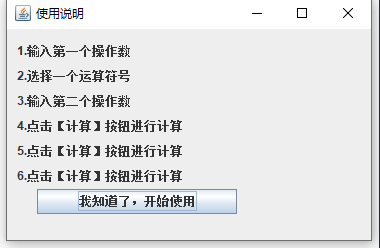
Help.java
import java.awt.GridLayout;
import java.awt.Toolkit;
import java.awt.event.*;
import javax.swing.*;

//计算器的实现
public class Help extends JFrame {
	JButton btnOK = new JButton("我知道了,开始使用");

	public Help() {
		super("使用说明");
		JLabel lab1 = new JLabel("1.输入第一个操作数");
		JLabel lab2= new JLabel("2.选择一个运算符号");
		JLabel lab3 = new JLabel("3.输入第二个操作数");
		JLabel lab4 = new JLabel("4.点击【计算】按钮进行计算");
		JLabel lab5 = new JLabel("5.点击【计算】按钮进行计算");
		JLabel lab6 = new JLabel("6.点击【计算】按钮进行计算");

		lab1.setBounds(10, 10, 300, 25);
		lab2.setBounds(10, 35, 300, 25);
		lab3.setBounds(10, 60, 300, 25);
		lab4.setBounds(10, 85, 300, 25);
		lab5.setBounds(10, 110, 300, 25);
		lab6.setBounds(10, 135, 300, 25);

		btnOK.setBounds(30, 160, 200, 25);
		btnOK.addActionListener(new ActionListener() {
			public void actionPerformed(ActionEvent ee) {
				Calculator c = new Calculator();
				c.CenterPanel();
			}
		});
		JPanel p = new JPanel();
		p.setLayout(null);
		p.add(lab1);
		p.add(lab2);
		p.add(lab3);
		p.add(lab4);
		p.add(lab5);
		p.add(lab6);
		p.add(btnOK);

		getContentPane().add(p);
		setSize(380, 250);
		setDefaultCloseOperation(JFrame.EXIT_ON_CLOSE);
		setVisible(true);
	}

	public static void main(String[] args) {
		Help s = new Help();
		s.CenterPanel();
	}

	public void CenterPanel() {
		int width = Toolkit.getDefaultToolkit().getScreenSize().width;
		int height = Toolkit.getDefaultToolkit().getScreenSize().height;
		this.setLocation(width / 2, height / 4);
	}

	//判断字符串是不是数字
	public static boolean isNumeric(String str){
		for (int i = str.length();--i>=0;){
			if (!Character.isDigit(str.charAt(i))){
				return false;
			}
		}
	return true;
	}
}

Calculator.java
import java.awt.GridLayout;
import java.awt.Toolkit;
import java.awt.event.*;
import javax.swing.*;

//计算器的实现
public class Calculator extends JFrame {
	JTextField txtNum1 = new JTextField();
	JTextField txtNum2 = new JTextField();
	JTextField txtResult = new JTextField();
	JButton btnCalcul = new JButton("计算");
	JButton btnClear = new JButton("清屏");
	JButton btnExit = new JButton("退出");

	public Calculator() {
		super("计算器");
		JLabel lab1 = new JLabel("请输入操作数1:");
		JLabel lab2= new JLabel("请选择运算符:");
		JLabel lab3 = new JLabel("请输入操作数2:");

		final JRadioButton radioButton1=new JRadioButton("加");
        final JRadioButton radioButton2=new JRadioButton("减");
        final JRadioButton radioButton3=new JRadioButton("乘");
        final JRadioButton radioButton4=new JRadioButton("除");
        ButtonGroup bg=new ButtonGroup();
        bg.add(radioButton1);
        bg.add(radioButton2);
		bg.add(radioButton3);
		bg.add(radioButton4);
		JPanel jp1=new JPanel(new GridLayout(1,4));
        jp1.add(radioButton1);
        jp1.add(radioButton2);
        jp1.add(radioButton3);
        jp1.add(radioButton4);


		JLabel lab4= new JLabel("计算结果:");
		lab1.setBounds(10, 10, 100, 25);
		lab2.setBounds(10, 40, 100, 25);
		lab3.setBounds(10, 70, 100, 25);
		lab4.setBounds(10, 100, 100, 25);

		txtNum1.setBounds(110, 10, 200, 25);
		jp1.setBounds(110, 40, 200, 25);
		txtNum2.setBounds(110, 70, 200, 25);
		txtResult.setBounds(110, 100, 200, 25);

		btnCalcul.setBounds(30, 130, 90, 25);
		btnClear.setBounds(130, 130, 90, 25);
		btnExit.setBounds(230, 130, 90, 25);
		//计算
		btnCalcul.addActionListener(new ActionListener() {
			public void actionPerformed(ActionEvent ee) {
				String num1=txtNum1.getText().trim();
				String num2=txtNum2.getText().trim();
				String Result="";
				if (!isNumeric(num1)){
				JOptionPane.showMessageDialog(null, "操作数1只允许为数字");
				return;
				}
				if (!isNumeric(num2))
				{
				JOptionPane.showMessageDialog(null, "操作数2只允许为数字");
				return;
				}
				if(radioButton1.isSelected()){
				Result=num1+" + "+num2+" = "+(Integer.parseInt(num1)+Integer.parseInt(num2));
				}
				if(radioButton2.isSelected()){
					Result=num1+" - "+num2+" = "+(Integer.parseInt(num1)-Integer.parseInt(num2));
				}
				if(radioButton3.isSelected()){
					Result=num1+" * "+num2+" = "+(Integer.parseInt(num1)*Integer.parseInt(num2));
				}
				if(radioButton4.isSelected()){
					Result=num1+" / "+num2+" = "+(Integer.parseInt(num1)/Integer.parseInt(num2));
				}
				txtResult.setText(Result);
			}
		});
		//清屏
		btnClear.addActionListener(new ActionListener() {
			public void actionPerformed(ActionEvent ee) {
				txtNum1.setText("");
				txtNum2.setText("");
				txtResult.setText("");
			}
		});
		//退出程序
		btnExit.addActionListener(new ActionListener() {
			public void actionPerformed(ActionEvent ee) {
				System.exit(0);
			}
		});
		JPanel p = new JPanel();
		p.setLayout(null);
		p.add(lab1);
		p.add(lab2);
		p.add(lab3);
		p.add(lab4);

		p.add(txtNum1);
		p.add(txtNum2);
		p.add(jp1);
		p.add(txtResult);

		p.add(btnCalcul);
		p.add(btnClear);
		p.add(btnExit);

		getContentPane().add(p);
		setSize(380, 250);
		setDefaultCloseOperation(JFrame.EXIT_ON_CLOSE);
		setVisible(true);
	}

	public static void main(String[] args) {
		Calculator s = new Calculator();
		s.CenterPanel();
	}

	public void CenterPanel() {
		int width = Toolkit.getDefaultToolkit().getScreenSize().width;
		int height = Toolkit.getDefaultToolkit().getScreenSize().height;
		this.setLocation(width / 2, height / 4);
	}

	//判断字符串是不是数字
	public static boolean isNumeric(String str){
		for (int i = str.length();--i>=0;){
			if (!Character.isDigit(str.charAt(i))){
				return false;
			}
		}
	return true;
	}
}
此内容由惯性聚合(RSS阅读器)自动聚合整理,仅供阅读参考。 原文来自 — 版权归原作者所有。