





文本是使用SunnyUI的UIDataGridView控件进行演示的,同样适用于System.Windows.Forms.DataGridView控件
具体需求如下,下表是个成绩表,其中姓名、总分、平均分这三列信息重复,需要对数据表进行合并单元格处理。
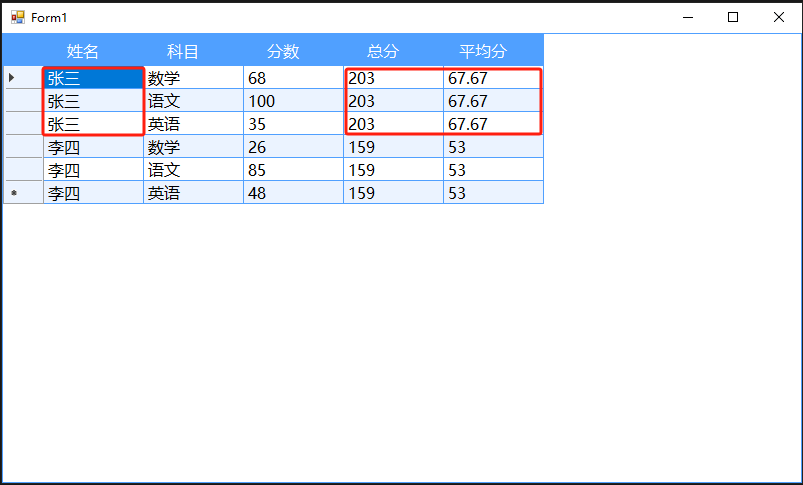
实现该需求需要两个步骤:
1.给表格添加单元格重绘事件
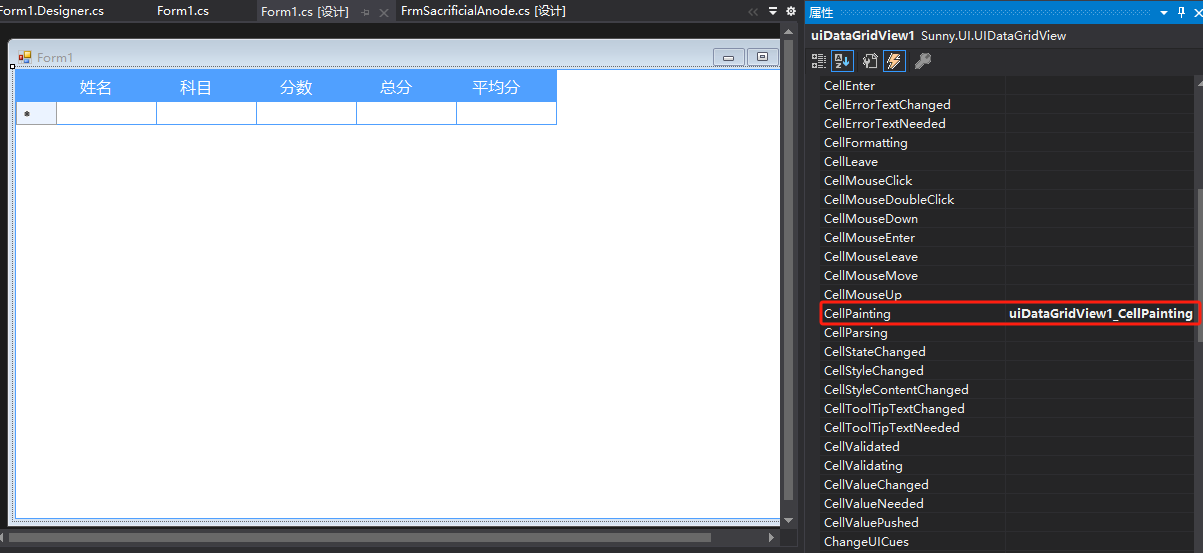
在方法uiDataGridView1_CellPainting中添加代码将需要合并的列的单元格边框去掉:
if (e.RowIndex >= 0 && (e.ColumnIndex == 0 || e.ColumnIndex == 3 || e.ColumnIndex == 4))
            {
                // 不显示单元格边框
                e.AdvancedBorderStyle.All = DataGridViewAdvancedCellBorderStyle.None;
            }
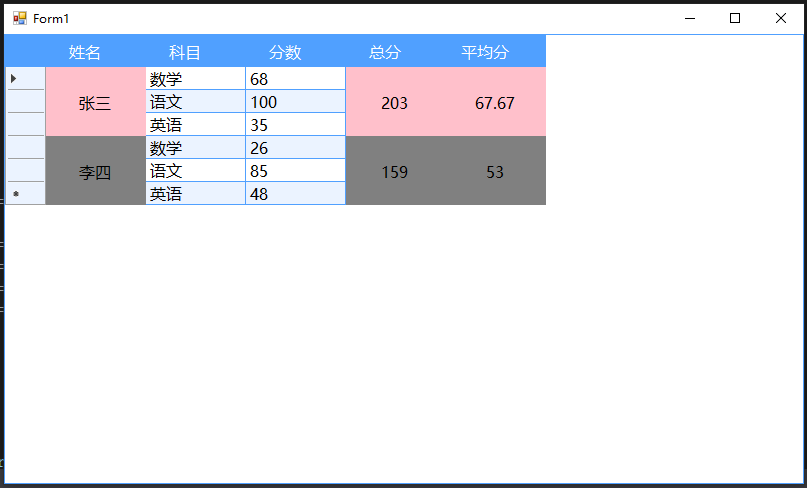
使用MergeCells方法,将指定单元格合并,原理是把要合并的单元格的内容清掉,然后在合并的中间行位置再将数值打出,实现合并的效果。
public void MergeCells(DataGridView dataGridView, int startRow, int endRow, int column, Color color)
        {
            if (dataGridView.Columns.Count <= column || startRow < 0 || endRow >= dataGridView.Rows.Count || startRow >= endRow)
            {
                return;
            }

            DataGridViewCell cell = dataGridView[column, startRow];
            string cellValue = cell.Value != null ? cell.Value.ToString() : "";

            for (int i = startRow; i <= endRow; i++)
            {
                dataGridView[column, i].Value = null;
            }
            //在中间的行写值
            int valRowIndex = 0;
            int rows = endRow - startRow + 1;
            int halfRow = rows / 2;
            valRowIndex = startRow + halfRow;

            DataGridViewTextBoxCell textBoxCell = new DataGridViewTextBoxCell();
            textBoxCell.Value = cellValue;
            dataGridView[column, valRowIndex] = textBoxCell;


            for (int i = startRow; i <= endRow; i++)
            {
                dataGridView[column, i].Style.BackColor = color;
                dataGridView[column, i].ReadOnly = true; // 设置合并后的单元格只读
                dataGridView[column, i].Style.Alignment = DataGridViewContentAlignment.MiddleCenter; // 设置文本居中
                dataGridView[column, i].Style.Padding = new Padding(0); // 设置内边距为0,达到不显示边框的效果
                dataGridView[column, i].Style.SelectionBackColor = dataGridView[column, i].Style.BackColor; // 设置选中背景色与背景色一致
            }
        }
调用:
            //合并 张三
            MergeCells(uiDataGridView1, 0, 2, 0, Color.Pink);
            MergeCells(uiDataGridView1, 0, 2, 3, Color.Pink);
            MergeCells(uiDataGridView1, 0, 2, 4, Color.Pink);
            //合并 李四
            MergeCells(uiDataGridView1, 3, 5, 0, Color.Gray);
            MergeCells(uiDataGridView1, 3, 5, 3, Color.Gray);
            MergeCells(uiDataGridView1, 3, 5, 4, Color.Gray);
最终效果如下:
整个Form1.cs如下:
using System;
using System.Collections.Generic;
using System.ComponentModel;
using System.Data;
using System.Drawing;
using System.Linq;
using System.Text;
using System.Threading.Tasks;
using System.Windows.Forms;

namespace MyForm
{
    public partial class Form1 : Form
    {
        private Random random = new Random();

        public Form1()
        {
            InitializeComponent();
            LoadData();
            //合并 张三
            MergeCells(uiDataGridView1, 0, 2, 0, Color.Pink);
            MergeCells(uiDataGridView1, 0, 2, 3, Color.Pink);
            MergeCells(uiDataGridView1, 0, 2, 4, Color.Pink);
            //合并 李四
            MergeCells(uiDataGridView1, 3, 5, 0, Color.Gray);
            MergeCells(uiDataGridView1, 3, 5, 3, Color.Gray);
            MergeCells(uiDataGridView1, 3, 5, 4, Color.Gray);
        }

        void LoadData()
        {
            List<Score> scores = new List<Score>();
            scores.Add(new Score() { Name = "张三", Subject = "数学", Mark = 68, Sum = 0, Avg = 0 });
            scores.Add(new Score() { Name = "张三", Subject = "语文", Mark = 100, Sum = 0, Avg = 0 });
            scores.Add(new Score() { Name = "张三", Subject = "英语", Mark = 35, Sum = 0, Avg = 0 });
            scores.Add(new Score() { Name = "李四", Subject = "数学", Mark = 26, Sum = 0, Avg = 0 });
            scores.Add(new Score() { Name = "李四", Subject = "语文", Mark = 85, Sum = 0, Avg = 0 });
            scores.Add(new Score() { Name = "李四", Subject = "英语", Mark = 48, Sum = 0, Avg = 0 });
            uiDataGridView1.RowCount = scores.Count();
            for (int i = 0; i < scores.Count(); i++)
            {
                uiDataGridView1.Rows[i].Cells[0].Value = scores[i].Name;
                uiDataGridView1.Rows[i].Cells[1].Value = scores[i].Subject;
                uiDataGridView1.Rows[i].Cells[2].Value = scores[i].Mark;
                uiDataGridView1.Rows[i].Cells[3].Value = scores.Where(o=>o.Name== scores[i].Name).Select(o => o.Mark).Sum();
                uiDataGridView1.Rows[i].Cells[4].Value = Math.Round(scores.Where(o => o.Name == scores[i].Name).Select(o => o.Mark).Average(), 2);
            }
        }

        public void MergeCells(DataGridView dataGridView, int startRow, int endRow, int column, Color color)
        {
            if (dataGridView.Columns.Count <= column || startRow < 0 || endRow >= dataGridView.Rows.Count || startRow >= endRow)
            {
                return;
            }

            DataGridViewCell cell = dataGridView[column, startRow];
            string cellValue = cell.Value != null ? cell.Value.ToString() : "";

            for (int i = startRow; i <= endRow; i++)
            {
                dataGridView[column, i].Value = null;
            }
            //在中间的行写值
            int valRowIndex = 0;
            int rows = endRow - startRow + 1;
            int halfRow = rows / 2;
            valRowIndex = startRow + halfRow;

            DataGridViewTextBoxCell textBoxCell = new DataGridViewTextBoxCell();
            textBoxCell.Value = cellValue;
            dataGridView[column, valRowIndex] = textBoxCell;


            for (int i = startRow; i <= endRow; i++)
            {
                dataGridView[column, i].Style.BackColor = color;
                dataGridView[column, i].ReadOnly = true; // 设置合并后的单元格只读
                dataGridView[column, i].Style.Alignment = DataGridViewContentAlignment.MiddleCenter; // 设置文本居中
                dataGridView[column, i].Style.Padding = new Padding(0); // 设置内边距为0,达到不显示边框的效果
                dataGridView[column, i].Style.SelectionBackColor = dataGridView[column, i].Style.BackColor; // 设置选中背景色与背景色一致
            }
        }

        private void uiDataGridView1_CellPainting(object sender, DataGridViewCellPaintingEventArgs e)
        {
            if (e.RowIndex >= 0 && (e.ColumnIndex == 0 || e.ColumnIndex == 3 || e.ColumnIndex == 4))
            {
                // 不显示单元格边框
                e.AdvancedBorderStyle.All = DataGridViewAdvancedCellBorderStyle.None;
            }
        }
    }


    public class Score
    {
        public string Name { get; set; }

        public string Subject { get; set; }

        public double Mark { get; set; }

        public double Sum { get; set; }

        public double Avg { get; set; }
    }

}
此内容由惯性聚合(RSS阅读器)自动聚合整理,仅供阅读参考。 原文来自 — 版权归原作者所有。