


1.给A元素的子元素B,在A hover的时候B显示,当离开A元素时B元素隐藏

当鼠标滑过关注微信的时候,显示
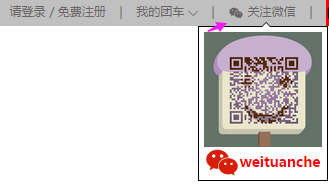
鼠标离开关注微信这个区域
   <div class="head_span Tbarweixin">
            <div>
                <span > <img src="weixin.png" class="cear"></span>
                <span><a href="#">关注微信</a></span>
            </div>
            <div class="TbarweixinBox">
                 <img src="erweima.jpg" class="qr_code">
                 <span class="name">
                     <span> <img src="weixin_red.png"></span>
                     <span>weituanche</span>
                 </span>
            </div>
     </div>
思路:1.需要三个div
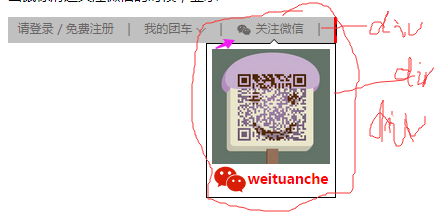
2.将"关注微信"所在的div的高度为 与父类元素高度一样(即最外层的div)
3.将父类div的样式设置为:
父类元素类名{
overflow:“hidden"}
父类元素类名:hover{
overflow:visible}
第二个div的位置设置:
1.给点击产生让子类显示或者隐藏效果的父类 Tbarweixin的css中设置position:relative
2.给需要显示隐藏的子类元素设置postion:absolut等
2.数据分析
鼠标移动动重庆上的时候,会显示出如下的列表。
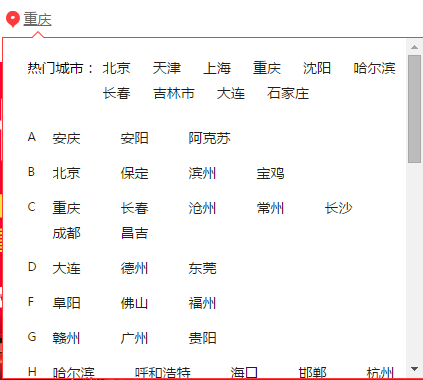
要实现这样的效果,我们需要哪些数据呢?和后台沟通需要哪些数据?
所需数据分析:对于每个城市,我们需要获取该城市名(name),和该城市对应的id或者其他的;
1.首先服务器返回来的是一个data对象。即data{}
2.分析上面的城市信息,又分为两大部分:
1。热门城市
2。A,B,C等各个列表
因此,data对象里的数据,可以分为两个数组:
data{
hot:[
{ index:“A”,
name:"北京",
href:"http://bj.tuanche.com/"
},
{index:“T”,
name:“天津”,
href:“"http://bj.tuanche.com/”
}
......
],
  common[
    {index:"A",
     citis:[{index:"A",
             name"安庆",
             href:"http://aq.tuanche.com/"
            },
            {index:"A",
             name:"安阳",
             href:"http://aq.tuanche.com/"
             },
    {index:"A",
name:"阿克苏",
href:"http://aks.tuanche.com/"}]},{index:"B",
citis:[{index:"B",
name:"北京",
href:"http://bj.tuanche.com/"},{index:"B",
http://bd.tuanche.com/”
name:"保定",
href:“
            }
            ......
      ]
......
}
]
}
3.
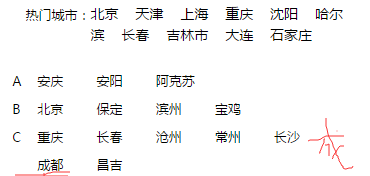 例如城市名“成都”换行要换行一起换,不会在上下行中拆开写。给<span>成都</span> 的css设置属性display:inline-block
此内容由惯性聚合(RSS阅读器)自动聚合整理,仅供阅读参考。 原文来自 — 版权归原作者所有。