



惯性聚合 高效追踪和阅读你感兴趣的博客、新闻、科技资讯
阅读原文 在惯性聚合中打开

推荐订阅源

N
News and Events Feed by Topic
S
Security @ Cisco Blogs
S
Secure Thoughts
Attack and Defense Labs
cs.AI updates on arXiv.org
Hacker News - Newest:
Hacker News - Newest: "LLM"
Recent Commits to openclaw:main
H
Hacker News: Front Page
博客园 - 叶小钗
H
Heimdal Security Blog
Microsoft Security Blog
Forbes - Security
Forbes - Security
AI
AI
cs.CV updates on arXiv.org
T
Troy Hunt's Blog
罗磊的独立博客
Application and Cybersecurity Blog
爱范儿
爱范儿
GbyAI
GbyAI
The Last Watchdog
The Last Watchdog
TaoSecurity Blog
TaoSecurity Blog
C
CXSECURITY Database RSS Feed - CXSecurity.com
D
DataBreaches.Net
Recent Announcements
Schneier on Security
C
Cisco Blogs
美团技术团队
D
Docker
让小产品的独立变现更简单 - ezindie.com
WordPress大学
WordPress大学
月光博客
月光博客
雷峰网
雷峰网
Threat Intelligence Blog | Flashpoint
H
Hackread – Cybersecurity News, Data Breaches, AI and More
A
Arctic Wolf
B
Blog RSS Feed
Cisco Talos Blog
Cisco Talos Blog
C
Cybersecurity and Infrastructure Security Agency CISA
V
Vulnerabilities – Threatpost
V2EX - 技术
V2EX - 技术
Y
Y Combinator Blog
N
News and Events Feed by Topic
www.infosecurity-magazine.com
W
WeLiveSecurity
Security Archives - TechRepublic
G
GRAHAM CLULEY
Jina AI
Jina AI
Hugging Face - Blog
Hugging Face - Blog
酷 壳 – CoolShell
酷 壳 – CoolShell
The Hacker News
The Hacker News

博客园 - ccfyyn

计算机原理 vue项目实战——网上商城项目 跨域 面试总结 npm&node.js ES6 输入URL到页面展现的过程 不同分辨率页面自适应 offsetheight和clientheight和scrollheight的区别以及offsetwidth和clientwidth和scrollwidth的区别 浏览器兼容 git代码提交 bootstrap的用法、bootstrap图标 HTML 5 Web 存储(客户端存储数据) require.js event事件 $().each 和 $each( )的区别 date-id自定义属性 项目经验 css水平垂直居中
jquery中bind与on的区别
ccfyyn · 2018-12-17 · via 博客园 - ccfyyn

jquery文档中bind和on函数绑定事件的用法:

.bind(events [,eventData], handler)

.on(events [,selector]  [,data], handler)

从文档中可以看出,.on方法比.bind方法多一个参数'selector'

.on的selector参数是筛选出调用.on方法的dom元素的指定子元素,如:

$('ul').on('click', 'li', function(){console.log('click');})就是筛选出ul下的li给其绑定click事件;

bind方法与on方法都是事件绑定,但是两者却又有着一个大区别:事件委托

当我们想要使用事件委托的时候,我们想到的肯定是on方法。而不是bind方法,因为相比bind方法,on方法多了一个selector方法,也就是子类选择器

回到正题,事件委托怎么实现的?

事件委托就是子类的事情委托给父类的去做,而这就让我们想起了冒泡事件,是的,这的确是委托事件的原型,而我们的selector,则是判断是不是那个子元素触发的事件,如果不是,自然就忽略掉了

举个例子:
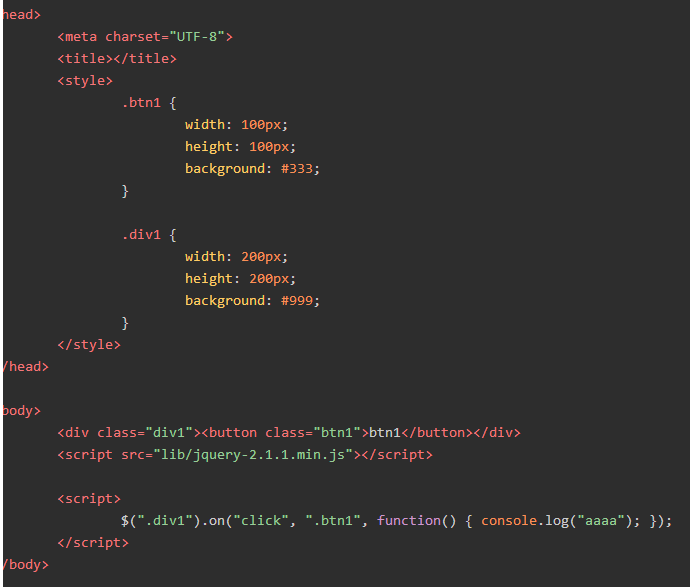
这是个最简单的委托事件,按钮将事件委托给了父亲节点---div,所以点击btn后我们触发的是按钮,委托的对象===div内部的事件就触发了,

事件委托有个很好的优点,就是不用多次去绑定一个事件,比如一个有着999条新闻的新闻列表,当我们绑定999次的时候,会耗费很多资源,而一次事件委托就足够了
jquery中绑定事件一般使用bind,或者click,但是这只能是对已经加载好的元素定义事件,那些后来添加插入的元素则需要另行绑定。在1.7版本以前使用live。但是在1.8版本以后推荐使用on。这里介绍jQuery中如何给动态添加的元素绑定事件

off()函数
off()函数用于移除元素上绑定的一个或多个事件的事件处理函数。
off()函数主要用于解除由on()函数绑定的事件处理函数。