惯性聚合 高效追踪和阅读你感兴趣的博客、新闻、科技资讯
阅读原文 在惯性聚合中打开

推荐订阅源

有赞技术团队
有赞技术团队
Exploit-DB.com RSS Feed
aimingoo的专栏
aimingoo的专栏
IT之家
IT之家
G
Google Developers Blog
爱范儿
爱范儿
博客园 - 司徒正美
Recent Announcements
The Register - Security
J
Java Code Geeks
The Cloudflare Blog
M
MIT News - Artificial intelligence
Apple Machine Learning Research
Microsoft Security Blog
博客园 - Franky
雷峰网
雷峰网
酷 壳 – CoolShell
酷 壳 – CoolShell
Blog — PlanetScale
Blog — PlanetScale
Vercel News
Vercel News
宝玉的分享
宝玉的分享
CTFtime.org: upcoming CTF events
B
Blog
小众软件
小众软件
Microsoft Azure Blog
让小产品的独立变现更简单 - ezindie.com
WordPress大学
WordPress大学
T
Troy Hunt's Blog
Application and Cybersecurity Blog
H
Hacker News: Front Page
H
Help Net Security
S
Security @ Cisco Blogs
V
V2EX
Security Archives - TechRepublic
Stack Overflow Blog
Stack Overflow Blog
O
OpenAI News
L
LINUX DO - 最新话题
Cyber Security Advisories - MS-ISAC
S
Secure Thoughts
Help Net Security
Help Net Security
F
Full Disclosure
博客园 - 叶小钗
The Hacker News
The Hacker News
Spread Privacy
Spread Privacy
Threat Intelligence Blog | Flashpoint
Jina AI
Jina AI
K
Kaspersky official blog
www.infosecurity-magazine.com
V
Vulnerabilities – Threatpost
P
Privacy International News Feed
Scott Helme
Scott Helme

博客园 - ccfyyn

计算机原理 vue项目实战——网上商城项目 跨域 面试总结 npm&node.js ES6 输入URL到页面展现的过程 不同分辨率页面自适应 jquery中bind与on的区别 offsetheight和clientheight和scrollheight的区别以及offsetwidth和clientwidth和scrollwidth的区别 浏览器兼容 git代码提交 bootstrap的用法、bootstrap图标 HTML 5 Web 存储(客户端存储数据) require.js event事件 $().each 和 $each( )的区别 项目经验 css水平垂直居中
date-id自定义属性
ccfyyn · 2017-12-30 · via 博客园 - ccfyyn

人们总喜欢往HTML标签上添加自定义属性来存储和操作数据

但这样做的问题是,你不知道将来会不会有其它脚本把你的自定义属性给重置掉,此外,你这样做也会导致html语法上不符合Html规范,以及一些其它副作用。这就是为什么在HTML5规范里增加了一个自定义data属性,你可以拿它做很多有用的事情。

你可以去读一下HTML5的详细规范,但这个自定义data属性的用法非常的简单,就是你可以往HTML标签上添加任意以 "data-"开头的属性,这些属性页面上是不显示的,它不会影响到你的页面布局和风格,但它却是可读可写的。

例如:

<div id="awesome" data-myid="3e4ae6c4e">Some awesome data</div>

 1.读取data-myid的数据

使用jQuery的.data()方法来访问这些"data-*" 属性

其中一个方法就是 .data(obj),这个方法是在jQuery1.4.3版本后出现的,它能返回相应的data属性。

你可以用下面的写法读取 data-myid属性值: var myid= jQuery("#awesome").data('myid');

console.log(myid);
即:var myid=$('#awesome').data('myid');
2.你也可以通过.data(key,value)方法直接给"data-*" 属性赋值。一个重要的你要注意的事情是,这些"data-*" 属性应该和它所在的元素有一定的关联,不要把它当成存放任意东西的存储工具。
译者补充:尽管"data-*" 是HTML5才出现的属性,但jquery是通用的,所以,在非HTML5的页面或浏览器里,你仍然可以使用.data(obj)方法来操作"data-*" 数据。

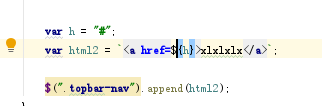
${}占位符用法(http://www.softwhy.com/article-9259-1.html)

`${address}`
例如