

惯性聚合 高效追踪和阅读你感兴趣的博客、新闻、科技资讯
阅读原文 在惯性聚合中打开

推荐订阅源

Security Archives - TechRepublic
罗磊的独立博客
T
The Blog of Author Tim Ferriss
The GitHub Blog
The GitHub Blog
Apple Machine Learning Research
The Register - Security
J
Java Code Geeks
V2EX - 技术
V2EX - 技术
Vercel News
Vercel News
N
News and Events Feed by Topic
腾讯CDC
P
Proofpoint News Feed
N
News | PayPal Newsroom
www.infosecurity-magazine.com
爱范儿
爱范儿
O
OpenAI News
酷 壳 – CoolShell
酷 壳 – CoolShell
月光博客
月光博客
Martin Fowler
Martin Fowler
Engineering at Meta
Engineering at Meta
D
Docker
Y
Y Combinator Blog
博客园 - 聂微东
G
Google Developers Blog
S
Security @ Cisco Blogs
Simon Willison's Weblog
S
Schneier on Security
H
Hackread – Cybersecurity News, Data Breaches, AI and More
S
SegmentFault 最新的问题
云风的 BLOG
云风的 BLOG
阮一峰的网络日志
阮一峰的网络日志
C
CXSECURITY Database RSS Feed - CXSecurity.com
CTFtime.org: upcoming CTF events
C
CERT Recently Published Vulnerability Notes
I
Intezer
G
GRAHAM CLULEY
有赞技术团队
有赞技术团队
Attack and Defense Labs
V
Visual Studio Blog
博客园 - Franky
博客园 - 三生石上(FineUI控件)
W
WeLiveSecurity
钛媒体:引领未来商业与生活新知
钛媒体:引领未来商业与生活新知
让小产品的独立变现更简单 - ezindie.com
Hugging Face - Blog
Hugging Face - Blog
Scott Helme
Scott Helme
T
Troy Hunt's Blog
Hacker News - Newest:
Hacker News - Newest: "LLM"
L
LINUX DO - 最新话题
C
Cybersecurity and Infrastructure Security Agency CISA

博客园 - ccfyyn

计算机原理 vue项目实战——网上商城项目 跨域 面试总结 npm&node.js ES6 输入URL到页面展现的过程 不同分辨率页面自适应 jquery中bind与on的区别 offsetheight和clientheight和scrollheight的区别以及offsetwidth和clientwidth和scrollwidth的区别 浏览器兼容 git代码提交 bootstrap的用法、bootstrap图标 HTML 5 Web 存储(客户端存储数据) require.js event事件 date-id自定义属性 项目经验 css水平垂直居中
$().each 和 $each( )的区别
ccfyyn · 2018-01-04 · via 博客园 - ccfyyn

在jquery中,遍历对象和数组,经常会用到$().each和$.each(),两个方法。两个方法是有区别的,从而这两个方法在针对不同的操作上,显示了各自的特点。

1.$().each

语法

$(selector).each(function(index,element))

定义和用法

each() 方法为每个匹配元素规定要运行的函数。

提示:返回 false 可用于及早停止循环。
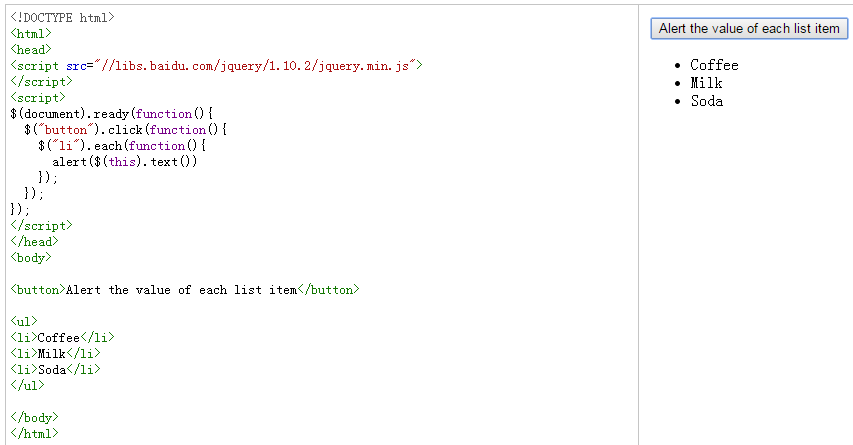
$().each,对于这个方法,在dom处理上面用的较多。如果页面有多个input标签类型为checkbox,对于这时用$().each来处理多个checkbook,例如:

遍历dom元素

$(“input[name=’ch’]”).each(function(i){
if($(this).attr(‘checked’)==true)
{
//一些操作代码

}

回调函数是可以传递参数,i就为遍历的索引。

$.each()的用法:

1.遍历数组

对于遍历一个数组,用$.each()来处理,简直爽到了极点。例如:

$.each([{“name”:”limeng”,”email”:”xfjylimeng”},{“name”:”hehe”,”email”:”xfjylimeng”},function(i,n)
{
alert(“索引:”+i,”对应值为:”+n.name);
});

参数i为遍历索引值,n为当前的遍历对象.

var arr1 = [ “one”, “two”, “three”, “four”, “five” ];
$.each(arr1, function(){
alert(this);
});

二维数组

var arr2 = [[1, 2, 3], [4, 5, 6], [7, 8, 9]]
$.each(arr2, function(i, item){
alert(item[0]);
});
输出:1   4   7

2.遍历对象

var obj = { one:1, two:2, three:3, four:4, five:5 };
$.each(obj, function(key, val) {
alert(obj[key]);
});
输出:1   2  3  4  5