





学习OpenAI Playground,使你在编写代码之前更好地了解 模型。学习 OpenAI Python 库,这部分内容包括登录信息和⼀个简单的 Hello World ⽰例。然后学习创建和发送 API 请求的过程,并 了解如何处理 API 响应。这将确保你知道如何解释这些 API 返回的数据。 最后,本章还会介绍诸如安全最佳实践和成本管理等考虑因素。
根据业务类型和模型特点选择不同的模型,这些模型可通过API 作为服务使⽤(通过直接的 HTTP 调⽤或提供的库)
OpenAI Playground 是⼀个基于试用 Web 的平台,可以注册账号,登录后,编写提⽰词,选择模型,并轻松查看模型⽣成的输出。
1.2 使⽤ OpenAI Python 库
GTP运行大模型服务,对外提供API接口,用户获取OpenAI 账户和 API 密钥,调用接口;密钥赋予你调⽤ API ⽅法的权利;它将你的 API 调⽤与你的账户关联,⽤于计费。最好将其导出为环境变量。这样⼀来,你的应⽤程序就能够在不直接将密钥写⼊代码的情况下使⽤它。以下说明具体如何做。OpenAI Python 库会⾃动查找名为 OPENAI_API_KEY 的环境变量。
# 设置当前会话的环境变量 OPENAI_API_KEY
export OPENAI_API_KEY=sk-(...)
# 设置当前会话的环境变量 OPENAI_API_KEY
set OPENAI_API_KEY=sk-(...)
1.3 helloworld程序
# 调⽤ OpenAI 的 ChatCompletion 端点
response = openai.ChatCompletion.create( model="gpt-3.5-turbo", messages=[{"role": "user", "content": "Hello World!"}], )
print(response["choices"][0]["message"]["content"])
openai api chat_completions.create -m gpt-3.5-turbo -g user "Hello world"
OpenAI Python 库会⾃动查找名为 OPENAI_API_KEY 的环境变量。
你可以使⽤以下代码将 openai 模块指向包含密钥的⽂件:
# 从⽂件加载 API 密钥 openai.api_key_path = <PATH>
你还可以使⽤以下⽅法在代码中⼿动设置 API 密钥:
openai.api_key = os.getenv("OPENAI_API_KEY")
1.4 ChatCompletion的create ⽅法入参
1.4.1 必选参数
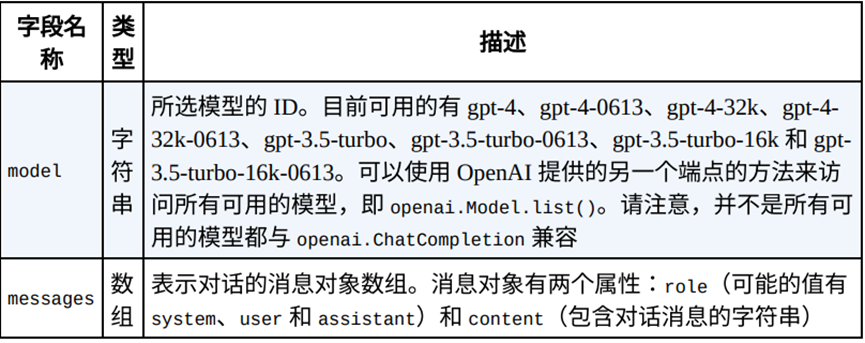
ChatCompletion 端点及其有多个输⼊参数,但只有两 个是必需的,如表 2-1 所⽰。
添加图片注释,不超过 140 字(可选)
ChatCompletion openai.ChatCompletion.create(
gpt-3.5-turbo model="gpt-3.5-turbo",
messages=[ {"role": "system", "content": "You are a helpful teacher."}, { "role": "user", "content": "Are there other measures than time complexity for an algorithm?", }, { "role": "assistant", "content": "Yes, there are other measures besides time complexity for an algorithm, such as space complexity.", }, {"role": "user", "content": "What is it?"}, ], )
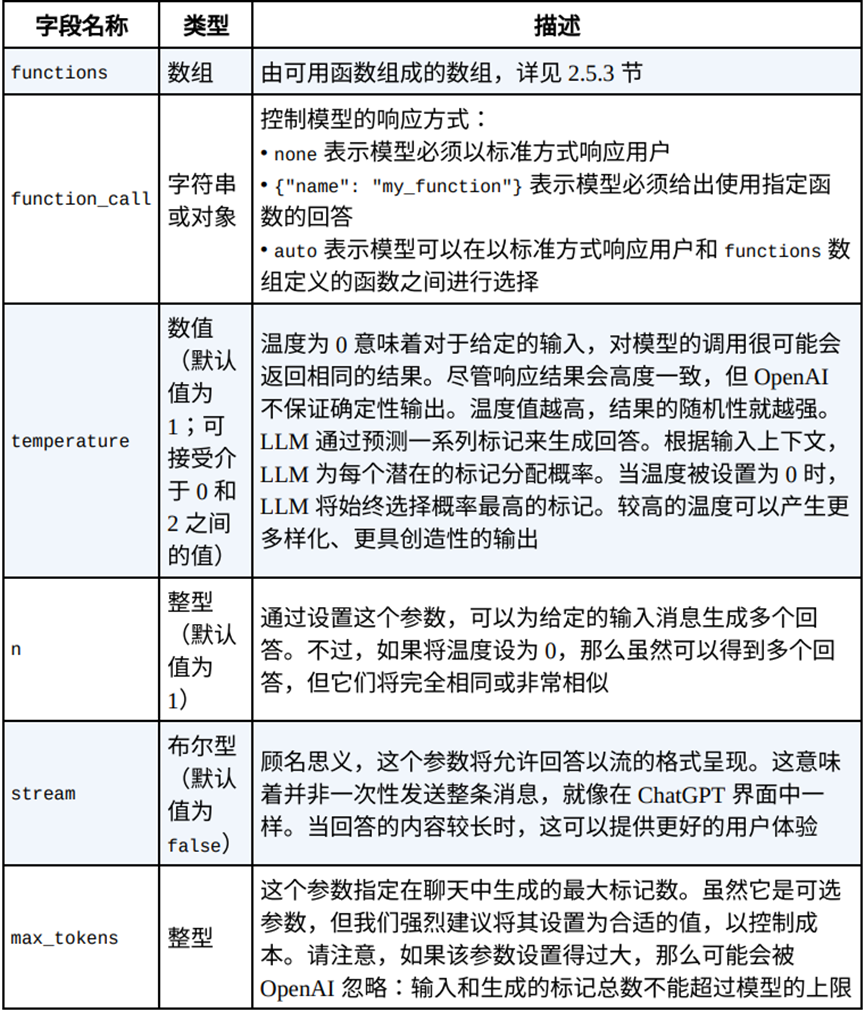
1.4.2 可选参数
添加图片注释,不超过 140 字(可选)
1.5 用GTP创建一个查询数据库的应用

添加图片注释,不超过 140 字(可选)
def find_product (query_SQL):
conn = sqlite3.connect(db_path)
cursor.execute(query_SQL)
results = cursor.fetchall()
函数规范的作用是将查询数据库函数和大模型做一个关联,定义了大模型调用这个函数的功能和输入参数;
"description": "Get a list of products from a sql query",
"description": "A SQL query",
"required": ["sql_query"],
user_question = "I need the top 2 products where the price is less
messages = [{"role": "user", "content": user_question}]
# 使⽤函数定义调⽤ ChatCompletion 端点
response = openai.ChatCompletion.create(
model="gpt-3.5-turbo-0613", messages=messages,
response_message = response["choices"][0]["message"]
messages.append(response_message)
function_args = json.loads(
response_message["function_call"]["arguments"]
products = find_product(function_args.get("sql_query"))
"content": json.dumps(products),
response = openai.ChatCompletion.create(
model="gpt-3.5-turbo-0613",
1.6 安全和隐私
⽤户的输⼊将被保留 30 天,⽤于监控和 使⽤合规检查⽬的。这意味着 OpenAI 员⼯和专门的第三⽅承包商可能会访 问你的 API 数据。 请勿通过 OpenAI 的端点发送个⼈信息或密码等敏感数据。
1.7 其他open Ai功能
1.7.1 嵌入
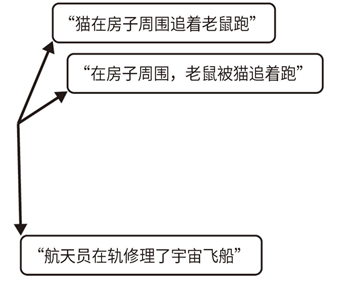
将嵌⼊视为⼀种复杂的语⾔解释器,它将丰富的词汇和句⼦转换为 ML 模型能够轻松理解的数值语⾔。嵌⼊的⼀个突出特点是,它能够保持语义相似性。也就是说,含义相近的词语或短语在数值空间中更接近。嵌⼊的原则是以某种⽅式有意义地表⽰⽂本字符串,以捕捉其语义相似性。由于模型依赖数学函数,因此它需要数值输⼊来处理信息。然⽽,许多元 素(如单词和标记)本质上并不是数值。为了解决这个问题,我们⽤嵌⼊ 将这些单词标记转化为数值向量,以数值⽅式表⽰这些概念,OpenAI提供了将⽂本转换为数值向量的模型。用这个模型先将输⼊⽂本转化为数字向量,然后将该向量作为模型的输⼊。嵌⼊具有这样的属性:如果两段⽂本具有相似的含义,那么它们的向量表 ⽰也是相似的。
result = openai.Embedding.create(
model="text-embedding-ada-002", input="your text"
result['data']['embedding']
添加图片注释,不超过 140 字(可选)
1.7.2 内容审核模型
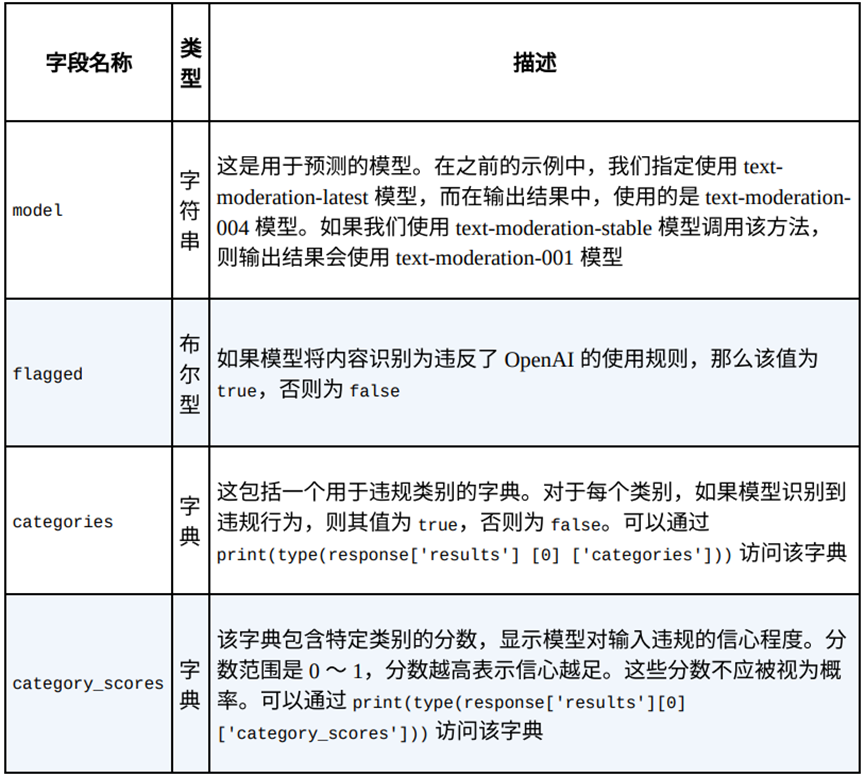
OpenAI 提供了⼀个模型来检查内容是否符合使用规则。识别用户输入对种族、性别、⺠族、宗教、国籍、残疾或种姓的仇恨。对特定群体的暴⼒⾏为或严重伤害。内容涉及⾃残⾏为。内容涉及性⾏为,涉及 18 岁以下的未成年⼈。内容涉及崇尚暴⼒或者给他⼈造成痛苦或羞辱。内容涉及详尽地描绘死亡、暴⼒或严重的⾝体伤害。
# 调⽤ Moderation 端点,并使⽤ text-moderation-latest 模型
response = openai.Moderation.create(
model="text-moderation-latest",
input="I want to kill my neighbor.",
{ "id": "modr-7AftIJg7L5jqGIsbc7NutObH4j0Ig", "model": "text-moderation-004", "results": [ { "categories": { "hate": false, "hate/threatening": false, "self-harm": false, "sexual": false, "sexual/minors": false, "violence": true, "violence/graphic": false }, "category_scores": { "hate": 0.0400671623647213, "hate/threatening": 0.000003671687863970874, "self-harm": 0.0000013143378509994363, "sexual": 0.0000005508050548996835, "sexual/minors": 0.00000011862029225540027, "violence": 0.9461417198181152, "violence/graphic": 0.000001463699845771771 }, "flagged": true } ] }
添加图片注释,不超过 140 字(可选)
此内容由惯性聚合(RSS阅读器)自动聚合整理,仅供阅读参考。 原文来自 — 版权归原作者所有。