

惯性聚合 高效追踪和阅读你感兴趣的博客、新闻、科技资讯
阅读原文 在惯性聚合中打开

推荐订阅源

爱范儿
爱范儿
Know Your Adversary
Know Your Adversary
Google DeepMind News
A
Arctic Wolf
P
Privacy & Cybersecurity Law Blog
云风的 BLOG
云风的 BLOG
Stack Overflow Blog
Stack Overflow Blog
V
Visual Studio Blog
Project Zero
Project Zero
L
LangChain Blog
N
News and Events Feed by Topic
博客园 - Franky
Last Week in AI
Last Week in AI
cs.AI updates on arXiv.org
T
The Blog of Author Tim Ferriss
宝玉的分享
宝玉的分享
Scott Helme
Scott Helme
T
The Exploit Database - CXSecurity.com
P
Proofpoint News Feed
Blog — PlanetScale
Blog — PlanetScale
www.infosecurity-magazine.com
W
WeLiveSecurity
月光博客
月光博客
博客园_首页
美团技术团队
CTFtime.org: upcoming CTF events
freeCodeCamp Programming Tutorials: Python, JavaScript, Git & More
腾讯CDC
Latest news
Latest news
WordPress大学
WordPress大学
cs.CV updates on arXiv.org
Spread Privacy
Spread Privacy
Attack and Defense Labs
量子位
L
LINUX DO - 热门话题
C
CERT Recently Published Vulnerability Notes
Webroot Blog
Webroot Blog
L
Lohrmann on Cybersecurity
aimingoo的专栏
aimingoo的专栏
T
Troy Hunt's Blog
Security Latest
Security Latest
小众软件
小众软件
Cloudbric
Cloudbric
Hacker News: Ask HN
Hacker News: Ask HN
S
Secure Thoughts
雷峰网
雷峰网
T
Threat Research - Cisco Blogs
H
Hacker News: Front Page
IT之家
IT之家
Simon Willison's Weblog

博客园 - 蓝天上的云℡

事件编程之eventfd 事件驱动编程模式之EventLoop syslog日志查看器GUI图形界面,支持Windows/Linux/Macos开箱即用 ERRNO链条分析 ARM AMBA总线之AXI系 Linux Kernel Init Bootstrap 内核初始化启动 RK芯片平台GPIO控制 Linux USB子系统之Gadget设备端驱动 远程调试桥接-网络-ADB-GDB 斐讯N1盒子安装飞牛FNOS NAS 安卓以太网链路检测 安卓原生开发-Recovery使用minui绘制图形 蓝牙音频协议——安卓开发 RKxx系列的RK628摄像头配置影响HDMI出图 usb储存之BOT/UAS内核驱动 现代操作系统-音频处理技术1 Linux驱动底层 Linux驱动适配I2C/SPI例子 模块编译的pr_debug Linux内核/GKI内核主线更新-usb网卡名称变更引出的BUG 安卓开机时间/性能优化 Linux/Golang/glibC系统调用 SGDMA与普通DMA Linux内核源码-存储驱动之 QSPI Flash golang数据转换技巧
为Kernel代码生成VSCODE索引,快速跳转
蓝天上的云℡ · 2025-07-15 · via 博客园 - 蓝天上的云℡

SUMMARY

直接通过生成clang索引,提供给VSCODE CPPTOOLS插件使用,避免多装一个CLAND插件造成冲突

生成索引

# 编译一次后
# 在kernel-6.10目录下
scripts/clang-tools/gen_compile_commands.py 

VSCODE工程配置

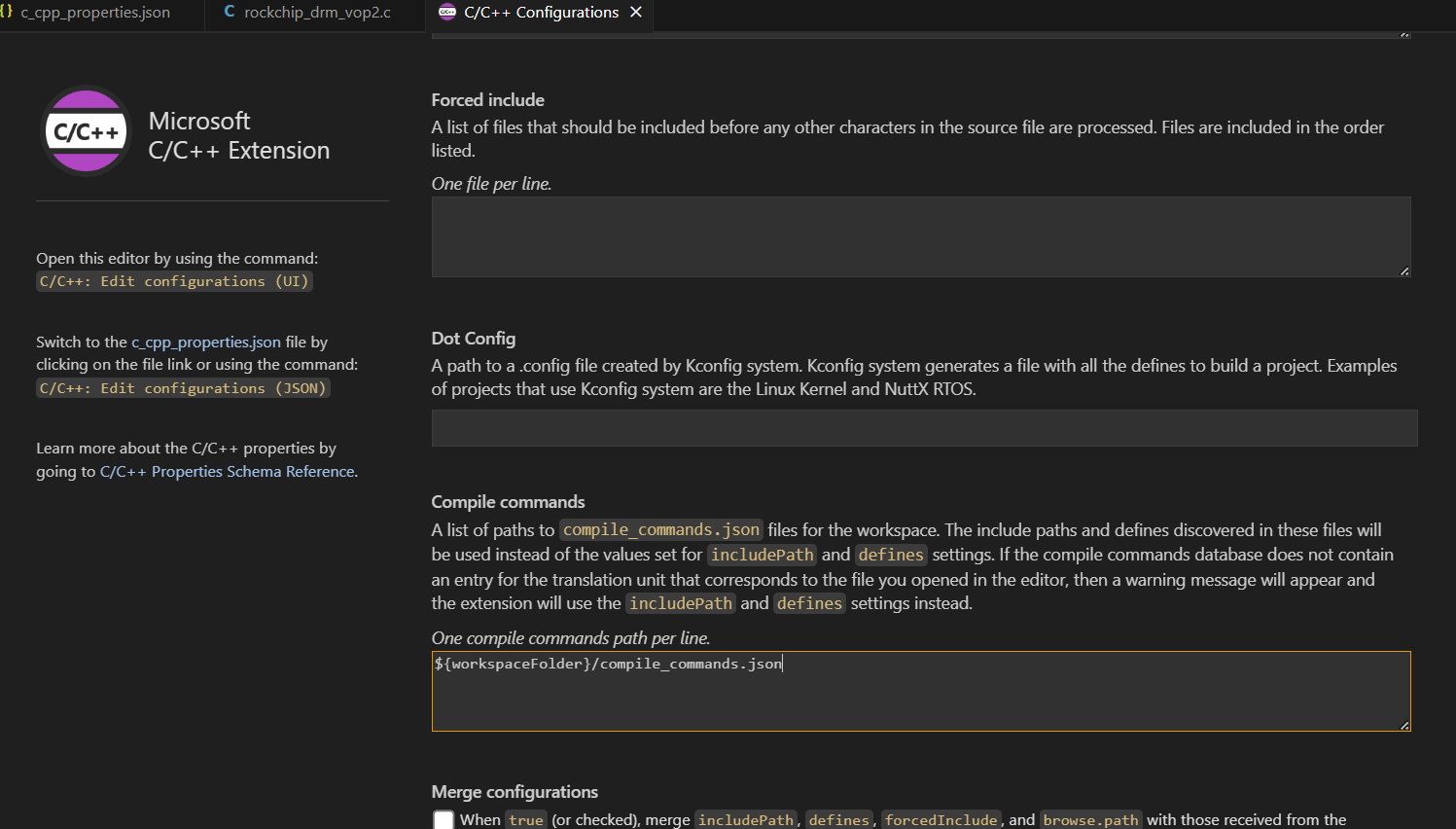
CTRL+SHIFT+P => C/C++: Edit configurations (UI) => Advanced Settings => Compile commands
添加一行

${workspaceFolder}/compile_commands.json
image

配置后的 .vscode/c_cpp_properties.json 大概如此:

{
    "configurations": [
        {
            "name": "Linux",
            "includePath": [
                "${workspaceFolder}/**"
            ],
            "defines": [],
            "compilerPath": "/usr/bin/gcc",
            "cStandard": "c17",
            "cppStandard": "gnu++17",
            "intelliSenseMode": "linux-gcc-x64",
            "compileCommands": [
                "${workspaceFolder}/compile_commands.json"
            ]
        }
    ],
    "version": 4
}

然后重启,等待索引完成即可。

NOTE

另外非内核普通程序也可以通过 cmake -DCMAKE_EXPORT_COMPILE_COMMANDS=True .. 生成CLAND索引 https://www.cnblogs.com/cong-wang/p/15026530.html

双语:

  1. EN https://code.visualstudio.com/docs/cpp/configure-intellisense#_compilecommandsjson-file
  2. CN https://vscode.js.cn/docs/cpp/configure-intellisense