





直接上代码,部分主要代码
1.发送内容
@Data
@Builder
public class Message {
    private String role;
    private String content;
}
2.请求参数体
@Data
@Builder
public class ChatMessage {
    private String model;
    private List<Message> messages;
    private boolean stream;
    private float temperature;
}
3.访问层
public SseEmitter createConnect(@RequestParam(name = "prompt") String prompt, @RequestParam(name = "temperature") float temperature) throws IOException {
        log.info("prompt {}", prompt);
        log.info("temperature {}", temperature);
        SseEmitter sseEmitter = new SseEmitter(-1L); //创建sse对象 -0表示永不超时
        /**补充自己代码,业务逻辑判断等*/
        deepSeekService.sendMessage(sseEmitter, prompt, apiKey, apiPoint, deepSeekModel, temperature);
        return sseEmitter;
    }
4.业务层
public void sendMessage(SseEmitter emitter, String prompt, String apiKey, String apiHost, String deepModel, float temperature) {
        Long userId = getUserId();
        StringBuffer buffer = new StringBuffer();
        new Thread(() -> {
            OkHttpClient client = new OkHttpClient();
            // 获取或初始化用户的对话历史
            List<Message> messages = getHistory(String.format(REDIS_DEEP_SEEK_USER, userId));
            Message message = Message.builder()
                    .role("user")
                    .content(prompt).build();
            // 添加新的用户消息到对话历史
            messages.add(message);
            //创建请求参数体
            ChatMessage requestBody = ChatMessage.builder()
                    .model(deepModel)
                    .messages(messages)
                    .stream(true)
                    .temperature(temperature)
                    .build();
            // 2. 构建请求
            Request request = new Request.Builder()
                    .url(apiHost)
                    .post(RequestBody.create(JSONObject.toJSONString(requestBody), MediaType.parse("application/json; charset=utf-8")))
                    .header("Authorization", "Bearer " + apiKey)
                    .build();
            try (Response response = client.newCall(request).execute()) {
                log.info("deepSeek返回状态 {}", response.code() + "-" + DeepSeekStatusEnum.fromCode(response.code()).getDescription());
                if (!response.isSuccessful()) {
                    log.error("DeepSeek返回错误信息: {}",response.code() + "-" + DeepSeekStatusEnum.fromCode(response.code()).getDescription());
                    emitter.send(SseEmitter.event().name("error").data("DeepSeek返回错误信息:" + response.code() + "-" + DeepSeekStatusEnum.fromCode(response.code()).getDescription()));
                    emitter.complete();
                    return;
                }
                saveHistory(String.format(REDIS_DEEP_SEEK_USER, userId), messages);
                ResponseBody responseBody = response.body();
                if (responseBody != null) {
                    try (BufferedReader reader = new BufferedReader(new InputStreamReader(responseBody.byteStream()))) {
                        String line;
                        BackDataVo backDataVo = new BackDataVo();
                        while ((line = reader.readLine()) != null) {
                            if (line.startsWith("data: ")) {
                                String jsonStr = line.substring(6).trim();
                                if ("[DONE]".equals(jsonStr)) {
                                    emitter.send(SseEmitter.event()
                                            .data("[DONE]")
                                            .id(UUID.randomUUID().toString()));
                                    break;
                                }
                                JsonNode node = objectMapper.readTree(jsonStr);
                                String content = node.at("/choices/0/delta/content").asText();
                                buffer.append(content);
                                if (!content.isEmpty()) {
                                    backDataVo.setValue(content);
                                    emitter.send(SseEmitter.event()
                                            .data(backDataVo)     //直接赋值content,数据会存在丢失
                                            .id(UUID.randomUUID().toString()));
                                }
                            }
                        }
                        emitter.complete();
                    } catch (IOException e) {
                        handleException(e, emitter);
                    }
                }
            } catch (IOException e) {
                handleException(e, emitter);
            }
        }).start();
        // 异步保存响应,将历史数据保存redis,下次使用
        emitter.onCompletion(() -> {
            List<Message> newHistory = getHistory(String.format(REDIS_DEEP_SEEK_USER, userId));
            if (CollectionUtils.isEmpty(newHistory)) {
                newHistory = new ArrayList<>();
            }
            log.info("对话返回数据:{}", buffer);
            Message message = Message.builder()
                    .role("assistant")
                    .content(buffer.toString()).build();
            newHistory.add(message);
            log.info("历史对话数据:{}",  newHistory);
            saveHistory(String.format(REDIS_DEEP_SEEK_USER, userId), newHistory);
        });
    }

    // 统一异常处理
    private void handleException(Exception e, SseEmitter emitter) {
        try {
            log.error("deepSeek Unexpected error: " + e.getMessage());
            emitter.send(SseEmitter.event().name("error").data("DeepSeek返回错误信息:" + e.getMessage()));
        } catch (IOException ex) {
            log.error("Error sending unexpected error message: " + ex.getMessage());
            emitter.completeWithError(ex);
        } finally {
            emitter.complete();
        }
    }
    private List<Message> getHistory(String key) {
        Object history = redisTemplate.opsForValue().get(key);
        return history != null ? (List<Message>) history : new ArrayList<>();
    }

    private void saveHistory(String key, List<Message> history) {
        redisTemplate.opsForValue().set(key, history);
        redisTemplate.expire(key, 30, TimeUnit.MINUTES); // 每次访问续期
    }
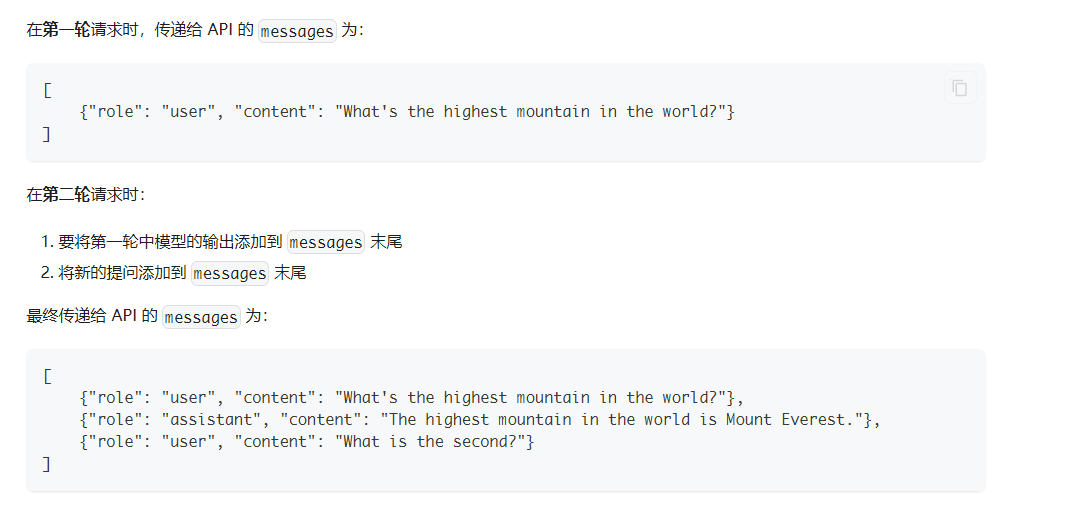
注意:deepseek多轮对话要将之前提问和返回的数据放入请求体中,因此需要保存会话期间的问题和结果
参考:https://blog.csdn.net/weiliang7/article/details/147971898
此内容由惯性聚合(RSS阅读器)自动聚合整理,仅供阅读参考。 原文来自 — 版权归原作者所有。