惯性聚合 高效追踪和阅读你感兴趣的博客、新闻、科技资讯
阅读原文 在惯性聚合中打开

推荐订阅源

K
Kaspersky official blog
Martin Fowler
Martin Fowler
CTFtime.org: upcoming CTF events
V
Visual Studio Blog
博客园_首页
Engineering at Meta
Engineering at Meta
The Cloudflare Blog
MongoDB | Blog
MongoDB | Blog
Blog — PlanetScale
Blog — PlanetScale
T
The Blog of Author Tim Ferriss
雷峰网
雷峰网
D
Docker
博客园 - 司徒正美
S
SegmentFault 最新的问题
M
MIT News - Artificial intelligence
博客园 - 叶小钗
博客园 - 三生石上(FineUI控件)
U
Unit 42
J
Java Code Geeks
A
About on SuperTechFans
N
Netflix TechBlog - Medium
freeCodeCamp Programming Tutorials: Python, JavaScript, Git & More
S
Security Affairs
I
Intezer
Cisco Talos Blog
Cisco Talos Blog
C
Cyber Attacks, Cyber Crime and Cyber Security
Threat Intelligence Blog | Flashpoint
B
Blog RSS Feed
P
Privacy & Cybersecurity Law Blog
T
Tenable Blog
T
Threatpost
H
Hacker News: Front Page
G
Google Developers Blog
博客园 - 【当耐特】
Hugging Face - Blog
Hugging Face - Blog
Apple Machine Learning Research
L
Lohrmann on Cybersecurity
大猫的无限游戏
大猫的无限游戏
Google DeepMind News
A
Arctic Wolf
S
Secure Thoughts
GbyAI
GbyAI
NISL@THU
NISL@THU
S
Security @ Cisco Blogs
Exploit-DB.com RSS Feed
Webroot Blog
Webroot Blog
C
CXSECURITY Database RSS Feed - CXSecurity.com
O
OpenAI News
Spread Privacy
Spread Privacy
Application and Cybersecurity Blog

博客园 - 一叶知秋。

从包含时间属性的对象列表中,筛选出时间≤指定时间参数且最接近该时间参数的那个对象 安装nginx和OpenSSL struts2的<s:if test>标签的注意点 mysql怎么写逻辑比较清晰? 设置idea 代码报错时不弹框显示 Collections.sort多个字段排序 LigerUI 中的 Grid (ligerGrid) 合并单元格 mysql模糊查找数据库使用的字段名 spring RestTemplate忽略证书验证 关于easyExcel解析未添加@ExcelProperty报错问题分析 Nginx的常用命令(启动重启停止等) 解决远程调用三方接口:javax.net.ssl.SSLHandshakeException:sun.security.validator.ValidatorException报错 msyql查询表的索引sql语句 MySQL查看表占用空间大小 js屏蔽回车提交 kettle同步表数据null处理 MySql 分组后获取距离时间最近的第一条数据 mysql解表和查看锁表 Windows关闭指定端口命令
Windows 技术篇-防火墙启用时指定外部可访问端口,防火墙开放端口设置
一叶知秋。 · 2022-05-14 · via 博客园 - 一叶知秋。

之前用电脑撘环境,发现外部设备访问不了自己环境的端口,其实就是防火墙为了保护我们电脑给阻止了,这种情况把防火墙关闭就好了,但是关闭防火墙安全性就降低了,我们可以通过简单的设置给端口放开。
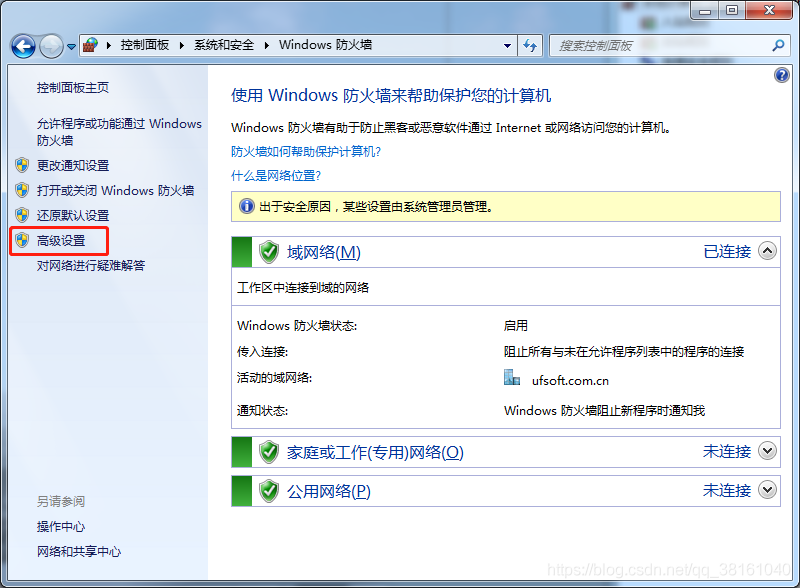
步骤一:
进入防火墙高级设置界面。
 步骤二:
然后在入站规则里新建个规则,选择端口。

 步骤三:
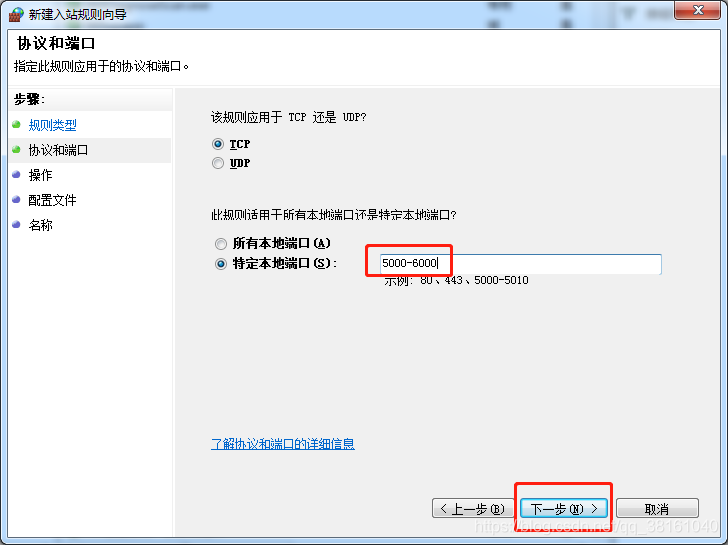
现在就可以设置要开放的端口了,可以指定特定的端口,也可以指定端口范围,端口与端口之间用顿号分隔。接下来就一直下一步就好啦。