惯性聚合 高效追踪和阅读你感兴趣的博客、新闻、科技资讯
阅读原文 在惯性聚合中打开

推荐订阅源

酷 壳 – CoolShell
酷 壳 – CoolShell
T
Threatpost
Latest news
Latest news
N
News | PayPal Newsroom
Threat Intelligence Blog | Flashpoint
Help Net Security
Help Net Security
D
Darknet – Hacking Tools, Hacker News & Cyber Security
AI
AI
Simon Willison's Weblog
TaoSecurity Blog
TaoSecurity Blog
The Last Watchdog
The Last Watchdog
L
LINUX DO - 热门话题
Google DeepMind News
T
Threat Research - Cisco Blogs
O
OpenAI News
钛媒体:引领未来商业与生活新知
钛媒体:引领未来商业与生活新知
T
The Exploit Database - CXSecurity.com
NISL@THU
NISL@THU
Application and Cybersecurity Blog
S
Securelist
小众软件
小众软件
cs.CL updates on arXiv.org
Martin Fowler
Martin Fowler
S
SegmentFault 最新的问题
Cisco Talos Blog
Cisco Talos Blog
云风的 BLOG
云风的 BLOG
AWS News Blog
AWS News Blog
GbyAI
GbyAI
N
News and Events Feed by Topic
cs.CV updates on arXiv.org
美团技术团队
Engineering at Meta
Engineering at Meta
A
About on SuperTechFans
博客园 - 三生石上(FineUI控件)
S
Schneier on Security
博客园 - 聂微东
V2EX - 技术
V2EX - 技术
T
Troy Hunt's Blog
SecWiki News
SecWiki News
S
Secure Thoughts
B
Blog RSS Feed
Hugging Face - Blog
Hugging Face - Blog
WordPress大学
WordPress大学
腾讯CDC
H
Heimdal Security Blog
Exploit-DB.com RSS Feed
Apple Machine Learning Research
月光博客
月光博客
www.infosecurity-magazine.com
P
Privacy International News Feed

博客园 - 星小梦

Linux系统调整java程序启动用户,导出xlsx时抛出Permission denied异常问题。 vue2的devtools开发工具卡死现象的解决方法 echarts图表在浏览器上打印出现裁剪的问题 apache echarts数据点重影或 Cannot read properties of undefined (reading 'type')错误问题 yarn install出现error Error: certificate has expired异常 git多代码仓库合并的方式 docker容器oshi如何获取宿主机的运行状态信息? su命令引起的nohup进程以root身份启动导致的问题 docker-compose启动服务,影响其他服务的原因 xxl-job provider netty_http server caught exception flutter升级导致的旧项目的运行环境问题排查记录 vue3插件库以及对JSX的支持。 JSX、TSX扩展语法学习材料 commitlint Lint 提交消息格式控制 Window10 关闭Edge浏览器的多选项卡通过Alt+Tab组合键切换的方式 Postgres16数据库集成外部库dblink和postgres_fdw扩展的方式 java 泛型类型如何保留类型的信息的方式 Postgres16 常见问题 docker镜像安装字体支持,解决jdk服务验证码生成找不到字体问题 window和Linux命令行执行多条命令的方法
Chromium历史版本下载方式
星小梦 · 2025-09-17 · via 博客园 - 星小梦

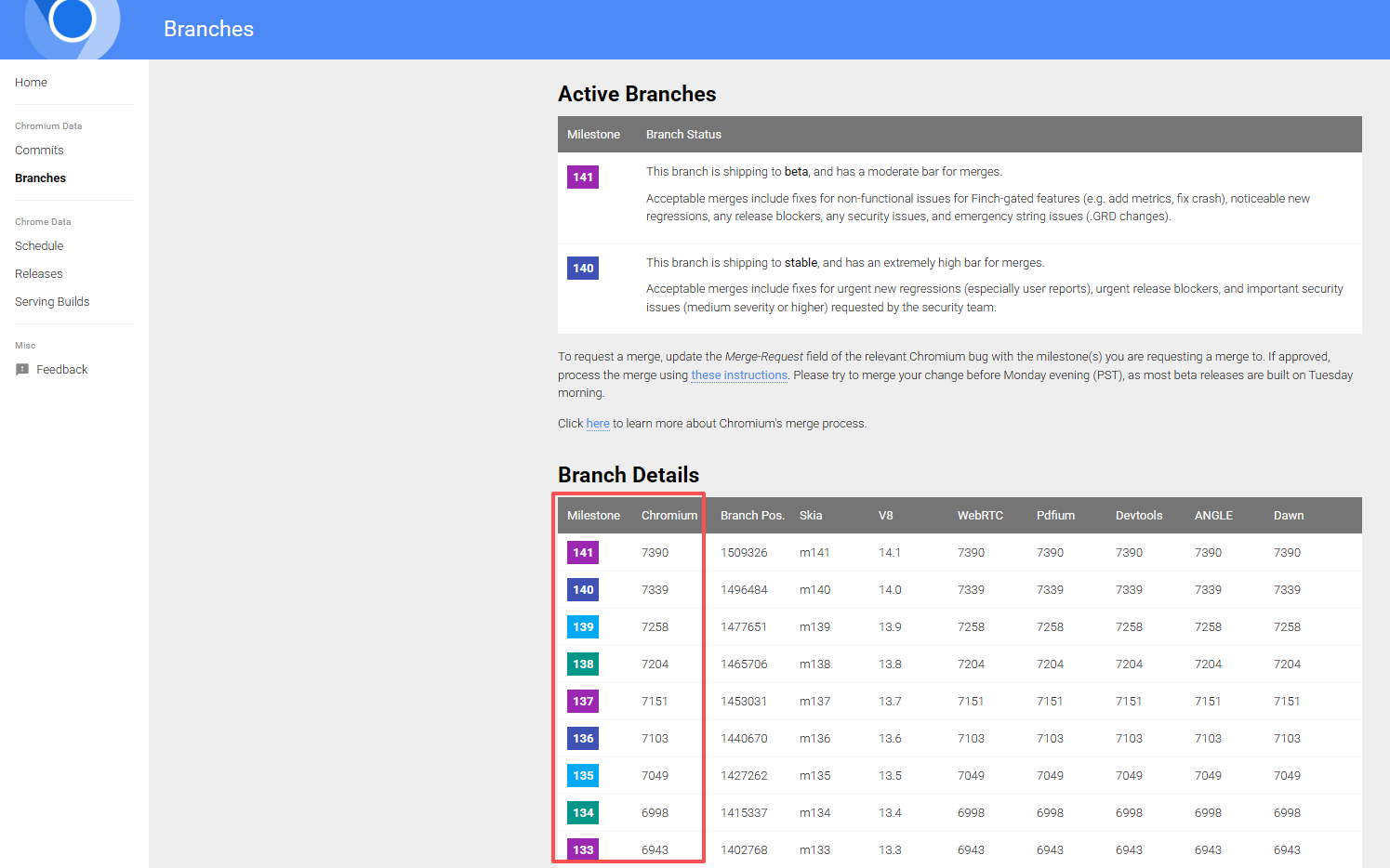
首先,访问 https://chromiumdash.appspot.com/branches此链接,点击将要下载的chromium版本。
image
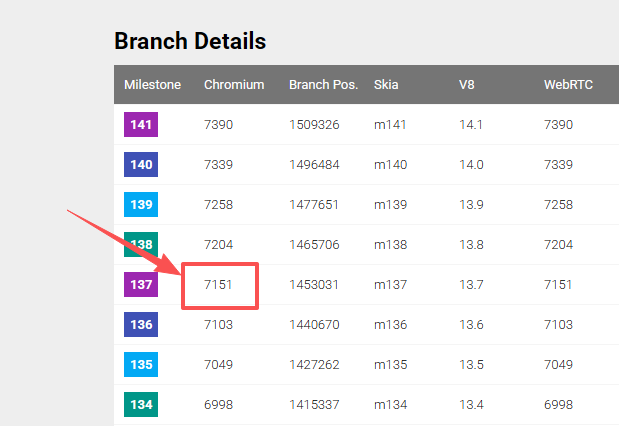
我们点击想要下载的版本的Chromium列,这里我们以137为例。
image
点击此处。会打开https://chromium.googlesource.com/chromium/src.git/+log/refs/branch-heads/7151网页。
image
点击上图红框处的链接。会打开https://chromium.googlesource.com/chromium/src.git/+/6bb43cea48a63143eb061114bf899fd8cf839eba网页。
image
记住上图的数字编号(红色框区域)后,打开https://commondatastorage.googleapis.com/chromium-browser-snapshots/index.html?prefix=Win_x64/网页。
image
由于1453031目录不存在,但是存在1453032目录。所以这个目录就是Chromium 137版本的浏览器。
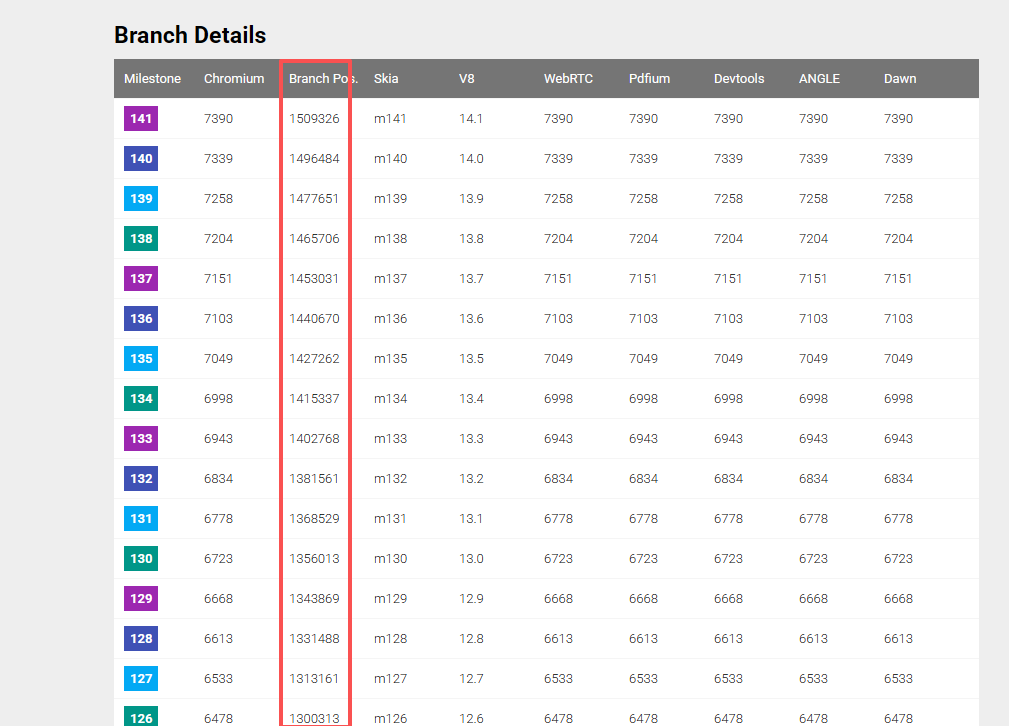
因为这些编号都是有规律的,如果不能全匹配上,那就逐字符的减去末尾的字符。能匹配上就代表是你要找的那个主版本号的浏览器。

image
也可以看这一列的数值,等价于提交记录中的数字编号。

参阅

  1. Download Chromium
  2. https://groups.google.com/a/chromium.org/g/chromium-dev/c/uH-nFrOLWtE/m/PhUj_inyAQAJ
  3. https://chromiumdash.appspot.com/home
  4. https://commondatastorage.googleapis.com/chromium-browser-snapshots/index.html