

惯性聚合 高效追踪和阅读你感兴趣的博客、新闻、科技资讯
阅读原文 在惯性聚合中打开

推荐订阅源

Stack Overflow Blog
Stack Overflow Blog
PCI Perspectives
PCI Perspectives
freeCodeCamp Programming Tutorials: Python, JavaScript, Git & More
让小产品的独立变现更简单 - ezindie.com
V2EX - 技术
V2EX - 技术
Google DeepMind News
量子位
博客园_首页
S
SegmentFault 最新的问题
S
Secure Thoughts
F
Full Disclosure
H
Hacker News: Front Page
博客园 - 三生石上(FineUI控件)
U
Unit 42
H
Heimdal Security Blog
N
News and Events Feed by Topic
A
About on SuperTechFans
C
CERT Recently Published Vulnerability Notes
Cyberwarzone
Cyberwarzone
Help Net Security
Help Net Security
The Hacker News
The Hacker News
L
LINUX DO - 最新话题
Application and Cybersecurity Blog
罗磊的独立博客
N
News | PayPal Newsroom
Spread Privacy
Spread Privacy
C
Cisco Blogs
C
CXSECURITY Database RSS Feed - CXSecurity.com
云风的 BLOG
云风的 BLOG
A
Arctic Wolf
Threat Intelligence Blog | Flashpoint
Simon Willison's Weblog
B
Blog
人人都是产品经理
人人都是产品经理
TaoSecurity Blog
TaoSecurity Blog
博客园 - 【当耐特】
C
Cyber Attacks, Cyber Crime and Cyber Security
P
Proofpoint News Feed
Hugging Face - Blog
Hugging Face - Blog
I
InfoQ
D
DataBreaches.Net
大猫的无限游戏
大猫的无限游戏
Apple Machine Learning Research
L
LINUX DO - 热门话题
Google Online Security Blog
V
Visual Studio Blog
V
Vulnerabilities – Threatpost
Know Your Adversary
Know Your Adversary
CTFtime.org: upcoming CTF events
B
Blog RSS Feed

博客园 - 云梦鸿

Winform界面显示的“语言”切换 Linux使用笔记 QT 练习笔记 QT 读写配置文件(*.INI) ubuntu 配置网口静态IP C++ 读写文件 C#编写Windows服务 C#代码计算农历(日期、节气、节日) 中标麒麟,使用笔记 关于无密码访问 Windows7/10 的远程桌面/共享 颜色转换:HSB颜色 与 RGB颜色 QT 信号(槽)绑定的使用_connect QT 给控件(Label)设置显示图片 QT 打包Windows应用程序(*.exe) C#程序执行Python脚本 C#监控U盘插拔 C# AnimateWindow 设置窗体动画 C# GetWindowRect 获取窗体在屏幕中的位置信息 C# 创建音频WAVE文件头信息(*.wav)
VS2019错误:CS8370 的处理方法
云梦鸿 · 2020-07-12 · via 博客园 - 云梦鸿

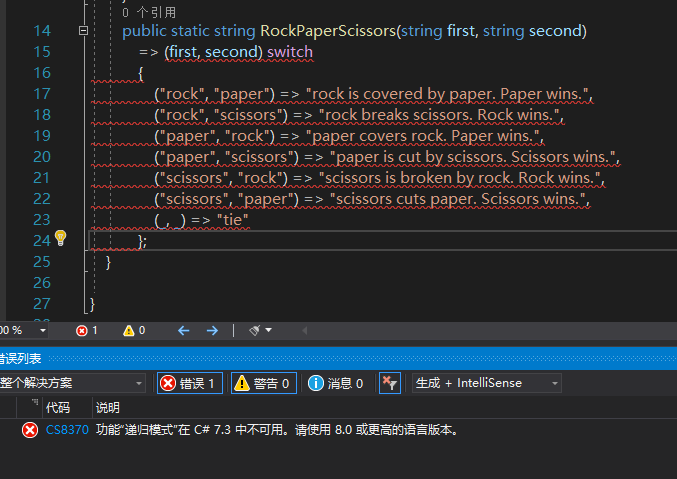
关于VS2019错误:CS8370 功能“递归模式”在 C# 7.3 中不可用。请使用 8.0 或更高的语言版本。 的处理方式

错误提示:
 处理方式:

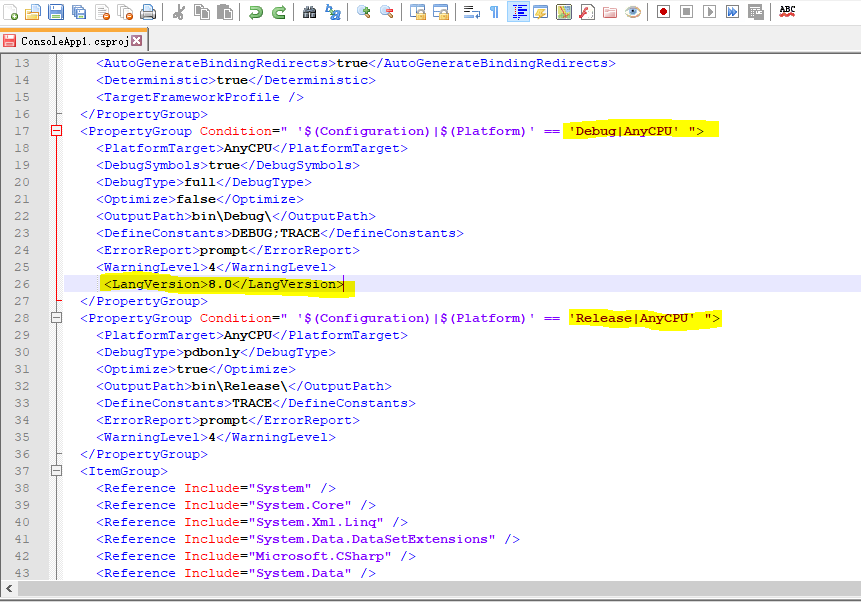
找到当前项目的配置文件:ConsoleApp1.csproj

用户记事本打开,找到 <PropertyGroup> 节点下的 <LangVersion>,将它的值改为8.0

  <LangVersion>8.0</LangVersion>

如果,没有这个字节点,则,在<PropertyGroup>节点下,<WarningLevel>节点后,直接添加<LangVersion>节点。

即:
 然后,重新加载项目,即可。