惯性聚合 高效追踪和阅读你感兴趣的博客、新闻、科技资讯
阅读原文 在惯性聚合中打开

推荐订阅源

Simon Willison's Weblog
P
Privacy International News Feed
www.infosecurity-magazine.com
T
Troy Hunt's Blog
Hacker News - Newest:
Hacker News - Newest: "LLM"
Attack and Defense Labs
S
Secure Thoughts
V2EX - 技术
V2EX - 技术
cs.AI updates on arXiv.org
O
OpenAI News
Cloudbric
Cloudbric
Google Online Security Blog
Schneier on Security
cs.CV updates on arXiv.org
Help Net Security
Help Net Security
Cyberwarzone
Cyberwarzone
G
GRAHAM CLULEY
L
Lohrmann on Cybersecurity
Threat Intelligence Blog | Flashpoint
Spread Privacy
Spread Privacy
NISL@THU
NISL@THU
N
News and Events Feed by Topic
T
Tenable Blog
S
Security @ Cisco Blogs
N
News and Events Feed by Topic
The Hacker News
The Hacker News
C
CXSECURITY Database RSS Feed - CXSecurity.com
宝玉的分享
宝玉的分享
月光博客
月光博客
酷 壳 – CoolShell
酷 壳 – CoolShell
美团技术团队
奇客Solidot–传递最新科技情报
奇客Solidot–传递最新科技情报
Google DeepMind News
钛媒体:引领未来商业与生活新知
钛媒体:引领未来商业与生活新知
T
Tailwind CSS Blog
V
Visual Studio Blog
P
Proofpoint News Feed
Webroot Blog
Webroot Blog
让小产品的独立变现更简单 - ezindie.com
博客园 - 三生石上(FineUI控件)
cs.CL updates on arXiv.org
Jina AI
Jina AI
雷峰网
雷峰网
T
The Blog of Author Tim Ferriss
Hugging Face - Blog
Hugging Face - Blog
腾讯CDC
L
LangChain Blog
The Register - Security
OSCHINA 社区最新新闻
OSCHINA 社区最新新闻
博客园 - 聂微东

博客园 - timseng

ai辅助升级前端安全更新(贼快!hh openclaw的token又耗完了,先不冲了,记录下折腾踩坑过程 (如果需要协助安装500,帮忙卸载250[doge]) VS Code我的配置(持续更新) 推广:flowable工作流引擎就是高级版本的数据库而已(一) springboot升级3x导致邮件发送失败:错误1 jakarta.mail.NoSuchProviderException: smtp nice du更好的du分析文件占用工具ncdu 前端发布shell脚本 virtualBox环境Ubuntu升级后太卡,转debian很丝滑 收藏:加不加「/」?Nginx location 路径与 proxy_pass 的规律 使用visjs分析flowable流程数据 浏览器标签页多行显示:使用Floorp浏览器 最先进的跨平台 Firefox 衍生品 开源之光 开源WAF:ModSecurity探究与部署 动态条件实现java mysql备份恢复云端之核心:更新扫描MySQL库里的所有表的UPDATE_TIME,若发生变动就mysqldump 使用MITMProxy转发请求到本地、保存鉴权给本地请求 这款Ubuntu的默认壁纸水母是真漂亮啊 笑死!'m not going to tell you who, but I know someone who recently locked himself out of the system he was using for an article covering iptables by forgetting the SSH rule. itext的PdfPCell中设置行间距失败的问题 Java递归函数计算递归次数出错
使用MITMProxy转发https请求到本地、保存鉴权给本地请求(二)
timseng · 2024-12-06 · via 博客园 - timseng

2. 配置浏览器使用 mitmproxy

  • 启动 mitmproxy
  • 设置浏览器代理为 mitmproxy 的监听地址(默认为 127.0.0.1:8080)。
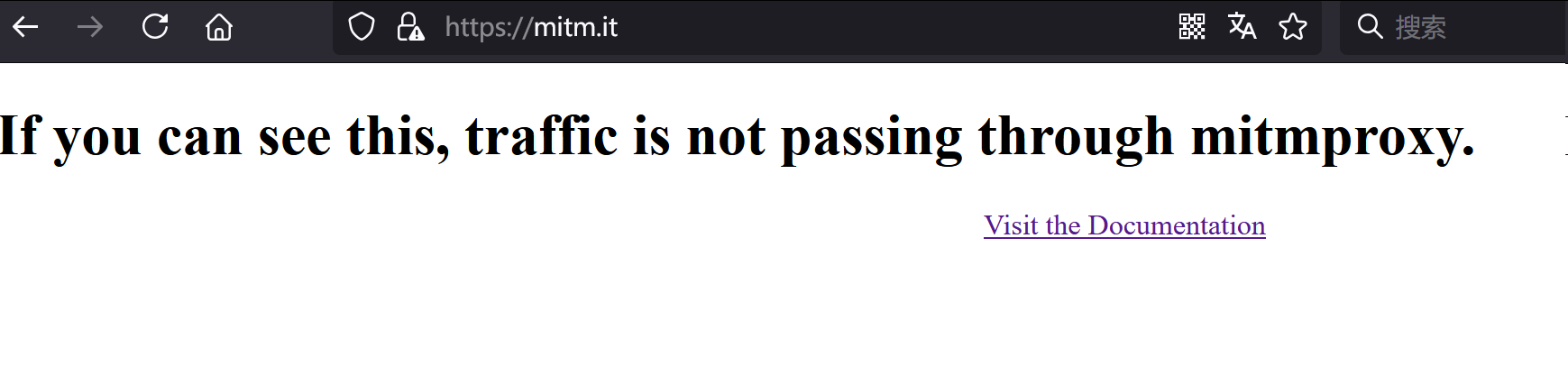
  • 未设置代理访问 mitm.it

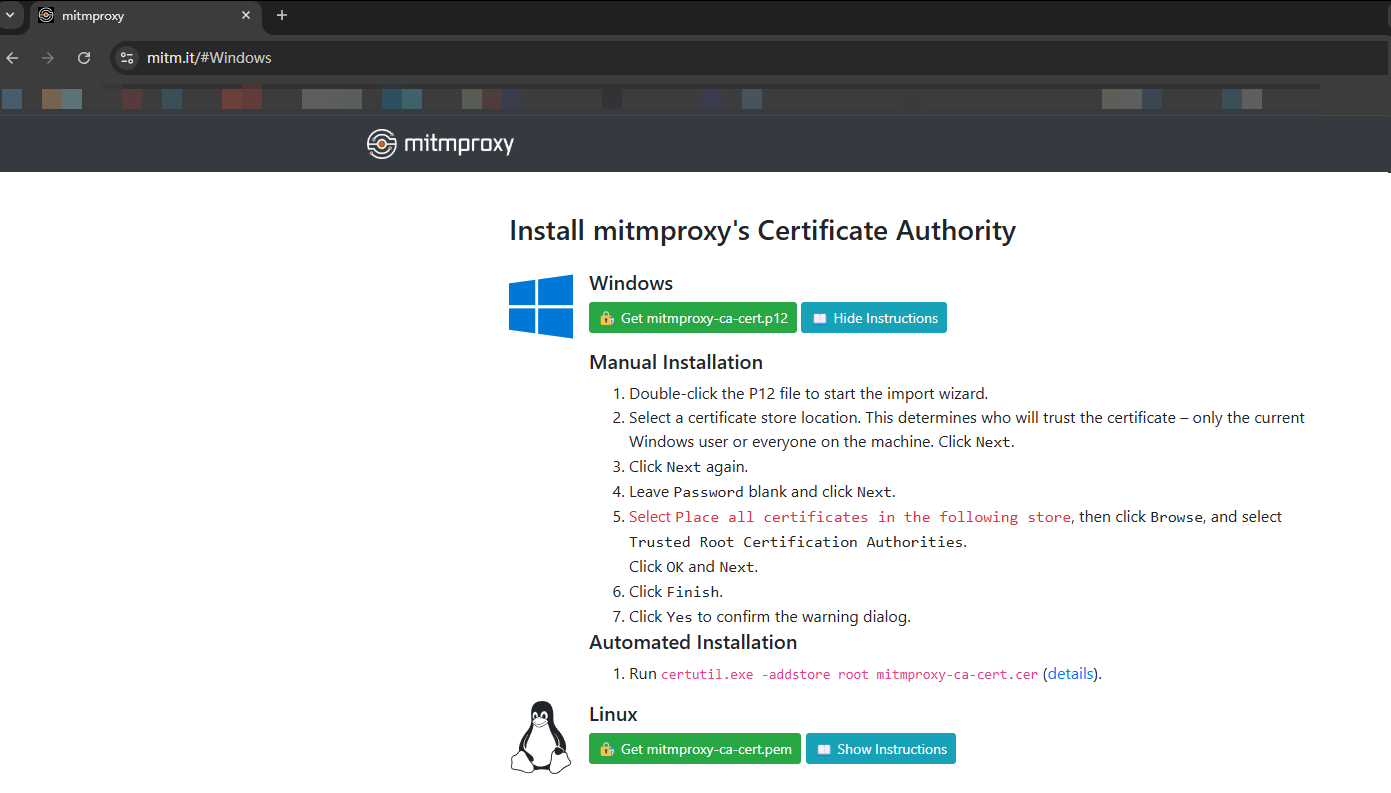
  • 信任 mitmproxy 的根证书:
    • 访问 mitm.it 下载证书。
    • 将证书导入并信任(具体步骤根据浏览器而异)。
      • 选择证书存储位置。这决定了证书的信任范围——仅限当前的 Windows 用户,还是整个计算机上的所有用户。点击“下一步”。
      • 再次点击“下一步”。
      • 将密码字段留空,点击“下一步”。
      • 选择“将所有证书放入以下存储”,然后点击“浏览”,选择“受信任的根证书颁发机构”。
      • 点击“确定”,然后点击“下一步”。
      • 点击“完成”。
      • 点击“是”以确认警告对话框。

      3. 编写替换脚本

      通过编写一个 mitmproxy 脚本实现请求的拦截和替换。

      创建一个脚本 redirect_request.py,内容如下:

    • from mitmproxy import http
      
      def request(flow: http.HTTPFlow) -> None:
          # 检查请求的 URL
          if flow.request.pretty_url == "https://a.com/userInfo":
              # 修改目标 URL
              flow.request.host = "localhost"
              flow.request.port = 8080
              flow.request.scheme = "http"
      

      4. 运行 mitmproxy 脚本

      使用以下命令运行 mitmproxy 并加载脚本:

    • mitmproxy -s redirect_request.py

      5. 验证效果

      在浏览器中访问 https://a.com/userInfomitmproxy 会拦截请求并将其重定向到 http://localhost:8080/userInfo

允许跨域请求

如果 mitmproxy 转发请求时没有进行合适的 CORS 配置,可能导致浏览器出现跨域问题。你可以在 mitmproxy 中强制修改响应头来允许跨域请求。

例如,添加如下的 CORS 响应头:

def response(flow: http.HTTPFlow) -> None:
    # 添加 CORS 响应头
    flow.response.headers["Access-Control-Allow-Origin"] = "*"
    flow.response.headers["Access-Control-Allow-Methods"] = "GET, POST, PUT, DELETE, OPTIONS"
    flow.response.headers["Access-Control-Allow-Headers"] = "Content-Type, Authorization"
    
# flow.response.headers["Access-Control-Allow-Headers"] = "*"
 

CORS 策略:当你设置 Access-Control-Allow-Headers* 时,某些浏览器可能会对某些头部有额外的限制。比如,某些请求头(如 AuthorizationContent-Type)在 CORS 请求中是受到限制的,因此你需要根据需求确保服务器端接受这些请求头。

解决 strict-origin-when-cross-origin 错误

strict-origin-when-cross-origin 是一种浏览器的安全策略,限制了跨域请求中的 RefererOrigin 信息。浏览器在跨域请求时只会传递源(origin)而不会传递完整 URL。由于这个限制,浏览器可能会拒绝某些跨域请求。

解决方案

  • 服务器端:确保服务器支持 CORS,允许适当的 OriginReferer 头部。通过响应头中的 Access-Control-Allow-OriginAccess-Control-Allow-Methods,和 Access-Control-Allow-Headers 来配置允许的跨域源和方法。

  • mitmproxy 中修改请求头:如果是因为请求头中缺少合适的 OriginReferer,可以通过 mitmproxy 修改请求头,确保这些头部值被正确传递。

def request(flow: http.HTTPFlow) -> None:
    # 添加 Origin 和 Referer 头部
    flow.request.headers["Origin"] = "http://localhost:8080"
    flow.request.headers["Referer"] = "http://localhost:8080"