惯性聚合 高效追踪和阅读你感兴趣的博客、新闻、科技资讯
阅读原文 在惯性聚合中打开

推荐订阅源

Cisco Talos Blog
Cisco Talos Blog
阮一峰的网络日志
阮一峰的网络日志
云风的 BLOG
云风的 BLOG
D
Docker
Vercel News
Vercel News
IT之家
IT之家
Recent Announcements
Last Week in AI
Last Week in AI
V
Visual Studio Blog
Engineering at Meta
Engineering at Meta
腾讯CDC
Google DeepMind News
I
InfoQ
博客园 - 三生石上(FineUI控件)
Apple Machine Learning Research
The GitHub Blog
The GitHub Blog
博客园 - Franky
The Cloudflare Blog
A
About on SuperTechFans
有赞技术团队
有赞技术团队
Y
Y Combinator Blog
T
Tenable Blog
P
Proofpoint News Feed
Recorded Future
Recorded Future
Security Latest
Security Latest
H
Hackread – Cybersecurity News, Data Breaches, AI and More
K
KPMG report finds enterprise disconnect between AI and its ROI | CIO
博客园 - 聂微东
CTFtime.org: upcoming CTF events
Threat Intelligence Blog | Flashpoint
Google Online Security Blog
酷 壳 – CoolShell
酷 壳 – CoolShell
Cyber Security Advisories - MS-ISAC
Simon Willison's Weblog
The Last Watchdog
The Last Watchdog
freeCodeCamp Programming Tutorials: Python, JavaScript, Git & More
OSCHINA 社区最新新闻
OSCHINA 社区最新新闻
N
News and Events Feed by Topic
TaoSecurity Blog
TaoSecurity Blog
U
Unit 42
The Hacker News
The Hacker News
Martin Fowler
Martin Fowler
T
Threat Research - Cisco Blogs
NISL@THU
NISL@THU
F
Full Disclosure
M
MIT News - Artificial intelligence
人人都是产品经理
人人都是产品经理
Hugging Face - Blog
Hugging Face - Blog
V
V2EX
Project Zero
Project Zero

博客园 - 布里

chrome浏览器扩展“猫抓” foobar2000歌词插件使用方法 blob视频地址如何下载 ffmpeg视频分割 ffmpeg合并视频+音频 You-Get和youtube-dl 【会声会影】初装会声会影时,必要的设置 【会声会影】视频导出、输出时,如何设置参数 【会声会影】导入的srt字幕文件,如何快速批量调整字体及大小 把h264文件快速包装成mp4格式 Notepad++正则表达式——去掉srt字幕文件的时间轴 百度地图API的网页使用 ASPCMS_判断语句if标签的使用 ASS字幕制作 批处理修改Hosts文件 Outlook2013修改数据文件默认存放目录 获取【酷我音乐】歌曲URL地址 Win7远程桌面的多用户连接破解 Print Spooler 服务自动停止
Premiere调整画布尺寸
布里 · 2023-05-16 · via 博客园 - 布里

软件版本:Premiere Pro CC 7.0

在已有项目中:
文件→新建→调整图层(把焦点定位在下方轨道栏,否则呈灰色,无法点击)
右击新建的调整图层,选择“从剪辑新建序列”——这样就建好了一个自定义视频尺寸的编辑轨道。

-------------------------------------------------------------------------------------
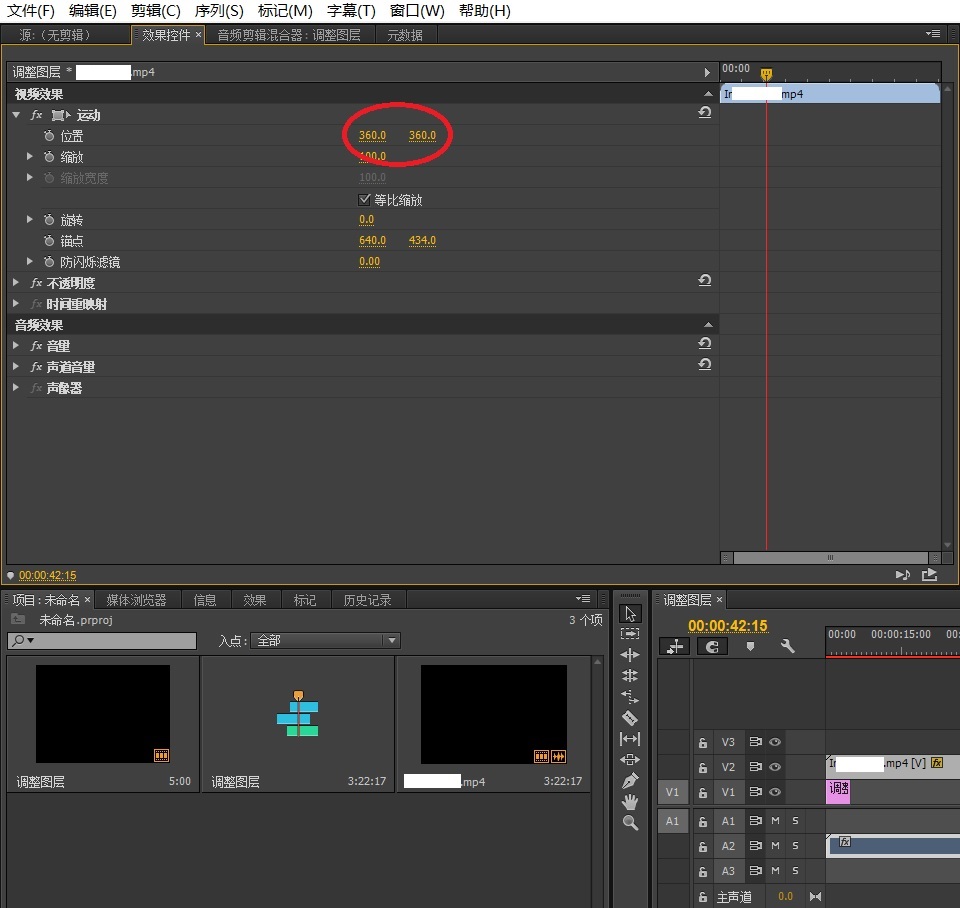
如果要让多个视频同时显示,就可以把画布调大,画布的分辨率为所有视频分辨率之和。
比如把两个视频上下同时显示:
把两个视频素材放在不同的轨道上,然后在左上栏里的“效果控件”中,视频效果→运动→位置,通过滑块调整视频画面的位置,使之一个视频居上,一个居下。(默认是居中显示,两个视频是有重叠的)