





当触发一个具有多层subDAG的任务时,会发现执行触发的task任务运行失败,但是需要触发的目标DAG已经在运行了,dag log 错误内容:
[2019-11-21 17:47:56,825] {base_task_runner.py:115} INFO - Job 2: Subtask peak_agg.daily_device_app_tx sqlalchemy.exc.IntegrityError: (_mysql_exceptions.IntegrityError) (1062, "Duplicate entry 'pcdn_export_agg_peak.split_to_agg_9.pcdn_agg-2019-11-21 09:47:00' for key 'dag_id'")
[2019-11-21 17:47:56,825] {base_task_runner.py:115} INFO - Job 2: Subtask peak_agg.daily_device_app_tx [SQL: INSERT INTO dag_run (dag_id, execution_date, start_date, end_date, state, run_id, external_trigger, conf) VALUES (%s, %s, %s, %s, %s, %s, %s, %s)]
[2019-11-21 17:47:56,825] {base_task_runner.py:115} INFO - Job 2: Subtask peak_agg.daily_device_app_tx [parameters: ('pcdn_export_agg_peak.split_to_agg_9.pcdn_agg', <Pendulum [2019-11-21T09:47:00+00:00]>, datetime.datetime(2019, 11, 21, 9, 47, 56, 409081, tzinfo=<Timezone [UTC]>), None, 'running', 'tri_peak_agg-daily_device_app_tx-for:2019-11-20-on:20191120013000.000000', 1, b'\x80\x04\x95&\x01\x00\x00\x00\x00\x00\x00}\x94(\x8c\x03env\x94\x8c\x03dev\x94\x8c\x08start_ts\x94J\x80=\xd5]\x8c\x06end_ts\x94J\xa4K\xd5]\x8c\tstat_ ... (275 characters truncated) ... \x8c\x06device\x94as\x8c\tlog_level\x94\x8c\x04INFO\x94\x8c\rseries_chunks\x94Kd\x8c\tsp_chunks\x94J@B\x0f\x00\x8c\nsp_schunks\x94J\xa0\x86\x01\x00u.')]
[2019-11-21 17:47:56,825] {base_task_runner.py:115} INFO - Job 2: Subtask peak_agg.daily_device_app_tx (Background on this error at: http://sqlalche.me/e/gkpj)
[2019-11-21 17:47:57,393] {logging_mixin.py:95} INFO - [[34m2019-11-21 17:47:57,392[0m] {[34mlocal_task_job.py:[0m105} INFO[0m - Task exited with return code 1[0m
经过分析,触发bug的代码块在airflow/api/common/experimental/trigger_dag.py的 def _trigger_dag 函数中,最后在进行dag触发的时候。
    triggers = list()
    dags_to_trigger = list()
    dags_to_trigger.append(dag)
    while dags_to_trigger:
        dag = dags_to_trigger.pop()
        trigger = dag.create_dagrun(
            run_id=run_id,
            execution_date=execution_date,
            state=State.RUNNING,
            conf=run_conf,
            external_trigger=True,
        )
        triggers.append(trigger)
        if dag.subdags:
            dags_to_trigger.extend(dag.subdags) # 在这里产生了重复触发的BUG
    return triggers
原因为,,dag.subdags 中包含了该DAG下所有subDAG,包含subDAG下的subDAG。因此在一个有多层嵌套的DAG中,第二层subDAG一下的subDAG,均会被重复追加到dags_to_trigger,从而在数据库的dag_runtable中,产生两条相同的记录。但是因为dag_runtable在创建的时候,具有两个UNIQUE KEY(如下),因此重复记录写入则会触发sql的写入错误。
| dag_run | CREATE TABLE `dag_run` (
  `id` int(11) NOT NULL AUTO_INCREMENT,
  `dag_id` varchar(250) DEFAULT NULL,
  `execution_date` timestamp(6) NULL DEFAULT NULL,
  `state` varchar(50) DEFAULT NULL,
  `run_id` varchar(250) DEFAULT NULL,
  `external_trigger` tinyint(1) DEFAULT NULL,
  `conf` blob,
  `end_date` timestamp(6) NULL DEFAULT NULL,
  `start_date` timestamp(6) NULL DEFAULT NULL,
  PRIMARY KEY (`id`),
  UNIQUE KEY `dag_id` (`dag_id`,`execution_date`),
  UNIQUE KEY `dag_id_2` (`dag_id`,`run_id`),
  KEY `dag_id_state` (`dag_id`,`state`)
) ENGINE=InnoDB DEFAULT CHARSET=latin1 |
解决方案:
修改源码,记录以触发的dag,每次从dags_to_trigger中取出dag之后,先判断该dag是否已经被触发,只有未被触发的dag才进行触发。
    triggers = list()
    dags_to_trigger = list()
    dags_to_trigger.append(dag)
    is_triggered = dict()
    while dags_to_trigger:
        dag = dags_to_trigger.pop()
        if is_triggered.get(dag.dag_id):
            continue
        is_triggered[dag.dag_id] = True
        trigger = dag.create_dagrun(
            run_id=run_id,
            execution_date=execution_date,
            state=State.RUNNING,
            conf=run_conf,
            external_trigger=True,
        )
        triggers.append(trigger)
        if dag.subdags:
            dags_to_trigger.extend(dag.subdags)
    return triggers
如下是通过修改官方example example_trigger_controller_dag 和 example_trigger_target_dag,为了方便测试,将两个DAG代码合并在一个文件中。
下面的例子使用了2个DAG,分别是:
my_trigger_target_dag,修改自example_trigger_target_dag;在这个DAG中,实现了2层subDAG嵌套。
my_trigger_controller_dag,修改自example_trigger_controller_dag;在这个DAG中,可以通过for循环控制,连续调用指定次数的my_trigger_target_dag。
在连续需触发其他DAG过程中,要注意的是:
run_id,如果没有手动设置那么系统会自动设置,但是为了方便查看触发任务和目标DAG的运行,最好手动标志一下run_id。execute_date的时候,要设置不同的execute_date,否则会触发 Duplicate entry ‘xxxx’ for key dag_id 的错误,原因和如上分析一样。execute_date 一定要是UTC格式,否则目标DAG执行时间会和你希望的时间不一致。import pprint
from datetime import datetime, timedelta
from airflow.utils import timezone
import airflow
from airflow.models import DAG
from airflow.operators.bash_operator import BashOperator
from airflow.operators.python_operator import PythonOperator
from airflow.operators.subdag_operator import SubDagOperator
from airflow.operators.dagrun_operator import TriggerDagRunOperator
pp = pprint.PrettyPrinter(indent=4)
# This example illustrates the use of the TriggerDagRunOperator. There are 2
# entities at work in this scenario:
# 1. The Controller DAG - the DAG that conditionally executes the trigger
# (in example_trigger_controller.py)
# 2. The Target DAG - DAG being triggered
#
# This example illustrates the following features :
# 1. A TriggerDagRunOperator that takes:
# a. A python callable that decides whether or not to trigger the Target DAG
# b. An optional params dict passed to the python callable to help in
# evaluating whether or not to trigger the Target DAG
# c. The id (name) of the Target DAG
# d. The python callable can add contextual info to the DagRun created by
# way of adding a Pickleable payload (e.g. dictionary of primitives). This
# state is then made available to the TargetDag
# 2. A Target DAG : c.f. example_trigger_target_dag.py
args = {
'start_date': airflow.utils.dates.days_ago(2),
'owner': 'airflow',
}
TARGET_DAG = "my_trigger_target_dag"
TRIGGER_CONTROLLER_DAG = "my_trigger_controller_dag"
target_dag = DAG(
dag_id=TARGET_DAG,
default_args=args,
schedule_interval=None,
)
def run_this_func(ds, **kwargs):
print("Remotely received value of {} for key=message".format(kwargs['dag_run'].conf['message']))
def sub_run_this_func(ds, **kwargs):
dag_run_conf = kwargs['dag_run'].conf or {}
print("Sub dag remotely received value of {} for key=message".format(dag_run_conf.get('message')))
def sub2_run_this_func(ds, **kwargs):
dag_run_conf = kwargs['dag_run'].conf or {}
print("Sub2 dag remotely received value of {} for key=message".format(dag_run_conf.get('message')))
def get_sub_dag(main_dag, sub_dag_prefix, schedule_interval, default_args):
parent_dag_name = main_dag.dag_id
sub_dag = DAG(
dag_id="%s.%s" % (parent_dag_name, sub_dag_prefix),
schedule_interval=schedule_interval,
default_args=default_args,
)
task1 = PythonOperator(
task_id="sub_task1",
provide_context=True,
python_callable=sub_run_this_func,
dag=sub_dag,
)
def create_subdag_for_action2(parent_dag, dag_name):
sub2_dag = DAG(
dag_id="%s.%s" % (parent_dag.dag_id, dag_name),
default_args=default_args.copy(),
schedule_interval=schedule_interval,
)
sub2_task1 = PythonOperator(
task_id="sub2_task1",
provide_context=True,
python_callable=sub2_run_this_func,
dag=sub2_dag
)
return sub2_dag
task2 = SubDagOperator(
task_id="sub_dag2",
subdag=create_subdag_for_action2(sub_dag, "sub_dag2"),
dag=sub_dag,
)
task1 >> task2
return sub_dag
run_this = PythonOperator(
task_id='run_this',
provide_context=True,
python_callable=run_this_func,
dag=target_dag,
)
sub_task = SubDagOperator(
task_id="sub_run",
subdag=get_sub_dag(target_dag, "sub_run", None, args),
dag=target_dag,
)
# You can also access the DagRun object in templates
bash_task = BashOperator(
task_id="bash_task",
bash_command='echo "Here is the message: '
'{{ dag_run.conf["message"] if dag_run else "" }}" ',
dag=target_dag,
)
run_this >> sub_task >> bash_task
"""
This example illustrates the use of the TriggerDagRunOperator. There are 2
entities at work in this scenario:
1. The Controller DAG - the DAG that conditionally executes the trigger
2. The Target DAG - DAG being triggered (in example_trigger_target_dag.py)
This example illustrates the following features :
1. A TriggerDagRunOperator that takes:
a. A python callable that decides whether or not to trigger the Target DAG
b. An optional params dict passed to the python callable to help in
evaluating whether or not to trigger the Target DAG
c. The id (name) of the Target DAG
d. The python callable can add contextual info to the DagRun created by
way of adding a Pickleable payload (e.g. dictionary of primitives). This
state is then made available to the TargetDag
2. A Target DAG : c.f. example_trigger_target_dag.py
"""
def conditionally_trigger(context, dag_run_obj):
"""This function decides whether or not to Trigger the remote DAG"""
c_p = context['params']['condition_param']
print("Controller DAG : conditionally_trigger = {}".format(c_p))
if context['params']['condition_param']:
dag_run_obj.payload = {'message': context['params']['message']}
pp.pprint(dag_run_obj.payload)
return dag_run_obj
# Define the DAG
trigger_dag = DAG(
dag_id=TRIGGER_CONTROLLER_DAG,
default_args={
"owner": "airflow",
"start_date": airflow.utils.dates.days_ago(2),
},
schedule_interval=None,
)
# Define the single task in this controller example DAG
execute_date = timezone.utcnow()
for idx in range(1):
trigger = TriggerDagRunOperator(
task_id='test_trigger_dagrun_%d' % idx,
trigger_dag_id=TARGET_DAG,
python_callable=conditionally_trigger,
params={
'condition_param': True,
'message': 'Hello World, exec idx is %d. -- datetime.utcnow: %s; timezone.utcnow:%s' % (
idx, datetime.utcnow(), timezone.utcnow()
)
},
dag=trigger_dag,
execution_date=execute_date,
)
execute_date = execute_date + timedelta(seconds=10)

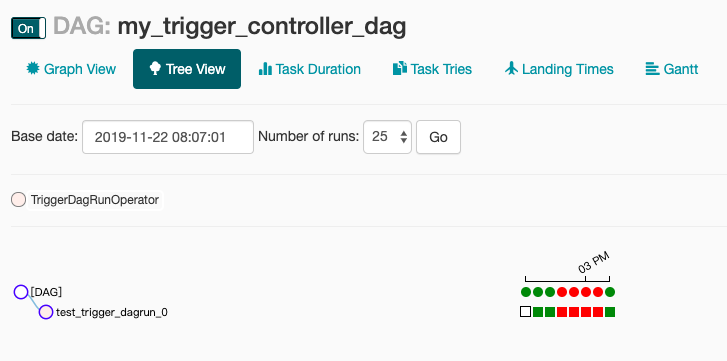
将左侧开关打开,进入触发的DAG,点击触发运行,就可以看到触发测试的结果了。
其中前3次运行时是未启用多层subDAG时的触发测试,测试是通过的。
中间3次是启用多层subDAG嵌套之后进行的触发测试,测试结果未通过。
最后一次是修复代码中触发部分的bug之后,再次触发测试。测试结果通过。
此内容由惯性聚合(RSS阅读器)自动聚合整理,仅供阅读参考。 原文来自 — 版权归原作者所有。