







跨组件传递的内容组件,该组件导出两个对象Provider 提供数据, Consumer, 消费数据
Context被翻译为上下文,在React的官方文档中归类于高级部分,属于React的高级API,但官方并不建议在稳定版的App中使用Context。
优秀的React组件都通过Context来完成自己的功能,比如react-redux的<Provider />,就是通过Context提供一个全局态的store,拖拽组件react-dnd,通过Context在组件中分发DOM的Drag和Drop事件,
路由组件react-router通过Context管理路由状态等等
当你不想在组件树中通过逐层传递 props 或者 state 方法来传递数据时,可以使用Context来实现跨层级的组件数据传递
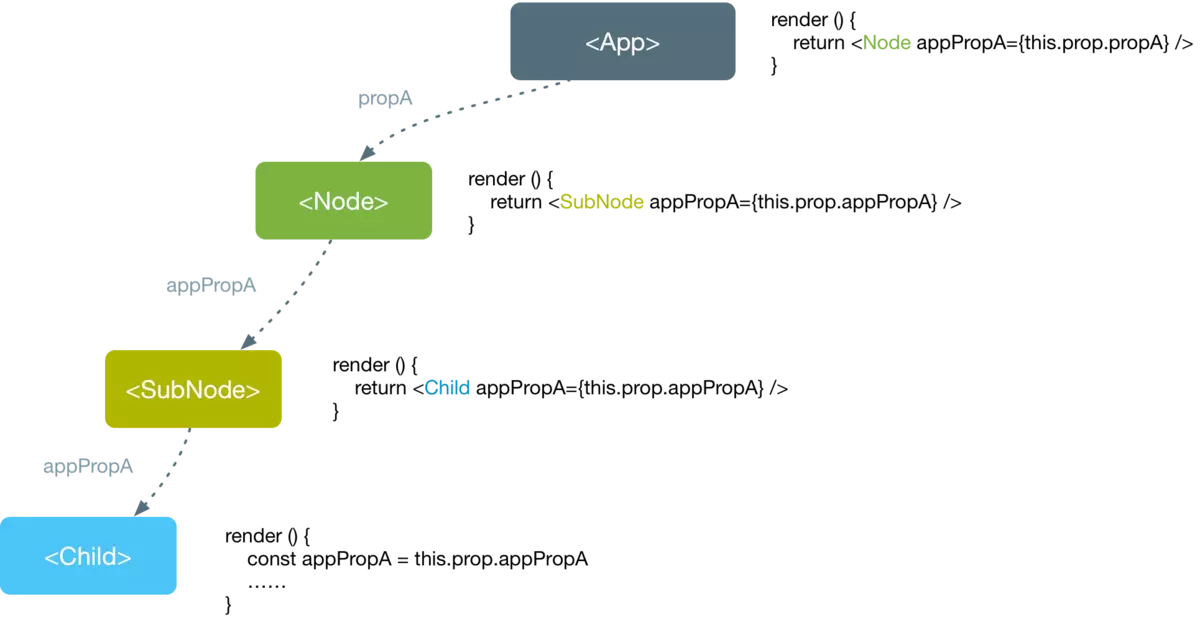
如果要Context发挥作用,需要用到两种组件,一个是Context生产者(Provider),通常是一个父节点,另外是一个Context的消费者(Consumer),通常是一个或者多个子节点。所以Context的使用基于生产者消费者模式。
const ThemeContext = React.createContext('light'); // 创建

class App extends React.Component {
  render() {
    // 使用一个 Provider 来将当前的 theme 传递给以下的组件树。
    // 无论多深,任何组件都能读取这个值。
    return (
      <ThemeContext.Provider value="dark">
        <Toolbar />
      </ThemeContext.Provider>
    );
  }
}

// 中间的组件再也不必指明往下传递 theme 了。
function Toolbar(props) {
  return (
    <div>
      <ThemedText />
    </div>
  );
}

class ThemedText extends React.Component {
  // 指定 contextType 读取当前的 theme context。
  // React 会往上找到最近的 theme Provider,然后使用它的值。
  static contextType = ThemeContext;
  render() {
    return <div>{this.context}</div>;
  }
}
cont MyContext = React.createContext(defaultValue);
创建一个context对象。组件会向组件所处的树中距离最近的那个Provider进行匹配context。
当组件所处的树没有匹配到Provider (不使用Provider组件) 时,defaultValue参数才会生效。
<MyContext.Provider value={/* 值 */}>
每个 Context 对象都会返回一个 Provider React 组件,它允许消费组件订阅 context 的变化。
Provider 接收一个 value 属性,传递给消费组件。一个 Provider 可以和多个消费组件有对应关系。多个 Provider 也可以嵌套使用,里层的会覆盖外层的数据。
当 Provider 的 value 值发生变化时,它内部的所有消费组件都会重新渲染。Provider 及其内部 consumer 组件都不受制于 shouldComponentUpdate 函数,因此当 consumer 组件在其祖先组件退出更新的情况下也能更新。
class MyClass extends React.Component {
  render() {
    let value = this.context;
    /* 基于 MyContext 组件的值进行渲染 */
  }
}
MyClass.contextType = MyContext;

// 或者像上面使用 static 定义静态变量
class MyClass extends React.Component {
  static contextType = MyContext;
  render() {
    let value = this.context;
  }
}
挂载在 class 上的 contextType 属性会被重赋值为一个由 React.createContext() 创建的 Context 对象。这能让你使用 this.context 来消费最近 Context 上的那个值。
注意:
你只通过该 API 订阅单一 context。
你可以使用 public class fields 的 static 这个类属性来初始化你的 contextType。
<MyContext.Consumer>
  {value => /* 基于 context 值进行渲染*/}
</MyContext.Consumer>
这种写法也可以订阅到 context,这需要函数作为子元素,这个函数接收当前的context值。
let { Provider, Consumer } = React.createContext();
<Provider value={this.state.value}>
// ...
</Provider>

<Consumer>
  { state => {
    return <div> // ... </div>
  }}
</Consumer>
但对于多个Context时,这种方法就无法标识是哪一个context,就需要在使用Provider和Consumer组件前调用所属Context。
class App extends React.Component {
  render() {
    return (
      <Provider value={{something: 'something'}}>
        <Toolbar />
      </Provider>
    );
  }
}
解决这个问题,将value 状态提升到父节点的state中:
class App extends React.Component {
  constructor(props) {
    super(props);
    this.state = {
      value: {something: 'something'},
    };
  }

  render() {
    return (
      <Provider value={this.state.value}>
        <Toolbar />
      </Provider>
    );
  }
}
此内容由惯性聚合(RSS阅读器)自动聚合整理,仅供阅读参考。 原文来自 — 版权归原作者所有。