





最近新申请了一台iPhone XR, 测试时发现使用ideviceinstaller命令老是报错:
Jackeys-MacBook-Pro:~ jackey$ ideviceinstaller -u 00008020-xxxxxxxxxxxx -U com.xxxx.xxxxxxxx
ERROR: Invalid UDID specified
Usage: ideviceinstaller OPTIONS
Manage apps on iOS devices.

  -u, --udid UDID    Target specific device by its 40-digit device UDID.
  -l, --list-apps    List apps, possible options:
       -o list_user    - list user apps only (this is the default)
       -o list_system    - list system apps only
       -o list_all    - list all types of apps
       -o xml        - print full output as xml plist
  -i, --install ARCHIVE    Install app from package file specified by ARCHIVE.
                           ARCHIVE can also be a .ipcc file for carrier bundles.
  -U, --uninstall APPID    Uninstall app specified by APPID.
  -g, --upgrade ARCHIVE    Upgrade app from package file specified by ARCHIVE.
  -L, --list-archives    List archived applications, possible options:
       -o xml        - print full output as xml plist
  -a, --archive APPID    Archive app specified by APPID, possible options:
       -o uninstall    - uninstall the package after making an archive
       -o app_only    - archive application data only
       -o docs_only    - archive documents (user data) only
       -o copy=PATH    - copy the app archive to directory PATH when done
       -o remove    - only valid when copy=PATH is used: remove after copy
  -r, --restore APPID    Restore archived app specified by APPID
  -R, --remove-archive APPID  Remove app archive specified by APPID
  -o, --options        Pass additional options to the specified command.
  -h, --help        prints usage information
  -d, --debug        enable communication debugging
提示udid错误, ideviceinstaller只支持40位UDID
看了下ideviceinstaller官方仓库 https://github.com/libimobiledevice/ideviceinstaller
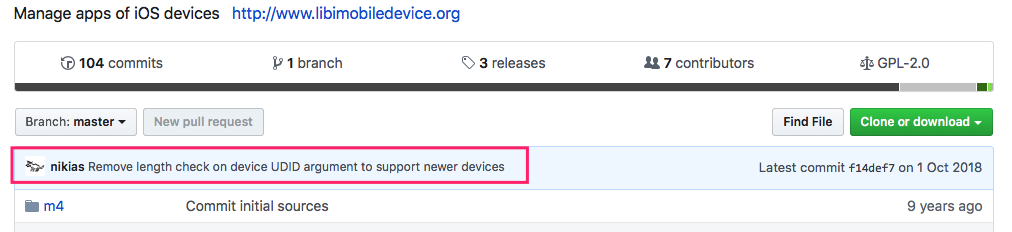
最新的代码已经解决了这个问题, 所以我们需要是用源码安装最新的版本
如果只下载ideviceinstaller源码进行安装的话会提示libimobiledevice版本低了, 所以我们需要把libimobiledevice跟ideviceinstaller都使用最新的源码安装下
以下是操作步骤:
1.如果当前的libimobiledevice跟ideviceinstaller不能正常使用, 可以使用以下方式恢复
brew uninstall --ignore-dependencies libimobiledevice
brew uninstall --ignore-dependencies usbmuxd
brew install --HEAD usbmuxd
brew unlink usbmuxd
brew link usbmuxd
brew install --HEAD libimobiledevice
brew install ideviceinstaller
brew link --overwrite ideviceinstaller
安装过程中可能会提示缺少后一个库, 使用brew install --HEAD ***安装下再重试就可以了; 如果只是提示安装失败就一般再试一次就可以
2.下载libimobiledevice源码
git clone https://github.com/libimobiledevice/libimobiledevice.git
进入libimobiledevice代码路径, 执行
./autogen.sh --disable-openssl
会提示缺少依赖, 使用brew install --HEAD ***安装下再重试
执行
3.下载ideviceinstaller源码
git clone https://github.com/libimobiledevice/ideviceinstaller.git
进入ideviceinstaller代码路径, 执行
./autogen.sh --disable-openssl
make
sudo make install
这样就OK了, 再试试操作手机
Jackeys-MacBook-Pro:ideviceinstaller jackey$ ideviceinstaller -u 00008020-xxxxxxxxxxxxx -U com.xxxxxxx.xxxxxxx
Uninstalling 'com.xxxxxxx.xxxxxxxxx'
Uninstall: RemovingApplication (50%)
Uninstall: GeneratingApplicationMap (90%)
Uninstall: Complete
大功告成
此内容由惯性聚合(RSS阅读器)自动聚合整理,仅供阅读参考。 原文来自 — 版权归原作者所有。