惯性聚合 高效追踪和阅读你感兴趣的博客、新闻、科技资讯
阅读原文 在惯性聚合中打开

推荐订阅源

Microsoft Azure Blog
博客园_首页
Forbes - Security
Forbes - Security
WordPress大学
WordPress大学
P
Proofpoint News Feed
T
Threat Research - Cisco Blogs
L
LINUX DO - 热门话题
L
Lohrmann on Cybersecurity
Spread Privacy
Spread Privacy
D
Darknet – Hacking Tools, Hacker News & Cyber Security
大猫的无限游戏
大猫的无限游戏
博客园 - 三生石上(FineUI控件)
P
Privacy International News Feed
A
About on SuperTechFans
T
Tailwind CSS Blog
I
InfoQ
S
Securelist
云风的 BLOG
云风的 BLOG
罗磊的独立博客
Recent Announcements
T
The Exploit Database - CXSecurity.com
B
Blog RSS Feed
V
Visual Studio Blog
Know Your Adversary
Know Your Adversary
The GitHub Blog
The GitHub Blog
Jina AI
Jina AI
腾讯CDC
Cyberwarzone
Cyberwarzone
有赞技术团队
有赞技术团队
AWS News Blog
AWS News Blog
博客园 - 【当耐特】
cs.AI updates on arXiv.org
F
Full Disclosure
S
Secure Thoughts
博客园 - 司徒正美
J
Java Code Geeks
Y
Y Combinator Blog
Google Online Security Blog
GbyAI
GbyAI
N
News and Events Feed by Topic
Help Net Security
Help Net Security
freeCodeCamp Programming Tutorials: Python, JavaScript, Git & More
Project Zero
Project Zero
T
Tenable Blog
cs.CV updates on arXiv.org
T
Tor Project blog
MyScale Blog
MyScale Blog
Scott Helme
Scott Helme
小众软件
小众软件
K
Kaspersky official blog

博客园 - 子墨老师

基于Hutool的poi导出excel表格【升级更新】 如何设置wps单元格下拉选项设置 Caused by: org.jasypt.exceptions.EncryptionOperationNotPossibleException: Encryption raised an exception ZoomIt的使用与快捷键 springboot项目中使用Java 8的日期时间API 基于springboot系统,如何跟踪会话过期,浏览器会话标识是否收到正常响应,存储,并在后续请求保持携带 SpringBoot+MyBatis实现数据库字段加密 Vue2中能否实现输入中文自动转化为拼音, 且不带音调 Excel导出问题:accessExternalStylesheet 解构赋值+扩展运算符在数组和对象上的应用例子 收藏一下JDK下载地址 介绍几个axios接口请求顺序的问题 vue cli的介绍 如何实现文件批量重命名后再进行批量打包下载 如何能成功在centos7下安装nodejs18+以上版本 centos7下卸载nodejs源码包 基于ConcurrentMap锁机制的NFS文件合并方案 基于ConcurrentMap锁机制的NFS分片上传方案 如何将已经存在的本地项目源码关联到远程git仓库中 gitee如何使用 centos7安装php+wordpress
Failed to start nginx.service: Unit nginx.service not found.
子墨老师 · 2025-10-23 · via 博客园 - 子墨老师

分享一篇nginx安装后,出现:Failed to start nginx.service: Unit nginx.service not found. 我们需要如何解决这个问题

在使用 Nginx 1.26.3 时遇到了 nginx.service找不到的问题。这是因为通过源码编译安装 Nginx 后,systemd 没有对应的服务单元文件。别担心,我们可以手动创建一个

1.创建服务文件

使用vi编辑器在 systemd 的系统目录中创建服务文件。通常建议放在 /etc/systemd/system/目录下

sudo vi /etc/systemd/system/nginx.service

2.编写服务配置

将以下内容复制到文件中。​请务必将路径 /usr/local/nginx/全部替换为您实际的 Nginx 安装路径 /usr/local/nginx-1.26.3/

[Unit]
Description=The NGINX HTTP and reverse proxy server
After=network.target
[Service]
Type=forking
PIDFile=/usr/local/nginx-1.26.3/logs/nginx.pid
ExecStartPre=/usr/local/nginx-1.26.3/sbin/nginx -t
ExecStart=/usr/local/nginx-1.26.3/sbin/nginx
ExecReload=/usr/local/nginx-1.26.3/sbin/nginx -s reload
ExecStop=/usr/local/nginx-1.26.3/sbin/nginx -s stop
PrivateTmp=true
[Install]
WantedBy=multi-user.target

关键提示​:请仔细核对并确保 PIDFileExecStartPreExecStartExecReloadExecStop的路径都正确指向您的 Nginx 安装路径 /usr/local/nginx-1.26.3

ExecStartPre参数用于在启动前测试配置文件语法,能帮助提前发现配置错误

3.重新加载systemd配置

创建文件后,必须让 systemd 重新加载配置,以识别这个新服务

sudo systemctl daemon-reload

4.启动并验证Nginx服务

sudo systemctl start nginx

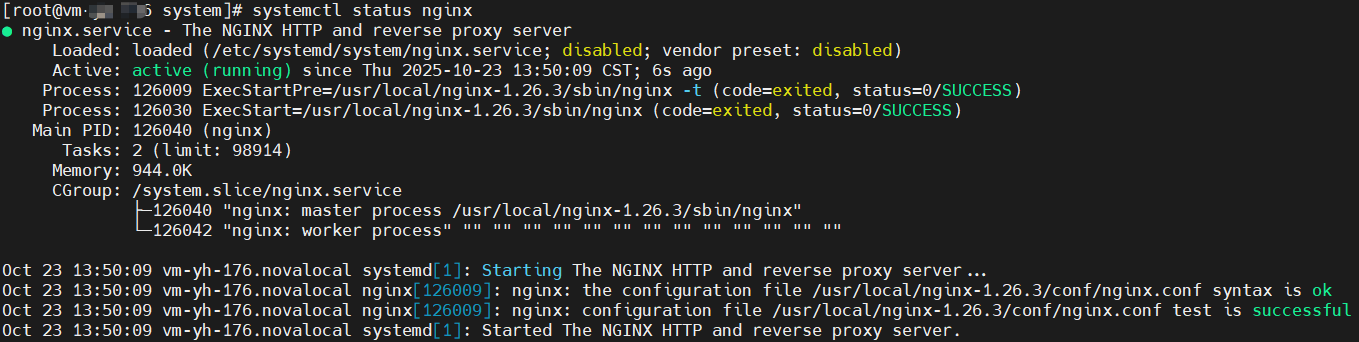
检查服务状态

sudo systemctl status nginx

Snipaste_2025-10-23_14-23-22

5.设置开机自启动

sudo systemctl enable nginx

Snipaste_2025-10-23_17-00-43

检查确认开机自启是否已成功启用

sudo systemctl is-enabled nginx

Snipaste_2025-10-23_14-25-03