惯性聚合 高效追踪和阅读你感兴趣的博客、新闻、科技资讯
阅读原文 在惯性聚合中打开

推荐订阅源

P
Palo Alto Networks Blog
大猫的无限游戏
大猫的无限游戏
Martin Fowler
Martin Fowler
GbyAI
GbyAI
CTFtime.org: upcoming CTF events
量子位
T
The Blog of Author Tim Ferriss
Y
Y Combinator Blog
Microsoft Azure Blog
C
CERT Recently Published Vulnerability Notes
Recent Announcements
A
About on SuperTechFans
aimingoo的专栏
aimingoo的专栏
P
Privacy International News Feed
cs.CL updates on arXiv.org
博客园 - 叶小钗
L
Lohrmann on Cybersecurity
G
GRAHAM CLULEY
T
The Exploit Database - CXSecurity.com
Hugging Face - Blog
Hugging Face - Blog
P
Proofpoint News Feed
NISL@THU
NISL@THU
博客园 - Franky
C
Cybersecurity and Infrastructure Security Agency CISA
The Register - Security
M
MIT News - Artificial intelligence
Know Your Adversary
Know Your Adversary
A
Arctic Wolf
F
Full Disclosure
T
Threat Research - Cisco Blogs
P
Privacy & Cybersecurity Law Blog
The Hacker News
The Hacker News
博客园 - 【当耐特】
D
Docker
T
Tailwind CSS Blog
S
SegmentFault 最新的问题
Cyber Security Advisories - MS-ISAC
Jina AI
Jina AI
Help Net Security
Help Net Security
V
Visual Studio Blog
小众软件
小众软件
B
Blog
Vercel News
Vercel News
云风的 BLOG
云风的 BLOG
N
News and Events Feed by Topic
Forbes - Security
Forbes - Security
N
Netflix TechBlog - Medium
让小产品的独立变现更简单 - ezindie.com
C
Cisco Blogs
Security Archives - TechRepublic

博客园 - 子墨老师

基于Hutool的poi导出excel表格【升级更新】 如何设置wps单元格下拉选项设置 Caused by: org.jasypt.exceptions.EncryptionOperationNotPossibleException: Encryption raised an exception ZoomIt的使用与快捷键 springboot项目中使用Java 8的日期时间API 基于springboot系统,如何跟踪会话过期,浏览器会话标识是否收到正常响应,存储,并在后续请求保持携带 SpringBoot+MyBatis实现数据库字段加密 Vue2中能否实现输入中文自动转化为拼音, 且不带音调 Excel导出问题:accessExternalStylesheet 解构赋值+扩展运算符在数组和对象上的应用例子 收藏一下JDK下载地址 介绍几个axios接口请求顺序的问题 vue cli的介绍 Failed to start nginx.service: Unit nginx.service not found. 如何实现文件批量重命名后再进行批量打包下载 centos7下卸载nodejs源码包 基于ConcurrentMap锁机制的NFS文件合并方案 基于ConcurrentMap锁机制的NFS分片上传方案 如何将已经存在的本地项目源码关联到远程git仓库中 gitee如何使用 centos7安装php+wordpress
如何能成功在centos7下安装nodejs18+以上版本
子墨老师 · 2025-08-20 · via 博客园 - 子墨老师

在centos7系统下安装nodejs18+以上版本会出现如下的问题,这些问题是因为操作系统版本低,无法正常支持18+高版本的nodejs

今天分享一下node-v20.18.0-linux-x64.tar.gz怎么能成功安装成功。关于nodejs源码包的安装这里我们就不在叙述,我们前面有文章的介绍,大家可以查看:centos7下安装nodejs-v16.x - 子墨老师 - 博客园

当node-v20.18.0-linux-x64.tar.gz安装后,我们需要通过命令去验证一下node, npm版本,就会出现如下的错误

[root@localhost nodejs]# node -v
node: /lib64/libm.so.6: version `GLIBC_2.27' not found (required by node)
node: /lib64/libstdc++.so.6: version `GLIBCXX_3.4.20' not found (required by node)
node: /lib64/libstdc++.so.6: version `CXXABI_1.3.9' not found (required by node)
node: /lib64/libstdc++.so.6: version `GLIBCXX_3.4.21' not found (required by node)
node: /lib64/libc.so.6: version `GLIBC_2.28' not found (required by node)
node: /lib64/libc.so.6: version `GLIBC_2.25' not found (required by node)

解决流程:

  1. 升级gcc与make
  2. 更新libstdc++.so.6.0.26
  3. 更新glibc

后面有关系统的补丁(镜像地址,大家统一使用阿里的镜像源):gnu-glibc安装包下载_开源镜像站-阿里云

详细步骤:

升级gcc与make

1.gcc升级

# 升级GCC(默认为4 升级为8)
yum install -y centos-release-scl bison
yum install -y devtoolset-8-gcc* # 这一步特别重要
ln -s /opt/rh/devtoolset-8/root/bin/gcc /usr/bin/gcc
ln -s /opt/rh/devtoolset-8/root/bin/g++ /usr/bin/g++

但是,当我们执行yum install -y devtoolset-8-gcc*,系统就会提示错误

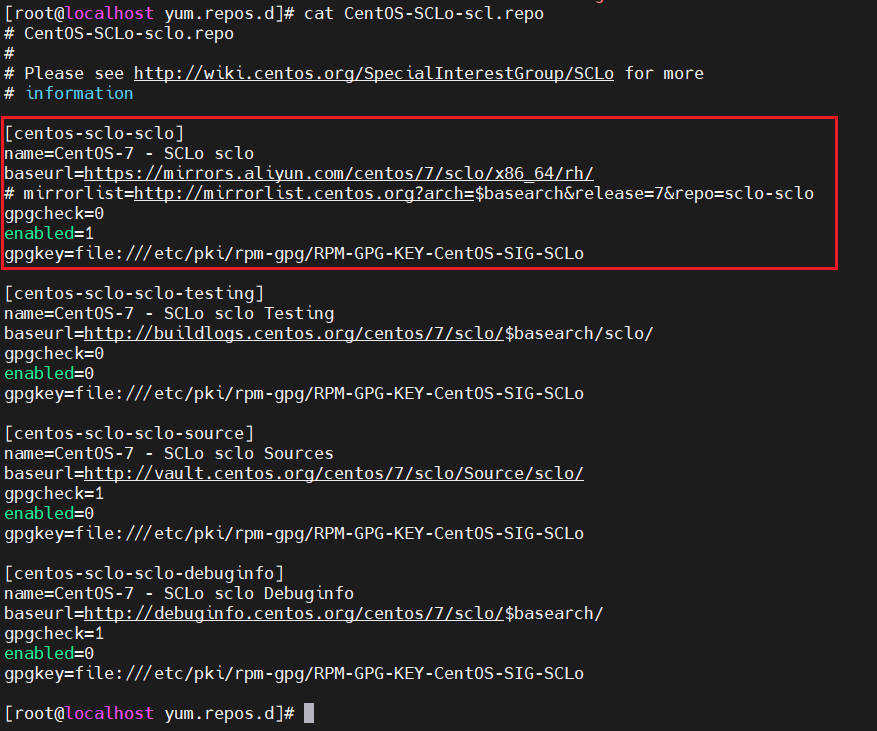
修改方案如下:

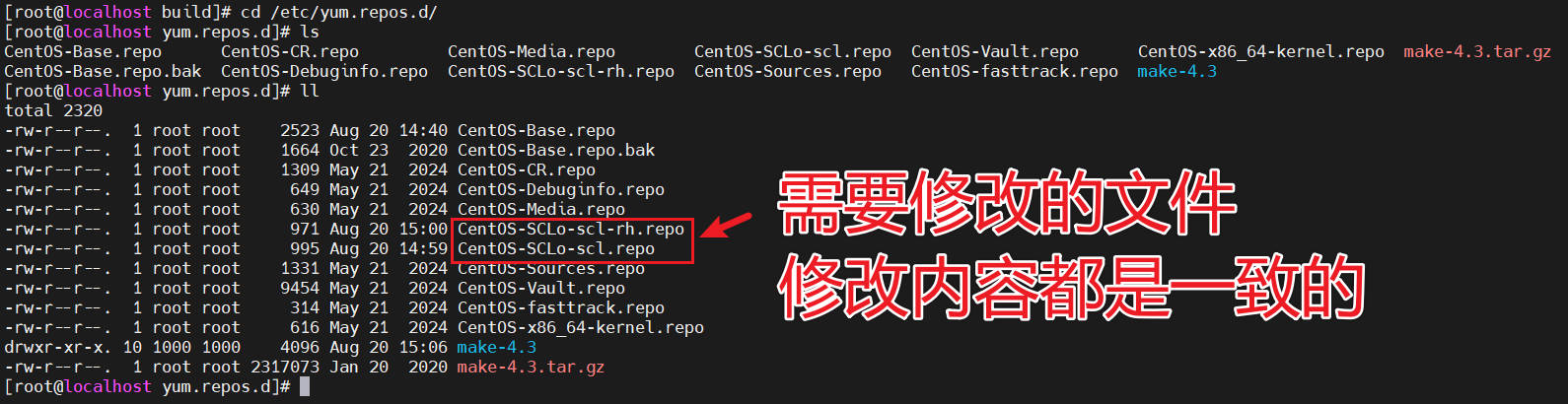
进入到系统yum源

cd /etc/yum.repos.d/
Snipaste_2025-08-20_16-30-17

需要修改的内容,如下

baseurl=https://mirrors.aliyun.com/centos/7/sclo/x86_64/rh/ 和 gpgcheck=0

大家参考我电脑里面的配置,如下图

Snipaste_2025-08-20_16-32-45

配置好以后,再去尝试:yum install -y devtoolset-8-gcc*,就没有问题

2.make升级

# 升级 make(默认为3 升级为4)
wget https://mirrors.aliyun.com/gnu/make/make-4.3.tar.gz
tar -xzvf make-4.3.tar.gz && cd make-4.3/
./configure  --prefix=/usr/local/make
make && make install
cd /usr/bin/ && mv make make.bak
ln -sv /usr/local/make/bin/make /usr/bin/make

 更新libstdc++.so.6.0.26

# 更新lib libstdc++.so.6.0.26
wget http://cdn.frostbelt.cn/software/libstdc%2B%2B.so.6.0.26
# 替换系统中的/usr/lib64
cp libstdc++.so.6.0.26 /usr/lib64/
cd /usr/lib64/
ln -snf ./libstdc++.so.6.0.26 libstdc++.so.6

更新glibc

推荐先升级一下如下内容

1.通过 yum安装最新版 Bison

sudo yum install -y bison

2.若后续仍报类似错误(如 flexpython缺失),同步安装

sudo yum install -y flex python3

3.再执行如下命令

wget https://mirrors.aliyun.com/gnu/glibc/glibc-2.28.tar.gz
tar xf glibc-2.28.tar.gz 
cd glibc-2.28/ && mkdir build  && cd build
../configure --prefix=/usr --disable-profile --enable-add-ons --with-headers=/usr/include --with-binutils=/usr/bin
make && make install