





在winform中读取文件信息时,突然抛出了FileNotFoundException的异常,但是本地是有这个文件的。
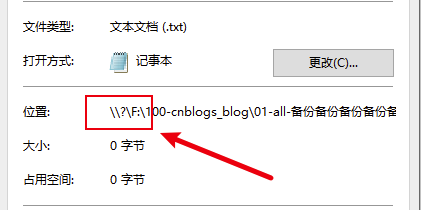
随后找到了这个文件,查看属性,[位置]属性,多了"\?"的前缀,百度得知这是windows对长路经的处理。
需要注意:
目前在NetFx框架下,才有这个问题。
在NetCore框架下,是正常运行。
static void Test02()
{
	List<string> dirList = new List<string>()
	{
		"F:\\100-cnblogs_blog",
		"01-all-备份备份备份备份备份备份备份",
		"02-html-备份备份备份备份备份备份备份",
		"03-bak-备份备份备份备份备份备份备份",
		"04-file-备份备份备份备份备份备份备份",
	};
	string basePath = Path.Combine(dirList.ToArray());
	if (Directory.Exists(basePath) == false)
		Directory.CreateDirectory(basePath);
	//假设有这2个文件
	//这个文件是正常=>1.txt
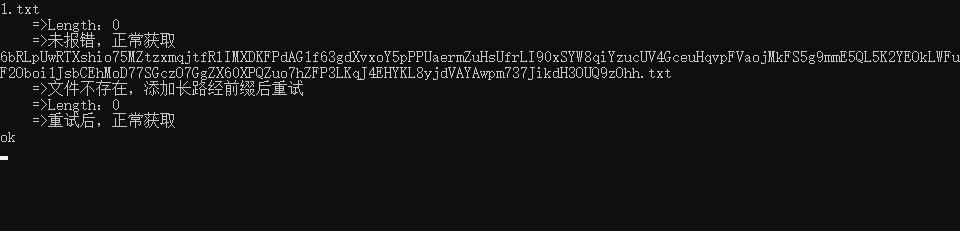
	//这个文件会报错=>6bRLpUwRTXshio75MZtzxmqjtfRlIMXDKFPdAG1f63gdXvxoY5pPPUaermZuHsUfrLI90xSYW8qiYzucUV4GceuHqvpFVaojMkFS5g9mmE5QL5K2YEOkLWFuF2Oboi1JsbCEhMoD77SGczO7GgZX60XPQZuo7hZFP3LKqJ4EHYKL8yjdVAYAwpm737JikdH3OUQ9zOhh.txt
	var files = Directory.GetFiles(basePath, "*.*", SearchOption.AllDirectories);
	foreach (var item in files)
	{
		string fullName = item;
		FileInfo fileInfo = new FileInfo(fullName);
		Console.WriteLine(fileInfo.Name);
		string pre = "    =>";
		bool retry = false;
		try
		{
			Console.WriteLine(pre + "Length:" + fileInfo.Length);
			Console.WriteLine(pre + "未报错,正常获取");
		}
		catch (FileNotFoundException)
		{
			fullName = @"\\?\" + fullName;
			retry = true;
			Console.WriteLine(pre + "文件不存在,添加长路经前缀后重试");
		}
		if (retry)
		{
			fileInfo = new FileInfo(fullName);
			try
			{
				Console.WriteLine(pre + "Length:" + fileInfo.Length);
				Console.WriteLine(pre + "重试后,正常获取");
			}
			catch (Exception ex)
			{
				Console.WriteLine(pre + "重试仍然报错");
				Console.WriteLine(ex.Message);
			}
		}
	}
}
先是考虑了捕获异常再重试的思路,但是在可预知的情况不应该使用trycatch方式处理问题。
所以采用了判断文件是否存在的方式
static void Test03()
{
	List<string> dirList = new List<string>()
	{
		"F:\\100-cnblogs_blog",
		"01-all-备份备份备份备份备份备份备份",
		"02-html-备份备份备份备份备份备份备份",
		"03-bak-备份备份备份备份备份备份备份",
		"04-file-备份备份备份备份备份备份备份",
	};
	string basePath = Path.Combine(dirList.ToArray());
	if (Directory.Exists(basePath) == false)
		Directory.CreateDirectory(basePath);
	var files = Directory.GetFiles(basePath, "*.*", SearchOption.AllDirectories);
	foreach (var item in files)
	{
		string fullName = item;
		if (File.Exists(fullName) == false)
			fullName = @"\\?\" + fullName;
		FileInfo fileInfo = new FileInfo(fullName);
		Console.WriteLine(fileInfo.Name);
		string pre = "    =>";
		Console.WriteLine(pre + "Length:" + fileInfo.Length);
	}
}

此内容由惯性聚合(RSS阅读器)自动聚合整理,仅供阅读参考。 原文来自 — 版权归原作者所有。