


UI皮肤 Material.Avalonia具体内容可以点进去看
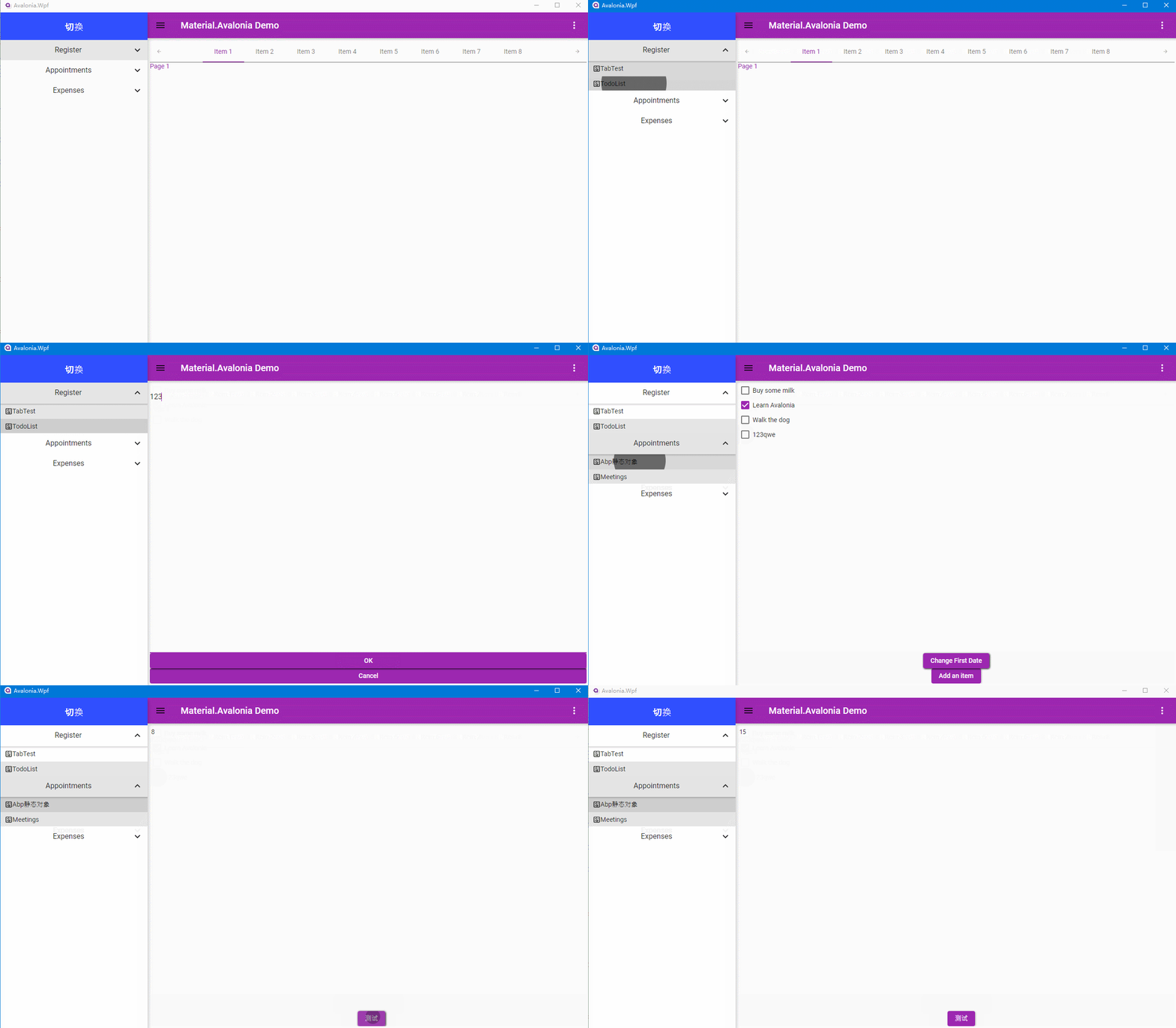
示例地址 由于module目录下有些类库非直接引用到启动项需要生成整个解决方案后运行。
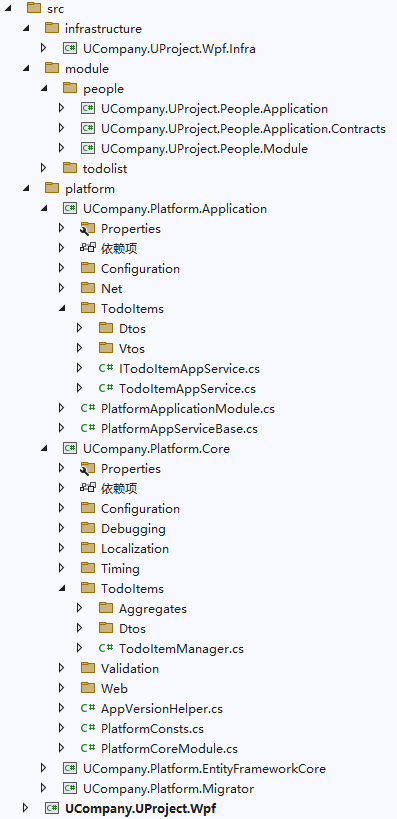
通过ConfigurationBuilder读取配置信息
var builder = new ConfigurationBuilder()
    .SetBasePath(AppDomain.CurrentDomain.BaseDirectory)
    .AddJsonFile("appsettings.json", optional: false, reloadOnChange: true)
    .AddUserSecrets(typeof(App).Assembly);

Configuration.DefaultNameOrConnectionString = builder.Build().GetConnectionString("Default");
添加UserSecrets启动项csproj文件PropertyGroup节点中会多出如下配置
<UserSecretsId>2f1ac190-35e0-4261-828d-f28c3b746de9</UserSecretsId>
本示例中使用abp版本7.3.0
var services = new ServiceCollection();
            services.CreateSeriLog(builder.Build())
                .UseSeriLog(SerilogCreatorExtensions.logger);
            IocManager.IocContainer.AddFacility<LoggingFacility>(f => f.LogUsing(new SerilogFactory(SerilogCreatorExtensions.logger)));

WindsorRegistrationHelper.CreateServiceProvider(IocManager.IocContainer, services);
使用到EF部分需要记录日志将IOC中SerilogFactory替换原有Microsoft.Extensions.Logging.ILoggerFactory
        Configuration.Modules.AbpEfCore().AddDbContext<PlatformDbContext>(options =>
        {
#if DEBUG
            var loggerFactory = IocManager.IocContainer.Resolve<ILoggerFactory>();
                options.DbContextOptions.UseLoggerFactory(loggerFactory);
                options.DbContextOptions.EnableSensitiveDataLogging(); // 记录SQL的参数值
#endif
            //...
        });
SerilogCreatorExtensions
public static class SerilogCreatorExtensions
{
    public static Serilog.ILogger logger;
    public static Serilog.Core.Logger CreateSerilog(this IConfigurationRoot configuration)
    {
        return BuildSerilogConfiguration(configuration).CreateLogger();
    }
    private static LoggerConfiguration BuildSerilogConfiguration(IConfiguration configuration)
    {
        // 默认读取 configuration 中 "Serilog" 节点下的配置
        var loggerConfiguration = new LoggerConfiguration();
        SetSerilogConfiguration(loggerConfiguration, configuration);
        return loggerConfiguration;
    }
    public static void SetSerilogConfiguration(LoggerConfiguration loggerConfiguration, IConfiguration configuration)
    {
        // 默认读取 configuration 中 "Serilog" 节点下的配置
        loggerConfiguration.ReadFrom.Configuration(configuration)
            .Enrich.WithExceptionDetails()
            .Enrich.WithExceptionDetails(new DestructuringOptionsBuilder()
                .WithDefaultDestructurers()
                .WithDestructurers(new[] { new DbUpdateExceptionDestructurer() })
            )
            .Enrich.FromLogContext()
            .MinimumLevel.Debug()//最小记录级别
            .WriteTo.Console();
        var logPath = System.IO.Path.Combine(AppDomain.CurrentDomain.BaseDirectory,"Logs", "logs.txt");
        loggerConfiguration.WriteTo.File(logPath, rollingInterval: RollingInterval.Day, shared: true);
    }
    public static IServiceCollection CreateSeriLog(this IServiceCollection collection, IConfigurationRoot configuration)
    {
        if (logger == null)
        {
            logger = BuildSerilogConfiguration(configuration).CreateLogger();
        }
        return collection;
    }

    public static IServiceCollection UseSeriLog(this IServiceCollection collection, Serilog.ILogger logger = null,
        bool dispose = false, LoggerProviderCollection providers = null)
    {
        if (providers != null)
        {
            collection.AddSingleton<ILoggerFactory>(services =>
            {
                var factory = new SerilogLoggerFactory(logger, dispose, providers);

                foreach (var provider in services.GetServices<ILoggerProvider>())
                    factory.AddProvider(provider);

                return factory;
            });
        }
        else
        {
            collection.AddSingleton<ILoggerFactory>(services => new SerilogLoggerFactory(logger, dispose));
        }
        ConfigureServices(collection, logger);

        return collection;
    }

    static void ConfigureServices(IServiceCollection collection, Serilog.ILogger logger)
    {
        if (collection == null) throw new ArgumentNullException(nameof(collection));

        if (logger != null)
        {
            collection.AddSingleton(logger);
        }
    }
}
appsettings.json配置
{
  "Serilog": {
    "MinimumLevel": {
      "Default": "Debug",
      "Override": {
        "Microsoft": "Information",
        "System": "Information"
      }
    }
  },
  "ConnectionStrings": {
    "Default": "Data Source=192.168.1.1;Database=avawpf;uid=root;pwd=root;charset=utf8mb4;Allow User Variables=true;"
  }
}
Abp模块加载
protected void OnStartup()
{
    Stopwatch watch = new Stopwatch();
    watch.Start();
    //var path = Path.Combine(AppDomain.CurrentDomain.BaseDirectory, @"\xx-path");
    //_bootstrapper.PlugInSources.AddFolder(path);
    _bootstrapper.Initialize();
    watch.Stop();
    TimeSpan timeSpan = watch.Elapsed;
    Console.WriteLine("执行时间:{0}(毫秒)", timeSpan.TotalMilliseconds);
}
加载耗时

ViewModel中调用AppService
本来是打算弄一个Prism.CastleWindsor扩展就能统一IOC容器,但是使用后有些prism的Factory相关类型注入存在问题(纯属本人对Castle.Windsor使用上没有弄透彻)

最后暂时通过IocManager获取IOC实例,由于Prims(Prism.DryIoc.Avalonia)与Abp(Castle.Windsor)中使用IOC不一样故使用如下方式。
private readonly ITodoItemAppService _todoItemAppService = IocManager.Instance.Resolve<ITodoItemAppService>();
如果需要使用job也可以借助Quartz实现
基本和原先prism使用基本上没什么区别
App.xaml.cs
public class App : PrismApplication
{
    public static bool IsSingleViewLifetime =>
        Environment.GetCommandLineArgs()
            .Any(a => a == "--fbdev" || a == "--drm");

    public static AppBuilder BuildAvaloniaApp() =>
        AppBuilder
            .Configure<App>()
            .UsePlatformDetect();

    public override void Initialize()
    {
        AvaloniaXamlLoader.Load(this);
        base.Initialize();              // <-- Required
    }

    protected override void RegisterTypes(IContainerRegistry containerRegistry)
    {
        // Register Services
        // Views - Generic
        // Views - Region Navigation
    }

    protected override AvaloniaObject CreateShell()
    {
        if (IsSingleViewLifetime)
            return Container.Resolve<MainControl>(); // For Linux Framebuffer or DRM
        else
            return Container.Resolve<MainWindow>();
    }

    protected override void ConfigureModuleCatalog(IModuleCatalog moduleCatalog)
    {
        // Register modules
    }

    /// <summary>Called after <seealso cref="Initialize"/>.</summary>
    protected override void OnInitialized()
    {
      // Register initial Views to Region.
    }
}
此内容由惯性聚合(RSS阅读器)自动聚合整理,仅供阅读参考。 原文来自 — 版权归原作者所有。