








git stack 是一种 堆叠式分支管理(Stacked Branch Management)工作流工具,它的核心思想是: 把多个有依赖关系的功能分支像“积木”一样堆叠起来,按顺序开发、审查和合并,而不是一次性在一个大分支里完成所有改动。
https://www.stacking.dev/
https://graphite.dev/blog/stacked-prs
https://graphite.dev/blog/the-ideal-pr-is-50-lines-long
https://graphite.dev/blog/how-large-prs-slow-down-development
https://andrewlock.net/working-with-stacked-branches-in-git-part-1/
https://andrewlock.net/working-with-stacked-branches-in-git-part-2/
gitGraph commit id: "M0" branch feature/base commit id: "base1" commit id: "base2" branch feature/middle commit id: "middle1" branch feature/top commit id: "top1" commit id: "top2" checkout main commit id: "M1"
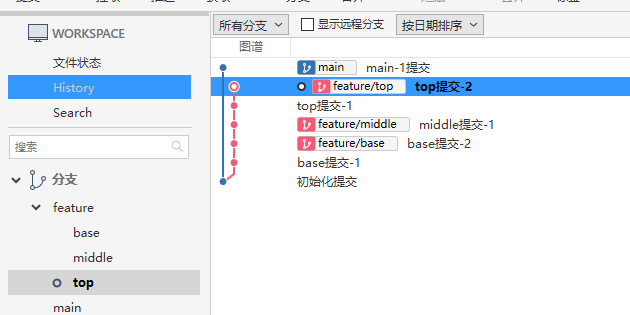
$ git checkout feature/top
Already on 'feature/top'
$ git rebase main --update-refs
Successfully rebased and updated refs/heads/feature/top.
Updated the following refs with --update-refs:
        refs/heads/feature/base
        refs/heads/feature/middle
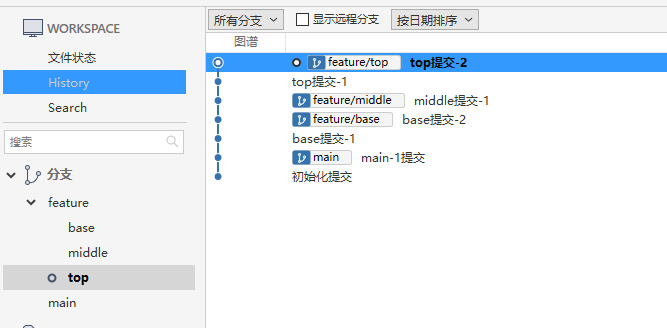
# M0
chcp 65001
mkdir Test
cd Test
git init -b main
echo 初始化内容 > init.txt
git add .
git commit -m "初始化提交"

# base1
chcp 65001
cd Test
git checkout main
git checkout -b feature/base
echo base内容-1 > base.txt
git add .
git commit -m "base提交-1"

# middle1
chcp 65001
cd Test
git checkout feature/base
git checkout -b feature/middle
echo middle内容-1 > middle.txt
git add .
git commit -m "middle提交-1"

# top1
chcp 65001
cd Test
git checkout feature/middle
git checkout -b feature/top
echo top内容-1 > top.txt
git add .
git commit -m "top提交-1"

# top2
chcp 65001
cd Test
git checkout feature/top
echo top内容-2 >> top.txt
git add .
git commit -m "top提交-2"

# base2
chcp 65001
cd Test
git checkout feature/base
echo base内容-2 >> base.txt
git add .
git commit -m "base提交-2"

# M1
chcp 65001
cd Test
git checkout main
echo main-1 >> init.txt
git add .
git commit -m "main-1提交"
gitGraph commit id: "M0" branch feature/base commit id: "base1" branch feature/middle commit id: "middle1" branch feature/top commit id: "top1" commit id: "top2" checkout feature/base commit id: "base2" checkout main commit id: "M1"
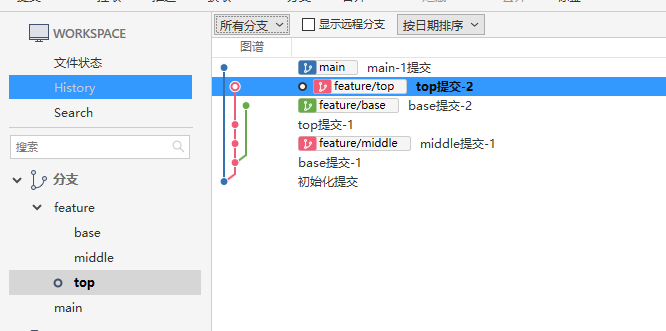
$ git checkout feature/top
Already on 'feature/top'
$ git rebase main --update-refs
Successfully rebased and updated refs/heads/feature/top.
Updated the following refs with --update-refs:
        refs/heads/feature/middle
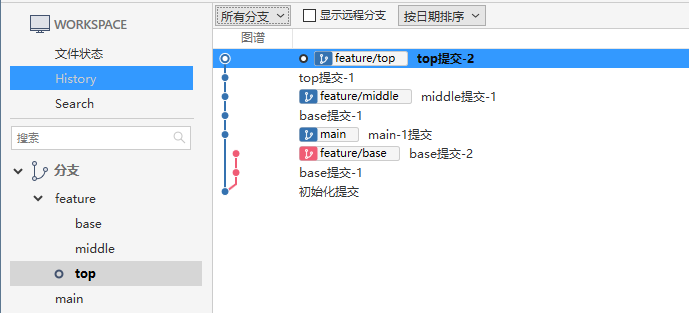
$ git checkout feature/base
Switched to branch 'feature/base'
$ git rebase main --update-refs
Successfully rebased and updated refs/heads/feature/base.
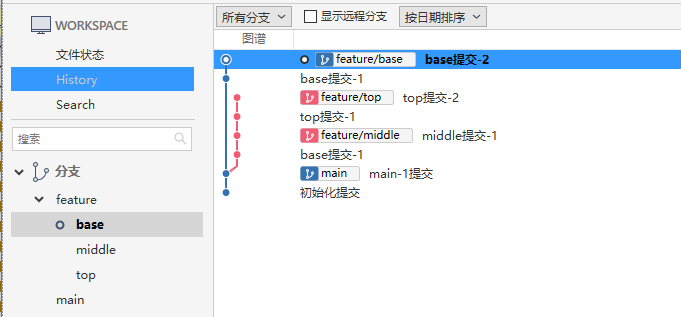
$ git checkout feature/top
Already on 'feature/top'
$ git rebase feature/base --update-refs
warning: skipped previously applied commit 935fa8b
hint: use --reapply-cherry-picks to include skipped commits
hint: Disable this message with "git config advice.skippedCherryPicks false"
Successfully rebased and updated refs/heads/feature/top.
Updated the following refs with --update-refs:
        refs/heads/feature/middle
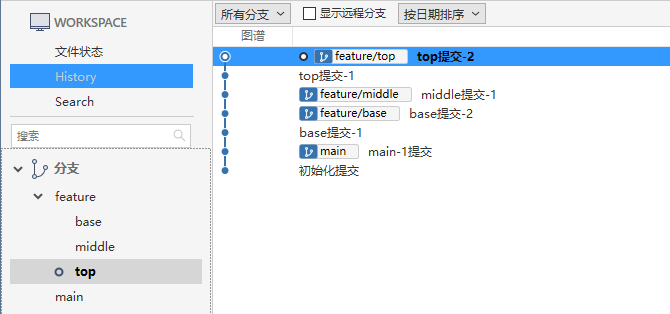
#解决冲突继续rebase
git rebase --continue
#终止rebase
git rebase --abort

#设置默认启用--update-refs
git config --global --add --bool rebase.updateRefs true
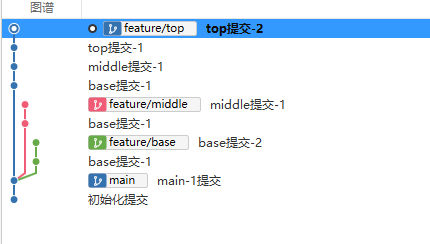
base、middle、top合并完成效果
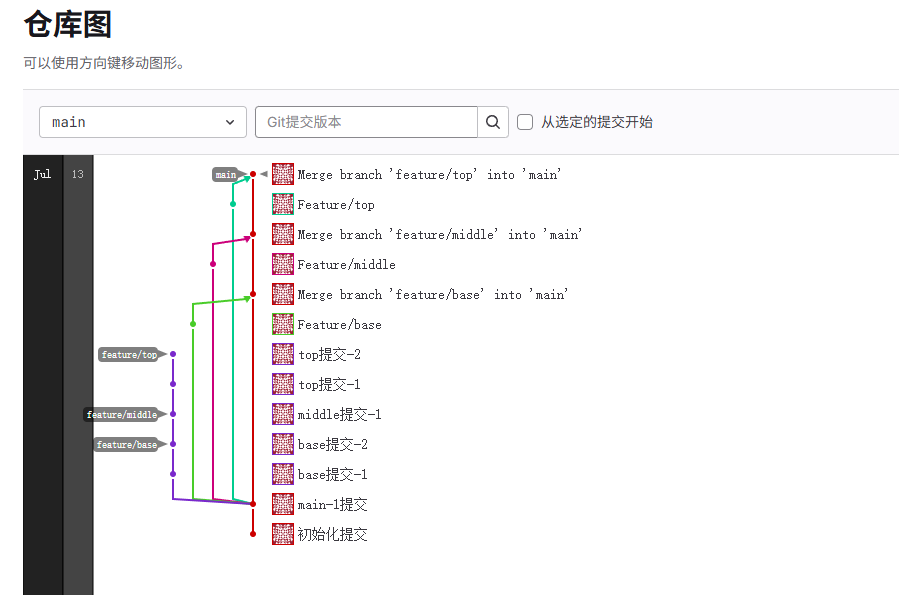
--update-refs 是 Git 在 2.38 版本中引入的新选项
git default-branch 默认分支
git merge-base-origin 获取当前分支与默认分支最近共同祖先
git stack 查看当前分支堆叠
git push-stack 推送所在分支及堆叠上游分支
在 C:\Users\UserName\.gitconfig 文件中添加
[alias]
	default-branch = "!git symbolic-ref refs/remotes/origin/HEAD | sed 's@^refs/remotes/origin/@@'"
	merge-base-origin ="!f() { git merge-base ${1-HEAD} origin/$(git default-branch); };f "
	stack = "!f() { \
		BRANCH=${1-HEAD}; \
		MERGE_BASE=$(git merge-base-origin $BRANCH); \
		git log --decorate-refs=refs/heads --simplify-by-decoration --pretty=format:\"%(decorate:prefix=,suffix=,tag=,separator=%n)\" $MERGE_BASE..$BRANCH; \
	};f "
	push-stack = "!f() { \
		BRANCH=${1-HEAD}; \
		git stack $BRANCH | xargs -I {} git push --force-with-lease origin {}; \
	};f "
https://github.com/abhinav/git-spice
下载gs命令解压后把gs.exe拷贝到 C:\Program Files\Git\cmd 目录
https://abhinav.github.io/git-spice/setup/auth/#gitlab-self-hosted
# 自托管设置
git config spice.forge.gitlab.url https://gitlab.example.com

# gitlab 用户设置 -> 访问令牌 -> 添加新token 后auth
gs auth login
https://abhinav.github.io/git-spice/start/stack/
https://abhinav.github.io/git-spice/start/submit/
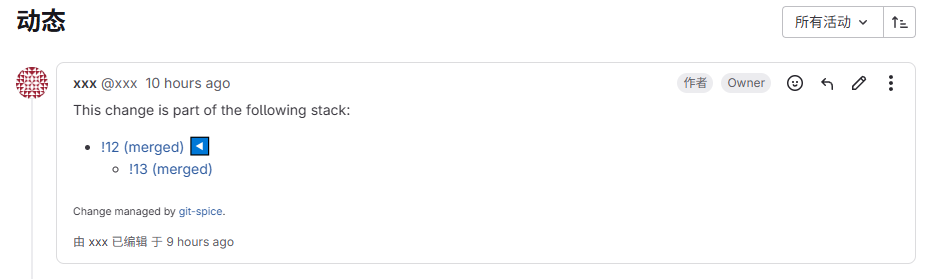
gs branch submit 到远端效果
此内容由惯性聚合(RSS阅读器)自动聚合整理,仅供阅读参考。 原文来自 — 版权归原作者所有。