


本系列汇总,请查看这里:https://www.cnblogs.com/uncleyong/p/19503695
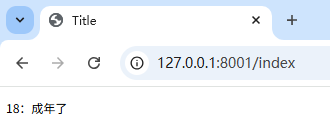
jinja2中的if语句类似与Python的if语句,它也具有单分⽀,多分⽀等多种结构,不同的是,条件语句不需要使⽤冒号结尾,⽽结束控制语句,需要使⽤endif关键字。
index.html
<!DOCTYPE html>
<html lang="en">
<head>
    <meta charset="UTF-8">
    <title>Title</title>
</head>
<body>
{% if age >= 18 %}

<p>{{age}}:成年了</p>

{% else %}

<p>{{age}}:未成年</p>

{% endif %}


</body>
</html>
test_jinja2.py
import uvicorn
from fastapi import FastAPI, Request
from fastapi.templating import Jinja2Templates

app = FastAPI()

templates = Jinja2Templates(directory="templates")  # 实例化Jinja2对象,并将文件夹路径设置为以templates命令的文件夹


@app.get("/index")
def index(request: Request):  # TemplateResponse要求上下文包含Request类型的对象,这里需要传入
    age = 18

    return templates.TemplateResponse(
        "index.html",  # 模板文件
        {
            "age": age,
            "request": request,  # TemplateResponse要求上下文(context)中必须包含 "request" 键,value是Request类型对象
        },  # context上下文对象,一个字典
    )


if __name__ == '__main__':
    uvicorn.run("test_jinja2:app", port=8001, reload=True)
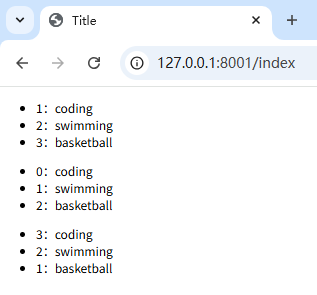
jinja2中的for循环⽤于迭代Python的数据类型,包括列表,元组和字典。在jinja2中不存在while循环。
index.html
<!DOCTYPE html>
<html lang="en">
<head>
    <meta charset="UTF-8">
    <title>Title</title>
</head>
<body>


<!--使用 loop.index(从 1 开始-->
<ul>
    {% for hobby in hobbies %}
    <li>{{ loop.index }}:{{hobby}}</li>
    {% endfor %}
</ul>

<!--使用 loop.index0(从 0 开始)-->
<ul>
    {% for hobby in hobbies %}
    <li>{{ loop.index0 }}:{{hobby}}</li>
    {% endfor %}
</ul>

<!--使用 loop.revindex(倒序)-->
<ul>
    {% for hobby in hobbies %}
    <li>{{ loop.revindex }}:{{hobby}}</li>
    {% endfor %}
</ul>


</body>
</html>
test_jinja2.py
import uvicorn
from fastapi import FastAPI, Request
from fastapi.templating import Jinja2Templates

app = FastAPI()

templates = Jinja2Templates(directory="templates")  # 实例化Jinja2对象,并将文件夹路径设置为以templates命令的文件夹


@app.get("/index")
def index(request: Request):  # TemplateResponse要求上下文包含Request类型的对象,这里需要传入
    hobbies = ["coding", "swimming", "basketball"]

    return templates.TemplateResponse(
        "index.html",  # 模板文件
        {
            "hobbies": hobbies,
            "request": request,  # TemplateResponse要求上下文(context)中必须包含 "request" 键,value是Request类型对象
        },  # context上下文对象,一个字典
    )


if __name__ == '__main__':
    uvicorn.run("test_jinja2:app", port=8001, reload=True)
结果
index.html
<!DOCTYPE html>
<html lang="en">
<head>
    <meta charset="UTF-8">
    <title>Title</title>
</head>
<body>
{% if age >= 18 %}
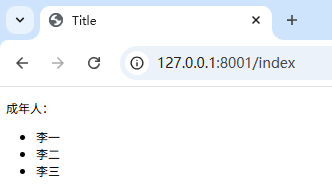
<p>成年人:</p>
<ul>
    {%for name in person.adults%}
    <li>{{name}}</li>
    {% endfor %}
</ul>

{% else %}
<p>未成年人:</p>
<ul>
    {%for name in person.minors%}
    <li>{{name}}</li>
    {% endfor %}
</ul>

{% endif %}


</body>
</html>
test_jinja2.py
import uvicorn
from fastapi import FastAPI, Request
from fastapi.templating import Jinja2Templates

app = FastAPI()

templates = Jinja2Templates(directory="templates")  # 实例化Jinja2对象,并将文件夹路径设置为以templates命令的文件夹


@app.get("/index")
def index(request: Request):  # TemplateResponse要求上下文包含Request类型的对象,这里需要传入
    age = 18
    person = {"adults": ["李一", "李二", "李三"], "minors": ["王一", "王二"]}

    return templates.TemplateResponse(
        "index.html",  # 模板文件
        {
            "person": person,
            "age": age,
            "hobbies": hobbies,
            "request": request,  # TemplateResponse要求上下文(context)中必须包含 "request" 键,value是Request类型对象
        },  # context上下文对象,一个字典
    )


if __name__ == '__main__':
    uvicorn.run("test_jinja2:app", port=8001, reload=True)
结果
index.html
<!DOCTYPE html>
<html lang="en">
<head>
    <meta charset="UTF-8">
    <title>Title</title>
</head>
<body>
<h3>price高于100的书有:</h3>
<ul>
    {%for book in books%}
    {% if book.price > 100 %}
    <li>{{book.title}}</li>
    {% endif %}
    {% endfor %}
</ul>
<h3>price低于80的书有:</h3>
<ul>
    {%for book in books%}
    {% if book.price <80 %}
    <li>{{book.title}}</li>

    {% endif %}
    {% endfor %}
</ul>

</body>
</html>
test_jinja2.py
import uvicorn
from fastapi import FastAPI, Request
from fastapi.templating import Jinja2Templates

app = FastAPI()

templates = Jinja2Templates(directory="templates")  # 实例化Jinja2对象,并将文件夹路径设置为以templates命令的文件夹


@app.get("/index")
def index(request: Request):  # TemplateResponse要求上下文包含Request类型的对象,这里需要传入
    books = [{"title": "性能分析调优", "price": 90},
             {"title": "Python基础", "price": 50},
             {"title": "Python爬虫入门", "price": 60},
             {"title": "Python爬虫进阶", "price": 130},
             {"title": "Python进阶", "price": 120}]

    return templates.TemplateResponse(
        "index.html",  # 模板文件
        {
            "books": books,
            "request": request,  # TemplateResponse要求上下文(context)中必须包含 "request" 键,value是Request类型对象
        },  # context上下文对象,一个字典
    )


if __name__ == '__main__':
    uvicorn.run("test_jinja2:app", port=8001, reload=True)
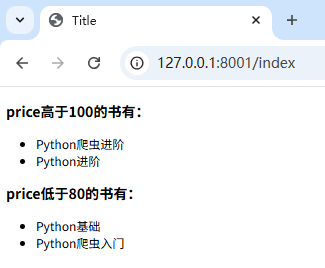
结果
此内容由惯性聚合(RSS阅读器)自动聚合整理,仅供阅读参考。 原文来自 — 版权归原作者所有。