










本系列汇总,请查看这里:https://www.cnblogs.com/uncleyong/p/19503695
项目目录下创建目录templates
index.html
<!DOCTYPE html>
<html lang="en">
<head>
    <meta charset="UTF-8">
    <title>Title</title>
    <!-- 最新版本的 Bootstrap 核心 CSS 文件 -->
    <link rel="stylesheet" href="https://stackpath.bootstrapcdn.com/bootstrap/3.4.1/css/bootstrap.min.css"
          integrity="sha384-HSMxcRTRxnN+Bdg0JdbxYKrThecOKuH5zCYotlSAcp1+c8xmyTe9GYg1l9a69psu" crossorigin="anonymous">
</head>
<body>
<h1>学生信息</h1>

<div class="row">
    <div class="col-md-8 col-md-offset-2">
<!--        <p>-->
<!--            <button class="btn primary"><a href="">添加学生</a></button>-->
<!--        </p>-->

        <table class="table table-bordered table-striped table-hover">
            <thead>
            <tr>
                <th>学生学号</th>
                <th>学生姓名</th>
                <th>学生班级</th>
            </tr>
            </thead>

            <tbody>
            {% for student in students %}
                <tr>
                    <td>{{ student.sno }}</td>
                    <td>{{ student.name }}</td>
                    <td>{{ student.clas_id }}</td>
                </tr>
            {% endfor %}

            </tbody>
        </table>
    </div>
</div>


</body>
</html>
student.py
from fastapi import APIRouter
from fastapi import Request
from fastapi.templating import Jinja2Templates

from templates import templates_dir
from test_orm.models import Student

student_api = APIRouter()


@student_api.get("/index.html")
async def getAllStudent(request: Request):
    templates = Jinja2Templates(directory=templates_dir)
    # templates = Jinja2Templates("../templates")
    students = await Student.all()

    return templates.TemplateResponse(
        "index.html", {
            "request": request,
            "students": students
        }
    )
关于templates的目录,可以相对路径,也可以绝对路径
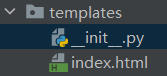
import os
from pathlib import Path

templates_dir = os.path.dirname(os.path.abspath(__file__))
print(templates_dir)

# 上面和下面的代码效果一样
templates_dir = Path(__file__).parent
print(templates_dir)
main.py
import uvicorn
from fastapi import FastAPI
from tortoise.contrib.fastapi import register_tortoise

from test_orm.api.student import student_api
from test_orm.settings import TORTOISE_ORM

app = FastAPI()

app.include_router(student_api, prefix="/student", tags=["学生接口"])

# register_tortoise是注册函数,fastapi一旦运行,register_tortoise已经执行,通过传递进去的app对象,监听服务启动和终止事件
register_tortoise(
    app=app,
    config=TORTOISE_ORM,
)

if __name__ == '__main__':
    uvicorn.run('main:app', host='127.0.0.1', port=8001, reload=True, workers=1)
请求结果

此内容由惯性聚合(RSS阅读器)自动聚合整理,仅供阅读参考。 原文来自 — 版权归原作者所有。