惯性聚合 高效追踪和阅读你感兴趣的博客、新闻、科技资讯
阅读原文 在惯性聚合中打开

推荐订阅源

Google Online Security Blog
博客园_首页
酷 壳 – CoolShell
酷 壳 – CoolShell
Jina AI
Jina AI
博客园 - Franky
大猫的无限游戏
大猫的无限游戏
Hugging Face - Blog
Hugging Face - Blog
博客园 - 司徒正美
V
V2EX
雷峰网
雷峰网
云风的 BLOG
云风的 BLOG
V
Visual Studio Blog
F
Full Disclosure
Y
Y Combinator Blog
V
V2EX - 技术
Attack and Defense Labs
S
Security @ Cisco Blogs
Schneier on Security
Microsoft Azure Blog
SecWiki News
SecWiki News
Cyber Security Advisories - MS-ISAC
The GitHub Blog
The GitHub Blog
量子位
PCI Perspectives
PCI Perspectives
S
Secure Thoughts
D
Darknet – Hacking Tools, Hacker News & Cyber Security
AWS News Blog
AWS News Blog
Blog — PlanetScale
Blog — PlanetScale
爱范儿
爱范儿
K
Kaspersky official blog
B
Blog
A
Arctic Wolf
Hacker News: Ask HN
Hacker News: Ask HN
L
LangChain Blog
T
Tor Project blog
P
Privacy & Cybersecurity Law Blog
Recent Announcements
宝玉的分享
宝玉的分享
The Register - Security
freeCodeCamp Programming Tutorials: Python, JavaScript, Git & More
L
Lohrmann on Cybersecurity
D
Docker
A
About on SuperTechFans
H
Hackread – Cybersecurity News, Data Breaches, AI and More
Google DeepMind News
The Last Watchdog
The Last Watchdog
S
Security Affairs
钛媒体:引领未来商业与生活新知
钛媒体:引领未来商业与生活新知
P
Privacy International News Feed
Simon Willison's Weblog

博客园 - 全栈测试笔记

博文阅读密码验证 - 博客园 FastAPI系列(24):ORM操作之删除接口开发 单例模式管理模型客户端的几种实现方式 博文阅读密码验证 - 博客园 FastAPI系列(23):ORM操作之编辑接口开发 FastAPI系列(22):ORM之多对多查询记录 FastAPI系列(21):ORM之多对多添加记录 CC Switch配置模型 Claude Code安装 FastAPI系列(20):ORM添加表记录 FastAPI系列(19):ORM响应页面数据 博文阅读密码验证 - 博客园 FastAPI系列(18):ORM查询操作 FastAPI系列(17):ORM的迁移命令 FastAPI系列(15):Jinja2模板语法之控制结构 FastAPI系列(14):Jinja2模板语法之过滤器 FastAPI系列(13):Jinja2模板介绍、模板语法之变量渲染 FastAPI系列(12):响应模型参数 【汇总】FastAPI系列教程
FastAPI系列(16):ORM创建模型类
全栈测试笔记 · 2026-01-28 · via 博客园 - 全栈测试笔记

本系列汇总,请查看这里https://www.cnblogs.com/uncleyong/p/19503695 

Tortoise ORM简介

官网:https://tortoise.org.cn/

源代码:https://github.com/tortoise/tortoise-orm/

Tortoise ORM 是一款为 Python 异步编程(Asyncio)设计的 ORM(对象关系映射)工具,它的设计灵感来自 Django ORM,语法风格也和 Django ORM 非常相似,但完全适配异步场景(比如 FastAPI、Starlette 等异步 Web 框架),可以让你用面向对象的方式操作数据库,无需直接编写 SQL 语句。

简单来说:

  • 核心特点:纯异步、支持多种数据库(PostgreSQL、MySQL、SQLite)、语法接近 Django ORM(学习成本低)、支持迁移(migrations)、类型提示友好。
  • 适用场景:异步 Python 项目(如 FastAPI 接口开发),替代同步 ORM(如 SQLAlchemy 同步版、Django ORM)。

安装

参考:https://tortoise.org.cn/getting_started.html

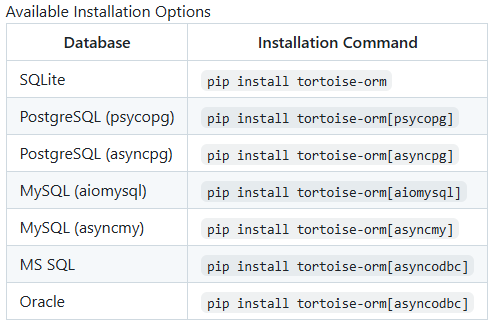
安装 tortoise:pip install tortoise-orm

您还可以使用您的数据库驱动程序进行安装,对于 MySQL:pip install tortoise-orm[asyncmy]

参考:GitHub - tortoise/tortoise-orm: Familiar asyncio ORM for python, built with relations in mind
image

创建模型类

1.主表

  • Student:学生表
  • Course:课程表
  • Clas:班级表
  • Teacher:教师表

2. 关联表

  • Student_course:学生与课程的多对多关系表

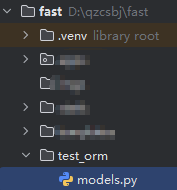
目录结构

image

models.py

# 选课
from tortoise import fields
from tortoise.models import Model


class Student(Model):
    id = fields.IntField(pk=True, description="主键")
    name = fields.CharField(max_length=32, description="姓名")
    pwd = fields.CharField(max_length=32, description="密码")
    sno = fields.IntField(description="学号")

    # 一对多的关系
    clas = fields.ForeignKeyField("models.Clas", related_name="students")  # 最后数据库中字段是clas_id,如果这里我们直接写成clas_id,最后数据库中是clas_id_id

    # 多对多的关系
    courses = fields.ManyToManyField("models.Course", related_name="students", description='学生选课表')  # 生成的表名是student_course,字段是student_id、course_id


class Course(Model):
    id = fields.IntField(pk=True)
    name = fields.CharField(max_length=32, description="课程名称")
    teacher = fields.ForeignKeyField("models.Teacher", related_name='courses', description='课程讲师表')
    # addr = fields.CharField(max_length=32, description="教室", default="")
    # desc = fields.CharField(max_length=32, description="教室信息", default="")


class Clas(Model):
    id = fields.IntField(pk=True)
    name = fields.CharField(max_length=32, description="班级名称")


class Teacher(Model):
    id = fields.IntField(pk=True)
    name = fields.CharField(max_length=32, description="姓名")
    pwd = fields.CharField(max_length=32, description="密码")
    tno = fields.IntField(description="老师编号")