惯性聚合 高效追踪和阅读你感兴趣的博客、新闻、科技资讯
阅读原文 在惯性聚合中打开

推荐订阅源

J
Java Code Geeks
小众软件
小众软件
博客园 - 叶小钗
宝玉的分享
宝玉的分享
博客园_首页
Hugging Face - Blog
Hugging Face - Blog
人人都是产品经理
人人都是产品经理
钛媒体:引领未来商业与生活新知
钛媒体:引领未来商业与生活新知
S
SegmentFault 最新的问题
B
Blog RSS Feed
Engineering at Meta
Engineering at Meta
N
Netflix TechBlog - Medium
Google DeepMind News
U
Unit 42
F
Fortinet All Blogs
IT之家
IT之家
Y
Y Combinator Blog
Martin Fowler
Martin Fowler
T
The Blog of Author Tim Ferriss
奇客Solidot–传递最新科技情报
奇客Solidot–传递最新科技情报
The GitHub Blog
The GitHub Blog
Stack Overflow Blog
Stack Overflow Blog
Blog — PlanetScale
Blog — PlanetScale
酷 壳 – CoolShell
酷 壳 – CoolShell

博客园 - Tinywan

响应错误: Indirect modification of overloaded element of app\model\StudentCacheModel has no effect - Tinywan Ubuntu 22.04 编译安装 PHP 7.4.33 报错:make: *** [Makefile:749: ext/openssl/openssl.lo] Error 1 how to set mpdf HTML contains invalid UTF-8 character(s) 和 CPU 100% Nginx添加第三方模块,出现“is not binary compatible in”错误的解决方案 Docker 数据库连接见解异常 SQLSTATE[HY000] [2002] php_network_getaddresses: getaddrinfo failed: Try again 解决mysql死锁问题 SQLSTATE[HY000]: General error: 1205 Lock wait timeout exceeded; try restarting transaction Java系列 | 如何讲自己的JAR包上传至阿里云maven私有仓库【云效制品仓库】 Redis系列 | 分类树查询功能如何从2s优化到0.1s Docker系列 | docker endpoint for “default” not found Node系列 | Node版本管理工具 fnm Java系列 | IntelliJ IDEA 如何导入和使用一个Jar包 Chrome扩展插件:Console Importer(控制台导入器) PHP系列 | mPdf字体库异常 Cannot find TTF TrueType font file "Eeyek.ttf" in configured font directories PHP系列 | PHP中的stdClass是什么? 网络安全 | 记录一次acme.sh更新证书 Error add txt for domain:_acme-challenge.tinywan.com 大数据系列 | 阿里云datav数据可视化(使用json文件生成可视化动态图标) Docker系列 | SQLSTATE[HY000] [2002] php_network_getaddresses: getaddrinfo failed: Try again768 Java系列 | Linux系统中运行JMeter脚本 PHP系列 | TP6使用表达式设置数据 Db::raw('end_time')
Redis Docekr WARNING Memory overcommit must be enabled! W...
Tinywan · 2024-03-01 · via 博客园 - Tinywan

Docker 容器

ssr-redis    | 1:C 01 Mar 2024 22:00:46.869 # oO0OoO0OoO0Oo Redis is starting oO0OoO0OoO0Oo
ssr-redis    | 1:C 01 Mar 2024 22:00:46.869 # Redis version=7.0.10, bits=64, commit=00000000, modified=0, pid=1, just started
ssr-redis    | 1:C 01 Mar 2024 22:00:46.869 # Warning: no config file specified, using the default config. In order to specify a config file use redis-server /path/to/redis.conf
ssr-redis    | 1:M 01 Mar 2024 22:00:46.869 * monotonic clock: POSIX clock_gettime
ssr-redis    | 1:M 01 Mar 2024 22:00:46.870 * Running mode=standalone, port=6379.
ssr-redis    | 1:M 01 Mar 2024 22:00:46.870 # WARNING: The TCP backlog setting of 511 cannot be enforced because /proc/sys/net/core/somaxconn is set to the lower value of 128.
ssr-redis    | 1:M 01 Mar 2024 22:00:46.870 # Server initialized
ssr-redis    | 1:M 01 Mar 2024 22:00:46.870 # WARNING Memory overcommit must be enabled! Without it, a background save or replication may fail under low memory condition. Being disabled, it can can also cause failures without low memory condition, see https://github.com/jemalloc/jemalloc/issues/1328. To fix this issue add 'vm.overcommit_memory = 1' to /etc/sysctl.conf and then reboot or run the command 'sysctl vm.overcommit_memory=1' for this to take effect.

您的 Redis 容器日志中的警告信息指出了内存超分配(overcommit)的设置问题。在 Linux 系统中,内存超分配是一种内核行为,允许进程分配超出物理内存大小的虚拟内存。对于 Redis,这是一个重要的设置,尤其是当执行如 RDB 快照或 AOF 日志重写等内存密集型操作时。

警告信息的含义

  • Redis 需要内存超分配(vm.overcommit_memory)被设置为 1。这意味着操作系统将始终允许分配所有请求的内存,这对于 Redis 的某些操作至关重要。
  • 如果没有正确设置,当 Redis 尝试创建快照或进行某些类型的复制时,可能会因为内存不足而失败。这可能导致数据丢失或其他问题。

解决方法

您需要在宿主机(运行 Docker 的服务器)上设置 vm.overcommit_memory 参数。这通常涉及两个步骤:

临时更改

在宿主机上执行以下命令:

sudo sysctl vm.overcommit_memory=1

永久更改

编辑 /etc/sysctl.conf 文件(或在某些系统上,可能是 /etc/sysctl.d/ 目录下的文件)。添加或修改以下行:

保存文件并重新启动系统,或者运行 sudo sysctl -p 来立即应用更改。

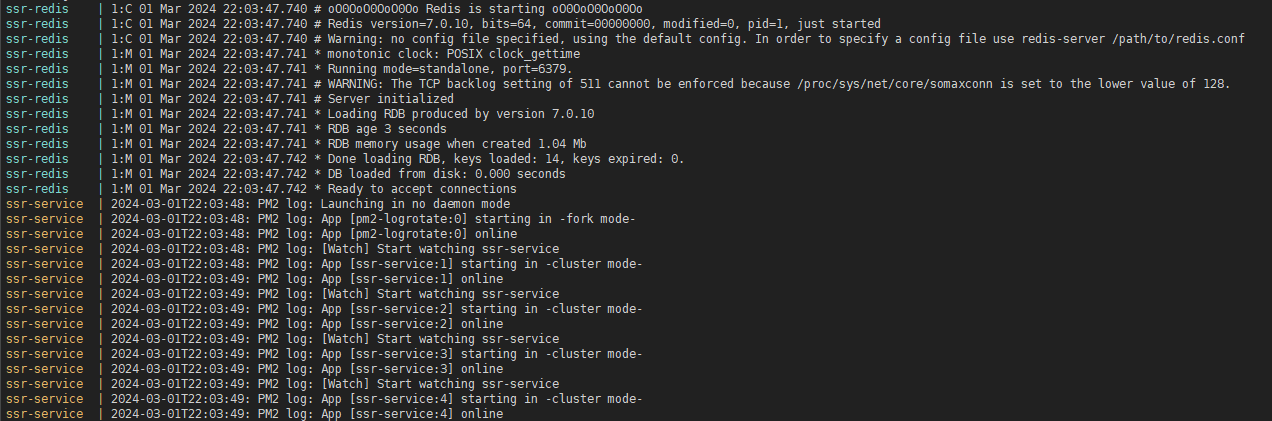
再次重启,问题解决