



安装所需环境
npm install --global httpsnippet
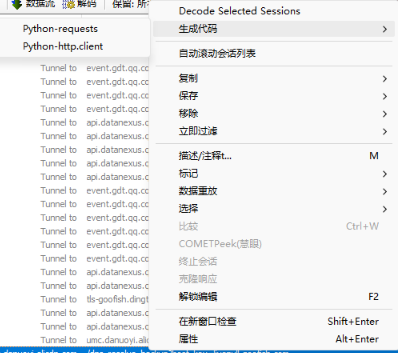
打开fiddler->ctrl+r调出脚本编辑器,在class Handlers内添加以下代码
`// ==================== Python 代码生成(修复 BOM 问题)====================
// 1. Python Requests 右键菜单
public static ContextAction("Python-requests", "生成代码")
function DoPythonRequests(arrSess: Session[]) {
GeneratePythonCodeWithNode(arrSess, "requests");
}
// 2. Python http.client 右键菜单
public static ContextAction("Python-http.client", "生成代码")
function DoPythonHttpClient(arrSess: Session[]) {
GeneratePythonCodeWithNode(arrSess, "python3");
}
// 3. 核心生成函数(使用 Node.js + httpsnippet,自动移除 BOM)
public static function GeneratePythonCodeWithNode(oSessions: Session[], client: String) {
// 临时文件路径
var tempHar = System.IO.Path.Combine(System.IO.Path.GetTempPath(), "fiddler_temp.har");
var tempHarFixed = System.IO.Path.Combine(System.IO.Path.GetTempPath(), "fiddler_temp_fixed.har");
var tempDir = System.IO.Path.Combine(System.IO.Path.GetTempPath(), "fiddler_output_" + System.Guid.NewGuid().ToString().Substring(0, 8));
// 清理旧文件
if(System.IO.File.Exists(tempHar)) System.IO.File.Delete(tempHar);
if(System.IO.File.Exists(tempHarFixed)) System.IO.File.Delete(tempHarFixed);
if(System.IO.Directory.Exists(tempDir)) System.IO.Directory.Delete(tempDir, true);
// 步骤 1:导出 HAR 文件
var oExportOptions = FiddlerObject.createDictionary();
oExportOptions.Add("Filename", tempHar);
FiddlerApplication.DoExport("HTTPArchive v1.2", oSessions, oExportOptions, null);
if(!System.IO.File.Exists(tempHar)) {
MessageBox.Show("❌ 导出 HAR 文件失败", "错误");
return;
}
// 步骤 2:移除 BOM
RemoveBomFromFile(tempHar, tempHarFixed);
if(!System.IO.File.Exists(tempHarFixed)) {
MessageBox.Show("❌ 处理 HAR 文件失败", "错误");
System.IO.File.Delete(tempHar);
return;
}
// 步骤 3:创建输出目录
System.IO.Directory.CreateDirectory(tempDir);
// 🔑 步骤 4:直接调用 httpsnippet(使用系统 PATH)
var args = "httpsnippet "" + tempHarFixed + "" -t python -c " + client + " -o "" + tempDir + """;
var process = new System.Diagnostics.Process();
process.StartInfo.FileName = "cmd.exe"; // 使用 cmd.exe
process.StartInfo.Arguments = "/c " + args; // /c 参数执行命令后退出
process.StartInfo.UseShellExecute = false;
process.StartInfo.RedirectStandardOutput = true;
process.StartInfo.RedirectStandardError = true;
process.StartInfo.CreateNoWindow = true;
process.Start();
var output = process.StandardOutput.ReadToEnd();
var error = process.StandardError.ReadToEnd();
process.WaitForExit();
process.Dispose();
// 步骤 5:查找生成的 Python 文件
var generatedFiles = System.IO.Directory.GetFiles(tempDir, "*.py");
if(generatedFiles.Length > 0) {
// 读取并删除
var code = System.IO.File.ReadAllText(generatedFiles[0]);
System.IO.File.Delete(generatedFiles[0]);
System.IO.Directory.Delete(tempDir, true);
System.IO.File.Delete(tempHar);
System.IO.File.Delete(tempHarFixed);
Clipboard.SetText(code);
MessageBox.Show("✅ Python 代码已生成并复制到剪贴板!\n\n客户端: " + client, "成功");
} else {
// 清理所有临时文件
if(System.IO.File.Exists(tempHar)) System.IO.File.Delete(tempHar);
if(System.IO.File.Exists(tempHarFixed)) System.IO.File.Delete(tempHarFixed);
if(System.IO.Directory.Exists(tempDir)) System.IO.Directory.Delete(tempDir, true);
MessageBox.Show("❌ 生成代码失败!\n\n错误信息:\n" + error, "错误");
}
}
// 🔑 关键函数:移除文件的 BOM
static function RemoveBomFromFile(sourceFile: String, targetFile: String) {
// 读取文件内容(File.ReadAllText 会自动处理 BOM)
var content = System.IO.File.ReadAllText(sourceFile, System.Text.Encoding.UTF8);
// 使用无 BOM 的 UTF8 编码保存
// new UTF8Encoding(false) 中的 false 表示不添加 BOM
var utf8WithoutBom = new System.Text.UTF8Encoding(false);
System.IO.File.WriteAllText(targetFile, content, utf8WithoutBom);
}
// ==================== 结束 ====================`
此内容由惯性聚合(RSS阅读器)自动聚合整理,仅供阅读参考。 原文来自 — 版权归原作者所有。