惯性聚合 高效追踪和阅读你感兴趣的博客、新闻、科技资讯
阅读原文 在惯性聚合中打开

推荐订阅源

S
SegmentFault 最新的问题
Spread Privacy
Spread Privacy
Google DeepMind News
WordPress大学
WordPress大学
Blog — PlanetScale
Blog — PlanetScale
OSCHINA 社区最新新闻
OSCHINA 社区最新新闻
Apple Machine Learning Research
SecWiki News
SecWiki News
腾讯CDC
P
Privacy International News Feed
Webroot Blog
Webroot Blog
J
Java Code Geeks
爱范儿
爱范儿
A
About on SuperTechFans
S
Secure Thoughts
cs.CL updates on arXiv.org
D
DataBreaches.Net
Cloudbric
Cloudbric
Security Archives - TechRepublic
CTFtime.org: upcoming CTF events
C
Cyber Attacks, Cyber Crime and Cyber Security
P
Proofpoint News Feed
钛媒体:引领未来商业与生活新知
钛媒体:引领未来商业与生活新知
H
Hackread – Cybersecurity News, Data Breaches, AI and More
Security Latest
Security Latest
Forbes - Security
Forbes - Security
小众软件
小众软件
www.infosecurity-magazine.com
C
Cybersecurity and Infrastructure Security Agency CISA
T
Threatpost
量子位
MongoDB | Blog
MongoDB | Blog
奇客Solidot–传递最新科技情报
奇客Solidot–传递最新科技情报
月光博客
月光博客
W
WeLiveSecurity
P
Privacy & Cybersecurity Law Blog
Vercel News
Vercel News
Google Online Security Blog
云风的 BLOG
云风的 BLOG
GbyAI
GbyAI
S
Security @ Cisco Blogs
T
The Exploit Database - CXSecurity.com
Help Net Security
Help Net Security
V
Visual Studio Blog
C
CXSECURITY Database RSS Feed - CXSecurity.com
Application and Cybersecurity Blog
博客园 - 聂微东
P
Proofpoint News Feed
C
CERT Recently Published Vulnerability Notes
Attack and Defense Labs

博客园 - talenth

windows下简单使用webrtc nvm配置nodejs ATL开发office插件 windows编译pp-shitu webdriver windows下不同cpu架构PE文件区别 vs中/EHa、/EHs、/EHsc的区别 主窗口,子窗口,拥有窗口关闭消息顺序 yara规则学习 usb3.0+mvme固态安装win7 驱动程序获取内核版本号 提取shell32.dll中的字符串 常见编码 修理鼠标微动开关 InfinityHook原理 段描述符 tls1.3报文 签名证书 windows内核同步机制
windows下注册一个打开特定扩展名的文件
talenth · 2023-07-12 · via 博客园 - talenth

参考 https://www.cnblogs.com/linliquan/p/10626944.html

一 大概步骤如下

1 在下面位置增加一个value指向一个应用程序能力的位置

HKEY_LOCAL_MACHINE\SOFTWARE\RegisteredApplications

2 在能力位置处添加要支持的扩展名或者协议名称

3 在HKEY_CLASSES_ROOT添加一系列项, 支持显示图标, 调用进程等等

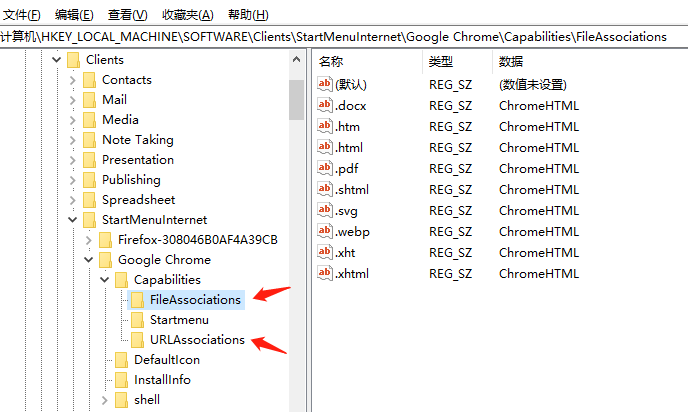
二 chrome对应的注册表

三 其他注册位置

HKEY_CURRENT_USER\SOFTWARE\RegisteredApplications