惯性聚合 高效追踪和阅读你感兴趣的博客、新闻、科技资讯
阅读原文 在惯性聚合中打开

推荐订阅源

量子位
S
Securelist
MyScale Blog
MyScale Blog
Jina AI
Jina AI
罗磊的独立博客
The Cloudflare Blog
美团技术团队
博客园 - 叶小钗
阮一峰的网络日志
阮一峰的网络日志
博客园 - 三生石上(FineUI控件)
月光博客
月光博客
雷峰网
雷峰网
小众软件
小众软件
aimingoo的专栏
aimingoo的专栏
大猫的无限游戏
大猫的无限游戏
博客园 - Franky
博客园 - 聂微东
Y
Y Combinator Blog
酷 壳 – CoolShell
酷 壳 – CoolShell
freeCodeCamp Programming Tutorials: Python, JavaScript, Git & More
MongoDB | Blog
MongoDB | Blog
T
Tailwind CSS Blog
Attack and Defense Labs
博客园_首页
Latest news
Latest news
Apple Machine Learning Research
Threat Intelligence Blog | Flashpoint
The Hacker News
The Hacker News
G
GRAHAM CLULEY
Simon Willison's Weblog
Exploit-DB.com RSS Feed
P
Proofpoint News Feed
CTFtime.org: upcoming CTF events
U
Unit 42
D
Docker
Webroot Blog
Webroot Blog
N
Netflix TechBlog - Medium
T
Tor Project blog
C
Cyber Attacks, Cyber Crime and Cyber Security
L
LINUX DO - 最新话题
cs.CV updates on arXiv.org
The Last Watchdog
The Last Watchdog
B
Blog
Recent Announcements
GbyAI
GbyAI
Microsoft Azure Blog
Security Latest
Security Latest
V2EX - 技术
V2EX - 技术
N
News | PayPal Newsroom
Microsoft Security Blog

博客园 - 汉克书

新工作新气象 记录一些skill的网站 重构代码的思路想法 内网服务器如何跟服务端通信 增加一下git提交记录的关键词 ai生成一段学习golang的select、context、go、channel的代码 水一篇博文 文件服务器对于devops的用处 git信息提交错误,进行修改 还是没啥东西写的,写点DevOps的想法 突然想了一些“思路”问题。提出的一些想法 就是想吐槽一下信创 mac和linux终端显示分支 继续一个日常 devops 这个月又没什么东西可以写的,就写个harbor的arm版本获取地方吧 写一个日常吧 docker 在x86运行arm容器 ansible的最佳实践 临时用的
这个月好像没啥可以写的,rest client
汉克书 · 2025-06-05 · via 博客园 - 汉克书

推荐一个vscode的插件rest client吧,其实网上已经很多了,我在整理一下

安装就是直接插件市场搜索一下

前提,这个插件对于自己开发比较好用,如果需要和别人合作,可能还需要编写swag文档且合作人员也需要学习这个工具的使用

和别人合作,还是用postman或者apifox吧,不要尝试去教别人

如何使用

文件名 http 结尾,或者 rest 结尾

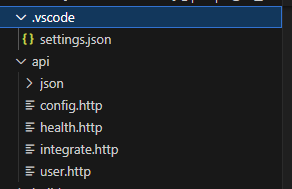
例如我的文件

变量

我是写在 .vscode/settings.json 让其跟随代码进行,然后在vscode的界面,右下角原则域进行调试使用

settings.json 内容如下

{
    "rest-client.environmentVariables": {
        "local": {
            "url": "http://127.0.0.1:9001"
        }
        
    }
}

如何使用

  1. 用注释,进行分割接口
  2. json文件使用相对路径, 也可以直接编写json内容到代码中
  3. POST 请求和请求头content-type 不能空行,而data和content-type需要一个空行
GET {{url}}/api/v1/config HTTP/1.1

### 用注释,进行分割
POST {{url}}/api/v1/config
content-type: application/json

< json/config/config.json

### 用注释,进行分割
POST {{url}}/api/v1/config
content-type: application/json

{
  "config": "test"
}