







使用
Spring(业务层)整合其他的框架SpringMVC(表现层)和MyBatis(持久层)
Spring框架创建数据库表
CREATE DATABASE ssm;
USE ssm;
CREATE TABLE account(
	id INT PRIMARY KEY AUTO_INCREMENT,
	NAME VARCHAR(20),
	money DOUBLE
);
pom文件导入坐标
  <properties>
    <project.build.sourceEncoding>UTF-8</project.build.sourceEncoding>
    <maven.compiler.source>1.8</maven.compiler.source>
    <maven.compiler.target>1.8</maven.compiler.target>
    <spring.version>5.0.2.RELEASE</spring.version>
    <slf4j.version>1.6.6</slf4j.version>
    <log4j.version>1.2.12</log4j.version>
    <mysql.version>5.1.6</mysql.version>
    <mybatis.version>3.4.5</mybatis.version>
  </properties>

  <dependencies>
实体类Account
public class Account implements Serializable {

    private Integer id;
    private String name;
    private Double money;
}
AccountDao接口(Spring框架)
public interface AccountDao {
AccountService接口
public interface AccountService {
AccountServiceImpl实现类
@Service("accountService")
public class AccountServiceImpl implements AccountService {
    @Override
    public List<Account> findAll() {
        System.out.println("业务层,查询所有账户");
        return null;
    }

    @Override
    public void saveAccount(Account account) {
        System.out.println("业务层,保存账户信息");
    }
}
表现层AccountController
@Controller
@RequestMapping(value = "/account")
public class AccountController {
}
配置文件applicationContext.xml
<?xml version="1.0" encoding="UTF-8"?>
<beans xmlns="http://www.springframework.org/schema/beans"
       xmlns:xsi="http://www.w3.org/2001/XMLSchema-instance"
       xmlns:context="http://www.springframework.org/schema/context"
       xmlns:aop="http://www.springframework.org/schema/aop"
       xmlns:tx="http://www.springframework.org/schema/tx"
       xsi:schemaLocation="http://www.springframework.org/schema/beans
            http://www.springframework.org/schema/beans/spring-beans.xsd
            http://www.springframework.org/schema/context
            http://www.springframework.org/schema/context/spring-context.xsd
            http://www.springframework.org/schema/aop
            http://www.springframework.org/schema/aop/spring-aop.xsd
            http://www.springframework.org/schema/tx
            http://www.springframework.org/schema/tx/spring-tx.xsd">
SpringMVC框架搭建web.xml1. <web-app>
<display-name>Archetype Created Web Application</display-name>
springmvc.xml
<?xml version="1.0" encoding="UTF-8"?>
<beans xmlns="http://www.springframework.org/schema/beans"
       xmlns:mvc="http://www.springframework.org/schema/mvc"
       xmlns:context="http://www.springframework.org/schema/context"
       xmlns:xsi="http://www.w3.org/2001/XMLSchema-instance"
       xsi:schemaLocation="
            http://www.springframework.org/schema/beans
            http://www.springframework.org/schema/beans/spring-beans.xsd
            http://www.springframework.org/schema/mvc
            http://www.springframework.org/schema/mvc/spring-mvc.xsd
            http://www.springframework.org/schema/context
            http://www.springframework.org/schema/context/spring-context.xsd">
AccountController
<?xml version="1.0" encoding="UTF-8"?>
<beans xmlns="http://www.springframework.org/schema/beans"
       xmlns:mvc="http://www.springframework.org/schema/mvc"
       xmlns:context="http://www.springframework.org/schema/context"
       xmlns:xsi="http://www.w3.org/2001/XMLSchema-instance"
       xsi:schemaLocation="
            http://www.springframework.org/schema/beans
            http://www.springframework.org/schema/beans/spring-beans.xsd
            http://www.springframework.org/schema/mvc
            http://www.springframework.org/schema/mvc/spring-mvc.xsd
            http://www.springframework.org/schema/context
            http://www.springframework.org/schema/context/spring-context.xsd">

    <!--开启注解扫描,只扫描Controller注解-->
    <context:component-scan base-package="com.atgw">
        <context:include-filter type="annotation" expression="org.springframework.stereotype.Controller"/>
    </context:component-scan>

    <!--配置的视图解析器对象-->
    <bean id="internalResourceViewResolver" class="org.springframework.web.servlet.view.InternalResourceViewResolver">
        <property name="prefix" value="/WEB-INF/pages/"/>
        <property name="suffix" value=".jsp"/>
    </bean>

    <!--过滤静态资源-->
    <mvc:resources mapping="/css/**" location="/css/"/>
    <mvc:resources mapping="/images/**" location="/images/"/>
    <mvc:resources mapping="/js/**" location="/js/"/>

    <!--开启SpringMVC注解的支持-->
    <mvc:annotation-driven/>
</beans>
index.jsp
<a href="account/findAll">测试</a>
list.jsp
<h3>查询所有账户</h3>
Spring整合SpringMVC框架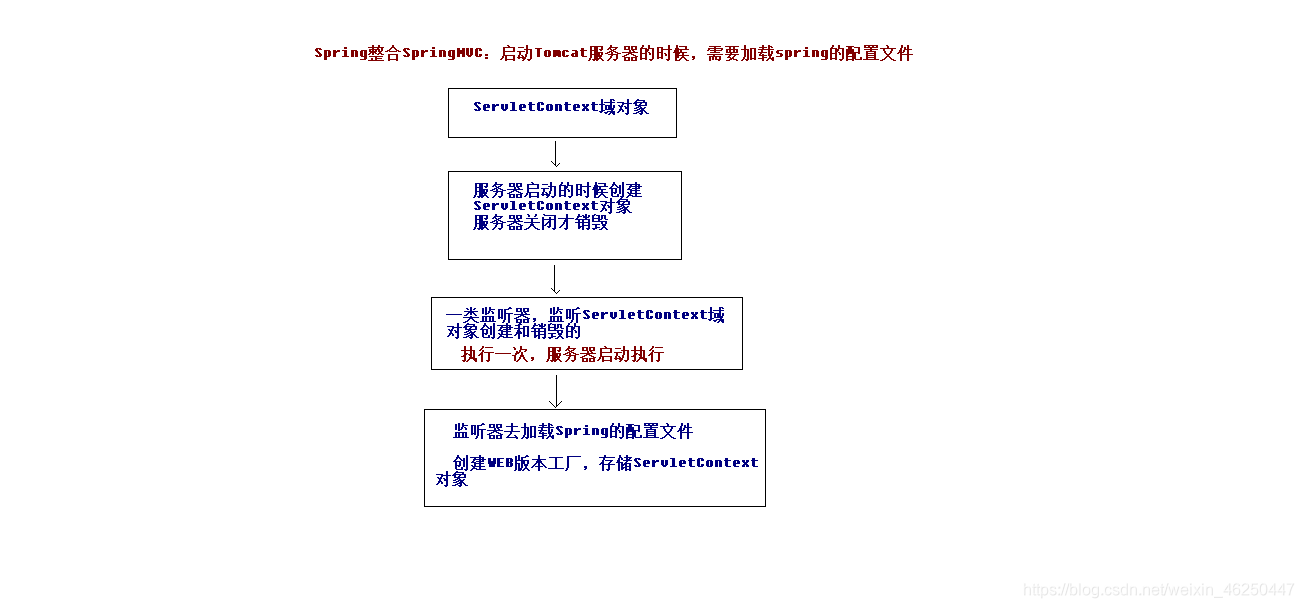
1web.xml
  <!--配置Spring的监听器,默认只加载WEB-INF目录下的applicationContext.xml配置文件-->
  <listener>
      <listener-class>org.springframework.web.context.ContextLoader</listener-class>
  </listener>
2AccountController)(方法中自动注入service)
@Controller
@RequestMapping(value = "/account")
public class AccountController {
Spring整合MyBatis框架web.xml配置Sping监听器,在服务器启动时加载applicationContext.xml配置文件
  <!--配置Spring的监听器,默认只加载WEB-INF目录下的application.xml配置文件-->
  <listener>
      <listener-class>org.springframework.web.context.ContextLoader</listener-class>
  </listener>
SqlMapConfig.xml配置数据库环境,引入映射类的地址
<?xml version="1.0" encoding="UTF-8"?>
<!DOCTYPE configuration
        PUBLIC "-//mybatis.org//DTD Config 3.0//EN"
        "http://mybatis.org/dtd/mybatis-3-config.dtd">

<configuration>
AccountDao接口,添加注释,写SQL语句
public interface AccountDao {
测试
//查询所有数据
@Test
    public void run1() throws Exception {
希望把dao对象代理到IOC容器中
SQLSessionFactory工厂可以创建SQLSession,然后创建dao代理对象,代理到IOC容器中
    <!--Spring整合MyBatis框架-->
    <!--配置连接池-->
    <bean id="dataSource" class="com.mchange.v2.c3p0.ComboPooledDataSource">
        <property name="driverClass" value="com.mysql.jdbc.Driver"/>
        <property name="jdbcUrl" value="jdbc:mysql://localhost:3306/ssm"/>
        <property name="user" value="root"/>
        <property name="password" value="000519"/>
    </bean>
AccountDao接口中添加@Repository注解
@Repository//交给IOC容器
public interface AccountDao {
}
AccountController中的方法中对遍历到数据的进行页面遍历
    @RequestMapping("/findAll")
    public String findAll(Model model){
        System.out.println("表现层:查询所有账户");
list.jsp页面(遍历数据)
<%@ page contentType="text/html;charset=UTF-8" language="java" isELIgnored="false" %>
<%@ taglib prefix="c" uri="http://java.sun.com/jsp/jstl/core" %>
<html>
<head>
    <title>Title</title>
</head>
<body>
    <h3>查询所有账户</h3>
    <c:forEach items="${list}" var="account">
        ${account.name}<br/>
    </c:forEach>
</body>
</html>
配置事务
applicationContext.xml
    <!--配置Spring框架声明式事务管理-->
    <!--配置事务管理器-->
    <bean id="transactionManager" class="org.springframework.jdbc.datasource.DataSourceTransactionManager">
        <property name="dataSource" ref="dataSource"></property>
    </bean>
AccountController
    @RequestMapping("/save")
    public void save(Account account, HttpServletRequest request, HttpServletResponse response) throws IOException {
        accountService.saveAccount(account);
index.jsp
    <form action="account/save" method="post">
        姓名:<input type="text" name="name" /><br/>
        金额:<input type="text" name="money" /><br/>
        <input type="submit" value="保存"/><br/>
    </form>
此内容由惯性聚合(RSS阅读器)自动聚合整理,仅供阅读参考。 原文来自 — 版权归原作者所有。