











本文是Lambda的入门文章。主要向读者介绍Lambda的基本概念和写法。主要面向的读者是Java新手。
主要内容:
背景知识:其中在逐步推导Lambda表达式时,需要用到并发编程中的Runnable接口。
目录
什么是Lambda
第一个Lambda表达式
原始写法
静态内部类简化
局部内部类简化
匿名内部类简化
Lambda简化
再简化
Lambda实例
基本特性:
使用前提:
函数式接口:
Lambda 语法
在并发编程中,我们可以通过实现Runnable接口来开辟一个新的任务线程。下面,通过任务线程的代码编写,来理解Lambda是如何简化写法的。
首先明确,Runnable接口只有一个方法,满足函数式接口的条件:
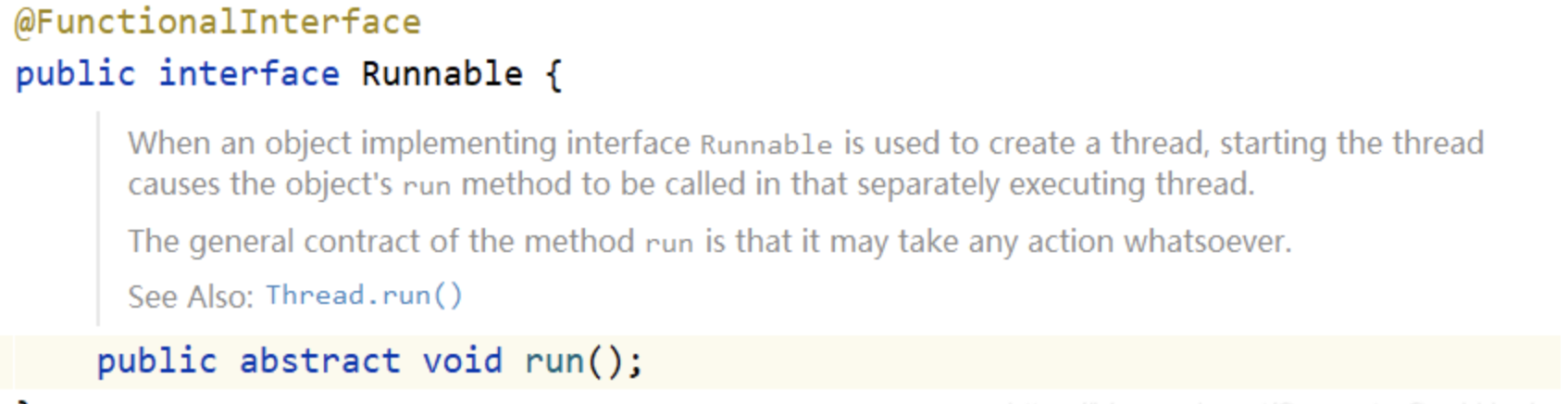
以下是常规的写法:
public class Main {
    public static void main(String[] args) {
        Thread thread = new Thread(new MyThread()); //创建一个线程
        thread.start(); //执行线程
    }
}

//实现Runnable接口,实现任务线程
class MyThread implements Runnable {
    @Override
    public void run() {
        System.out.println("线程"+Thread.currentThread().getName()+"执行了!");
    }
}
将线程任务类放在要调用内的内部,作为静态内部类或者成员内部类:
public class Main {
    //实现Runnable接口,实现任务线程
    public static class MyThread implements Runnable {
        @Override
        public void run() {
            System.out.println("线程"+Thread.currentThread().getName()+"执行了!");
        }
    }

    public static void main(String[] args) {
        Thread thread = new Thread(new MyThread()); //创建一个线程
        thread.start(); //执行线程
    }
}
把任务线程放在方法体内、局部变量的位置:
public class Main {
    public static void main(String[] args) {
        class MyThread implements Runnable { //局部内部类,就相当于申明一个变量
            @Override
            public void run() {
                System.out.println("线程"+Thread.currentThread().getName()+"执行了!");
            }
        }

        Thread thread = new Thread(new MyThread()); //创建一个线程
        thread.start(); //执行线程
    }
}
省略实现类类名的方式,其中“new Runnable() {}”,等价于“class 名字 implements Runnable() {}”:
public class Main {
    public static void main(String[] args) {
        Thread thread = new Thread(new Runnable() {
            @Override
            public void run() {
                System.out.println("线程"+Thread.currentThread().getName()+"执行了!");
            }
        }); //申明任务线程

        thread.start(); //执行线程
    }
}
Lambda的简化格式:
(匿名内部类被重写方法的形参列表) -> {
被重写方法的方法体代码。
}
Lambda简化:
public class Main {
    public static void main(String[] args) {

        //使用Lambda简化:
        // 把"public void run()"简化为"()"。
        // 之所以不用指定方法名,是因为函数式接口中有且仅有一个方法,只要一调用,只有那一个方法可以调用
        // 方法体保持不变
        Thread thread = new Thread( () -> {
            System.out.println("线程"+Thread.currentThread().getName()+"执行了!");
        });
        thread.start();
    }
}
再简化:
public class Main {
    public static void main(String[] args) {
        //方法体内只有一行代码,可以直接去掉方法体的花括号:{}
        Thread thread = new Thread(() -> System.out.println("线程"+Thread.currentThread().getName()+"执行了!") );
        thread.start();
    }
}


匿名对象的简化:
public class Main {
    public static void main(String[] args) {
        //把Thread类转换为匿名对象
        new Thread(() -> System.out.println("线程"+Thread.currentThread().getName()+"执行了!")).start();
    }
}
Lambda简化Comparator接口匿名内部类写法:
public static void main(String[] args) {
    List<Student> lists = new ArrayList<>();
    Student s1 = new Student("李铭",18,'男');
    Student s2 = new Student("冯龙",23,'男');
    Student s3 = new Student("王乐乐",21,'男');
    Collections.addAll(lists , s1 , s2 , s3);

    // 按照年龄进行升序排序!
    Collections.sort(lists, new Comparator<Student>() {
        @Override
        public int compare(Student s1, Student s2) {
            return s1.getAge() - s2.getAge();
        }
    });

    // Lambda简化写法
    Collections.sort(lists, (Student t1, Student t2) -> {
        return t1.getAge() - t2.getAge();
    });
    // 如果Lambda表达式的方法体代码只有一行代码。可以省略大括号不写。
    // 此时,如果这行代码是return语句,必须省略return不写,同时也必须省略";"不写
    Collections.sort(lists,(Student t1, Student t2) -> t1.getAge() - t2.getAge());

    // 参数类型可以省略
    Collections.sort(lists, (t1,  t2) -> t1.getAge() - t2.getAge());

    System.out.println(lists);
}
forEach遍历简化
public static void main(String[] args) {
    List<String> names = new ArrayList<>();
    names.add("胡伟光");
    names.add("甘挺");
    names.add("洪磊");

    //forEach遍历原理
    names.forEach(new Consumer<String>() {
        @Override
        public void accept(String s) {
            System.out.println(s);
        }
    });

    //Lambda简化
    names.forEach((String s) -> {
        System.out.println(s);
    });

    //省略入参类型
    names.forEach((s) -> {
        System.out.println(s);
    });
    //如果只有一个参数,省略:入参括号
    names.forEach(s -> {
        System.out.println(s);
    });

    //Lambda表达式的方法体代码只有一行代码,省略花括号、分号
    names.forEach(s -> System.out.println(s) );

    names.forEach(System.out::println);
}
总结:
此内容由惯性聚合(RSS阅读器)自动聚合整理,仅供阅读参考。 原文来自 — 版权归原作者所有。