惯性聚合 高效追踪和阅读你感兴趣的博客、新闻、科技资讯
阅读原文 在惯性聚合中打开

推荐订阅源

V2EX - 技术
V2EX - 技术
cs.AI updates on arXiv.org
Latest news
Latest news
T
The Exploit Database - CXSecurity.com
博客园 - 三生石上(FineUI控件)
WordPress大学
WordPress大学
L
Lohrmann on Cybersecurity
aimingoo的专栏
aimingoo的专栏
B
Blog
T
Threat Research - Cisco Blogs
罗磊的独立博客
Application and Cybersecurity Blog
P
Proofpoint News Feed
P
Palo Alto Networks Blog
奇客Solidot–传递最新科技情报
奇客Solidot–传递最新科技情报
宝玉的分享
宝玉的分享
博客园 - 司徒正美
Google DeepMind News
Blog — PlanetScale
Blog — PlanetScale
T
Tor Project blog
阮一峰的网络日志
阮一峰的网络日志
Last Week in AI
Last Week in AI
Martin Fowler
Martin Fowler
酷 壳 – CoolShell
酷 壳 – CoolShell
Recorded Future
Recorded Future
D
DataBreaches.Net
Y
Y Combinator Blog
大猫的无限游戏
大猫的无限游戏
IT之家
IT之家
B
Blog RSS Feed
Scott Helme
Scott Helme
P
Proofpoint News Feed
V
Vulnerabilities – Threatpost
A
Arctic Wolf
Help Net Security
Help Net Security
L
LINUX DO - 最新话题
cs.CV updates on arXiv.org
Vercel News
Vercel News
AWS News Blog
AWS News Blog
cs.CL updates on arXiv.org
S
Schneier on Security
Hacker News: Ask HN
Hacker News: Ask HN
N
Netflix TechBlog - Medium
L
LangChain Blog
博客园 - 叶小钗
Cyber Security Advisories - MS-ISAC
M
MIT News - Artificial intelligence
N
News and Events Feed by Topic
Webroot Blog
Webroot Blog
W
WeLiveSecurity

博客园 - 河在谈

华为云挂载其它硬盘 ubuntu24.04 LiteLLM的安装配置 copaw安装使用,ollama ubuntu24.04 安装 cuda 13.2 群辉采用Virtual Machine Manager安装ImmortalWrt Excel 宏 日期选择 ollama下载模型并运行 docker镜像离线导出、导入 构建一个huggingface的python虚拟环境,并下载模型 ESXi-6.7.0 安装黑群辉 7.1.1 群辉备份数据至通过rsync 备份至linux服务器 学位论文中 公式的插入,格式调整、编号以及引用 php-fpm配置redis存session 专利线框图绘制和导出,从Blender到3ds max 显卡掉卡收集日志给服务器供应商 photoshop 批量导出每个图层为独立图像 thinkcmfx 修改菜单不生效 ubuntu 采用.run文件安装的cuda,升级版本,安装cudnn docker 容器,将网络更改为默认bridge网络 CentOS系统实现PPT转图片
mathtype中嵌入数学公式导致行距变大的解决方法
河在谈 · 2024-10-11 · via 博客园 - 河在谈

原因是绝大多数情况下使用的是单倍行距,插入公式后撑大了,可以将字体大小换算成行距,然后改成固定值,

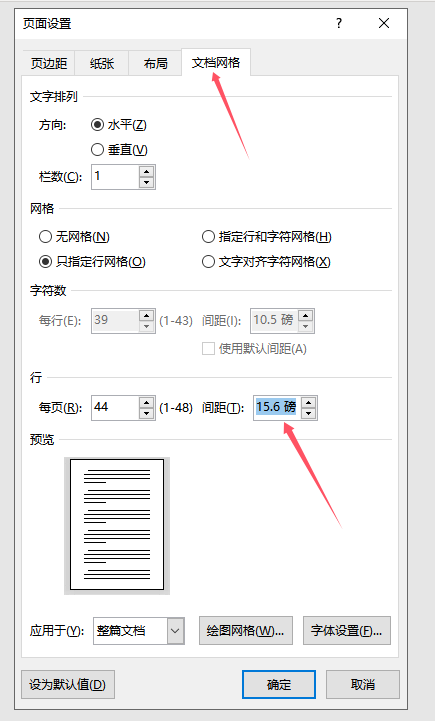
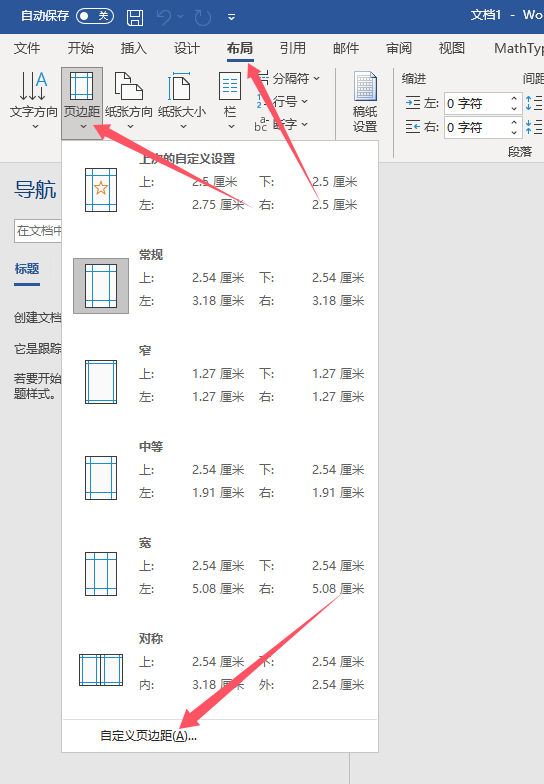
1、但是,有些毕业论文可能会 对齐到网格,那固定的值就不是行距大小,而是网格大小,来这儿看看你的网格是多大。
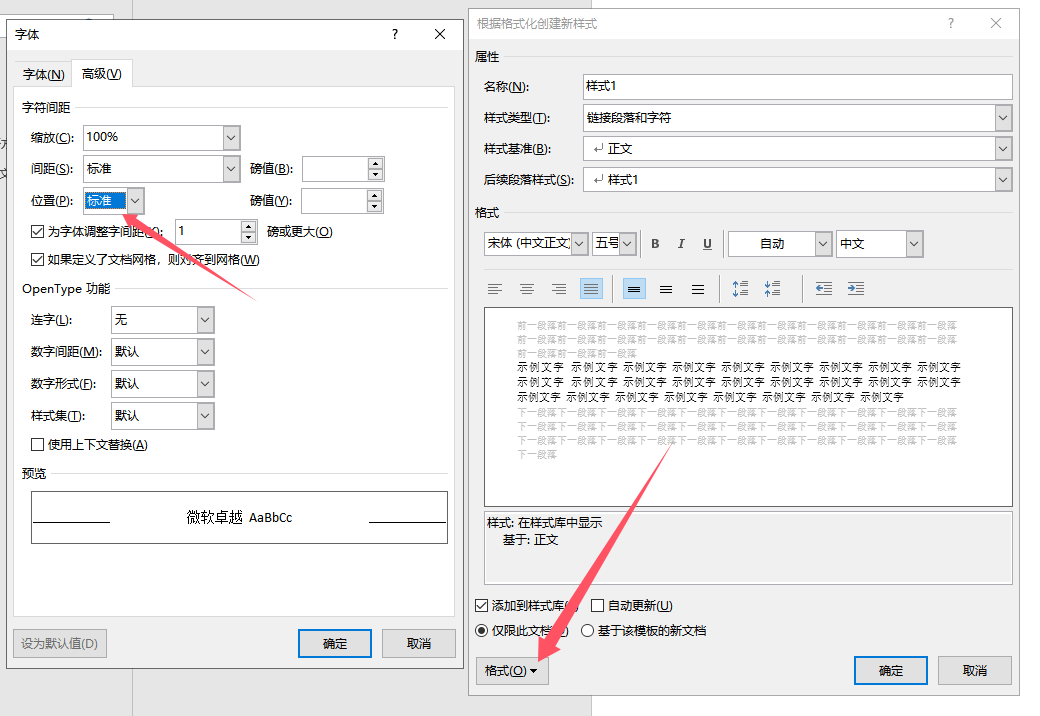
 2、创建的新样式,后续用,修改字体位置:标准
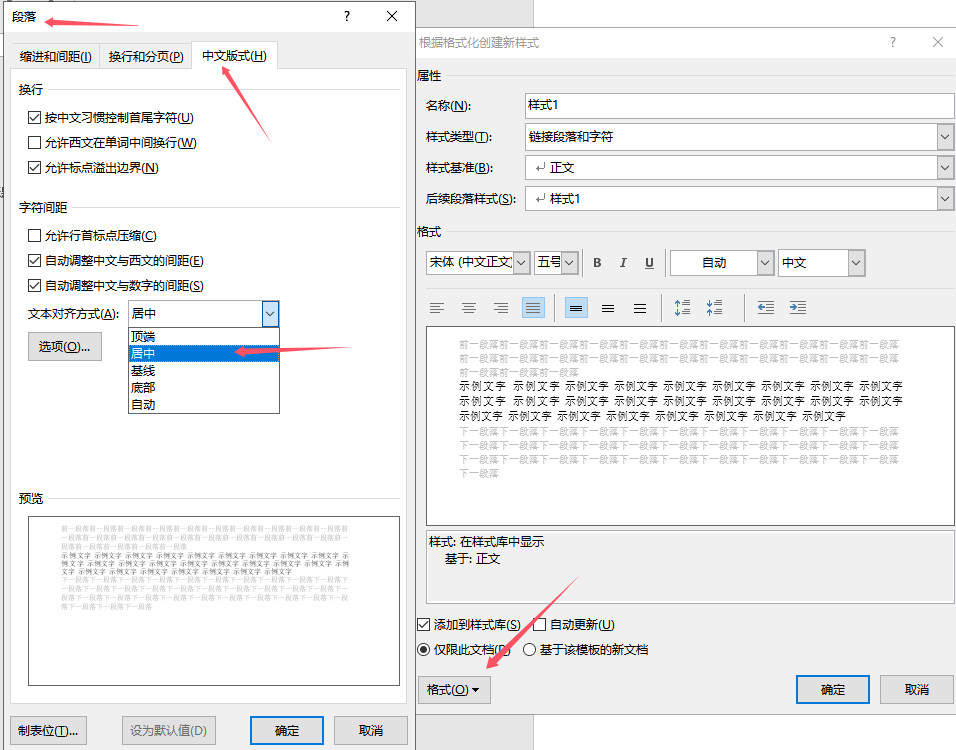
 3、修改段落设置:固定行距  和 中文板式  居中

 4、选中行距不对的段落,去刷就行
5、如果刷完后公式被部分遮挡,手动调整公式的大小,弄小点全漏出来就行。

发现个问题,有时候创建的样式点一下文字动了,公式没动,要点两下才行。