惯性聚合 高效追踪和阅读你感兴趣的博客、新闻、科技资讯
阅读原文 在惯性聚合中打开

推荐订阅源

P
Proofpoint News Feed
博客园 - 聂微东
Application and Cybersecurity Blog
MyScale Blog
MyScale Blog
罗磊的独立博客
H
Help Net Security
L
LangChain Blog
T
Threat Research - Cisco Blogs
量子位
S
Securelist
Last Week in AI
Last Week in AI
L
Lohrmann on Cybersecurity
T
The Exploit Database - CXSecurity.com
P
Privacy International News Feed
The Hacker News
The Hacker News
Vercel News
Vercel News
D
Darknet – Hacking Tools, Hacker News & Cyber Security
C
Cybersecurity and Infrastructure Security Agency CISA
T
The Blog of Author Tim Ferriss
T
Threatpost
Security Latest
Security Latest
P
Palo Alto Networks Blog
Microsoft Security Blog
NISL@THU
NISL@THU
F
Full Disclosure
WordPress大学
WordPress大学
cs.AI updates on arXiv.org
Stack Overflow Blog
Stack Overflow Blog
C
Check Point Blog
Hacker News - Newest:
Hacker News - Newest: "LLM"
酷 壳 – CoolShell
酷 壳 – CoolShell
H
Heimdal Security Blog
J
Java Code Geeks
Recorded Future
Recorded Future
Hugging Face - Blog
Hugging Face - Blog
G
GRAHAM CLULEY
Know Your Adversary
Know Your Adversary
K
KPMG report finds enterprise disconnect between AI and its ROI | CIO
阮一峰的网络日志
阮一峰的网络日志
U
Unit 42
B
Blog RSS Feed
月光博客
月光博客
C
Cisco Blogs
V
Visual Studio Blog
D
DataBreaches.Net
H
Hacker News: Front Page
博客园 - 叶小钗
N
News and Events Feed by Topic
爱范儿
爱范儿
A
Arctic Wolf

博客园 - zhuzhipeng

工作难找,我在江心洲摆野串,靠一个工具活下来了 约课系统-约刻 Mysql数据库导出数据字典文档Word或者HTML的3个工具 Linux 中 FTP的安装、apache安装并且设置apache的根目录为ftp用户的根目录 mysql中查看所有表、表字段、表注释、字段注释 mybatis-generator自动生成代码插件使用详解 CentOS7安装MySQL maven远程下载失败 手动导包到本地仓库 Linux文件权限一:普通权限(rwx) Windows安装Redis(转!) Git忽略已经提交过一次文件Git忽略文件 Intellij IDEA调试功能使用总结(step over / step into / force step into/step out等) Maven配置阿里云中心仓库 微信公众号分享时,提示invalid signature,签名错误 简单请求,复杂请求 ubuntu所有php扩展php-7.0扩展列表 Spring Boot整合UEditor不修改源码 beetl模版for循环渲染字符串 Springboot中IDE支持两种打包方式,即jar包和war包
Git 恢复本地误删的文件
zhuzhipeng · 2020-04-10 · via 博客园 - zhuzhipeng

通过git进行代码管理的项目,如果在本地编辑的过程中误删了某些文件或者文件夹,可以通过git操作来复原。

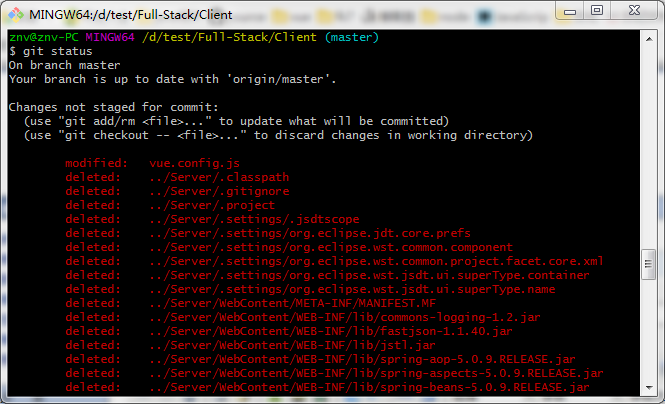
Step 1: git status

  查看本地对改动的暂存记录。如下图所示,本人误删了文件夹“../Server”。


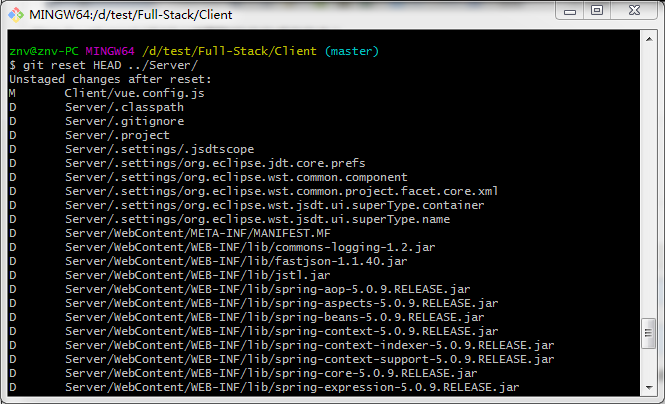
Step 2:git reset HEAD [ 被删除的文件或文件夹 ]

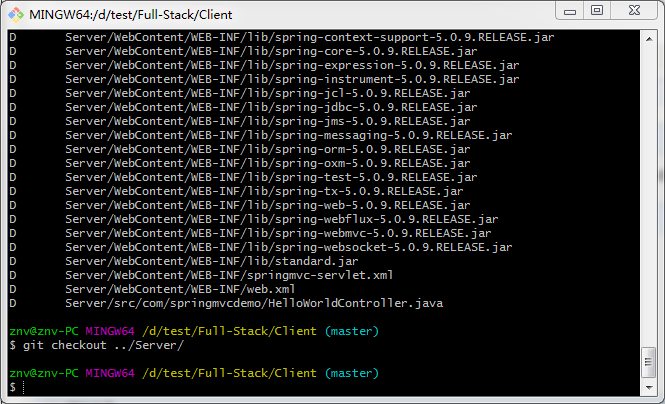
Step 3:git checkout  [ 被删除的文件或文件夹 ]

  以Server文件夹为例,需要先后执行:

  git reset HEAD ../Server

  git checkout ../Server

  至此,文件已恢复!