
惯性聚合 高效追踪和阅读你感兴趣的博客、新闻、科技资讯
阅读原文 在惯性聚合中打开

推荐订阅源

V
Visual Studio Blog
P
Privacy International News Feed
C
Cyber Attacks, Cyber Crime and Cyber Security
腾讯CDC
T
Threatpost
D
Darknet – Hacking Tools, Hacker News & Cyber Security
C
CERT Recently Published Vulnerability Notes
大猫的无限游戏
大猫的无限游戏
Apple Machine Learning Research
美团技术团队
Cisco Talos Blog
Cisco Talos Blog
C
Cisco Blogs
A
Arctic Wolf
人人都是产品经理
人人都是产品经理
NISL@THU
NISL@THU
L
LINUX DO - 热门话题
爱范儿
爱范儿
GbyAI
GbyAI
The Register - Security
AWS News Blog
AWS News Blog
MyScale Blog
MyScale Blog
T
Tenable Blog
Hugging Face - Blog
Hugging Face - Blog
A
About on SuperTechFans
Cyberwarzone
Cyberwarzone
量子位
Microsoft Azure Blog
让小产品的独立变现更简单 - ezindie.com
博客园_首页
C
Cybersecurity and Infrastructure Security Agency CISA
The Cloudflare Blog
B
Blog RSS Feed
小众软件
小众软件
D
Docker
Know Your Adversary
Know Your Adversary
Y
Y Combinator Blog
P
Privacy & Cybersecurity Law Blog
Engineering at Meta
Engineering at Meta
Latest news
Latest news
AI
AI
SecWiki News
SecWiki News
酷 壳 – CoolShell
酷 壳 – CoolShell
S
Secure Thoughts
N
News | PayPal Newsroom
The Hacker News
The Hacker News
MongoDB | Blog
MongoDB | Blog
Martin Fowler
Martin Fowler
博客园 - 司徒正美
L
Lohrmann on Cybersecurity
Cloudbric
Cloudbric

博客园 - zhuzhipeng

工作难找,我在江心洲摆野串,靠一个工具活下来了 约课系统-约刻 Mysql数据库导出数据字典文档Word或者HTML的3个工具 Linux 中 FTP的安装、apache安装并且设置apache的根目录为ftp用户的根目录 mysql中查看所有表、表字段、表注释、字段注释 mybatis-generator自动生成代码插件使用详解 CentOS7安装MySQL maven远程下载失败 手动导包到本地仓库 Linux文件权限一:普通权限(rwx) Git 恢复本地误删的文件 Windows安装Redis(转!) Git忽略已经提交过一次文件Git忽略文件 Intellij IDEA调试功能使用总结(step over / step into / force step into/step out等) Maven配置阿里云中心仓库 微信公众号分享时,提示invalid signature,签名错误 简单请求,复杂请求 ubuntu所有php扩展php-7.0扩展列表 beetl模版for循环渲染字符串 Springboot中IDE支持两种打包方式,即jar包和war包
Spring Boot整合UEditor不修改源码
zhuzhipeng · 2019-08-23 · via 博客园 - zhuzhipeng

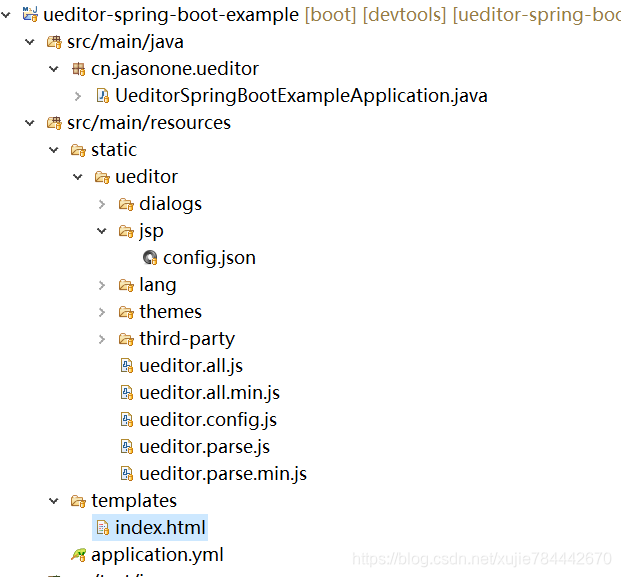
 1.创建Springboot项目,目录结构如下(在resources中static/ueditor/jsp/config.json)


        2.pom文件引入

<dependency>
    <groupId>cn.jasonone.ueditor</groupId>
	<artifactId>ueditor-spring-boot-starter</artifactId>
	<version>1.1.4</version>
</dependency>

3. Springboot application.yml配置(可选配置)

ue:
  root-path: classpath:/static #文件存储根目录(可选配置),默认为[classpath:/static]
  server-url: /ueditor/jsp/controller #服务器统一请求接口路径(可选配置),默认为[/ueditor/jsp/controller]
  upload: cn.jasonone.ueditor.upload.LocationFileStorage #文件持久化处理类(可选配置),默认为[cn.jasonone.ueditor.upload.LocationFileStorage]

 4.UEditor配置(必选)

  • static/ueditor/ueditor.config.js 将serverUrl 改为application.yml 中ue.server-url 的值
//...
//服务器统一请求接口路径
, serverUrl: URL + "jsp/controller"
//...

 5.HTML代码(index.html)

<!DOCTYPE html>
<html>
<head>
<meta charset="UTF-8">
<title>Insert title here</title>
</head>
<body>
	<script type="text/plain" id="editor"></script>
	<script th:src="@{/ueditor/ueditor.config.js}"></script>
	<script th:src="@{/ueditor/ueditor.all.js}"></script>
	<script th:src="@{/ueditor/lang/zh-cn/zh-cn.js}"></script>
	<script>
		UE.getEditor('editor');
	</script>
</body>
</html>

项目地址:https://gitee.com/hmjasonone/ueditor-spring-boot-stater

错误:Unable to read meta-data for class com.jason.ueditor.UeditorAutoConfiguration

 出错版本: 1.1.0

 解决办法: 将Jar包更新到1.1.3版本