惯性聚合 高效追踪和阅读你感兴趣的博客、新闻、科技资讯
阅读原文 在惯性聚合中打开

推荐订阅源

T
Tor Project blog
Threat Intelligence Blog | Flashpoint
T
Threatpost
T
Troy Hunt's Blog
O
OpenAI News
S
Securelist
cs.CV updates on arXiv.org
P
Proofpoint News Feed
S
Secure Thoughts
Martin Fowler
Martin Fowler
H
Hacker News: Front Page
博客园_首页
Security Latest
Security Latest
Cyberwarzone
Cyberwarzone
阮一峰的网络日志
阮一峰的网络日志
L
LINUX DO - 热门话题
V2EX - 技术
V2EX - 技术
W
WeLiveSecurity
雷峰网
雷峰网
博客园 - Franky
C
Cyber Attacks, Cyber Crime and Cyber Security
Jina AI
Jina AI
S
Security @ Cisco Blogs
Apple Machine Learning Research
S
Security Affairs
Scott Helme
Scott Helme
T
The Exploit Database - CXSecurity.com
博客园 - 三生石上(FineUI控件)
P
Privacy & Cybersecurity Law Blog
罗磊的独立博客
G
Google Developers Blog
L
Lohrmann on Cybersecurity
量子位
The GitHub Blog
The GitHub Blog
V
Vulnerabilities – Threatpost
大猫的无限游戏
大猫的无限游戏
T
Threat Research - Cisco Blogs
K
Kaspersky official blog
奇客Solidot–传递最新科技情报
奇客Solidot–传递最新科技情报
Webroot Blog
Webroot Blog
F
Fortinet All Blogs
CTFtime.org: upcoming CTF events
小众软件
小众软件
cs.CL updates on arXiv.org
GbyAI
GbyAI
PCI Perspectives
PCI Perspectives
N
News | PayPal Newsroom
OSCHINA 社区最新新闻
OSCHINA 社区最新新闻
Spread Privacy
Spread Privacy
有赞技术团队
有赞技术团队

博客园 - 陈晓猛

FFmpeg 完整介绍 验证网络ipv6的可用性 docker compose对应的内容,创建thread网络后连接设备 ONVIF协议与RTSP协议 OpenClaw:接入minimax-2.5的新手指引 Windows 端 OpenClaw 安装教程(保姆级) HA上配置MQTT esphome模拟IOT设备连接到HA ESPHome模拟设备脚本 自制hash_v1和hash_v2种子文件 接口 CDN(动态 CDN/API 网关 CDN)测试用例 cf-cache-status共有几种状态分别会在什么情况下产生 接口接入cdn和网页接入cdn的区别 pip安装依赖包报错内容为User defined options,Native files 如何解决 MCP:Trae中集成Playwright 实现网页自动化测试 测试用例设计检查项 如何给Playwright 添加 MCP(Microsoft Playwright Component Testing) npm 无法加载文件npm.ps1 文档收集地址 Ugreen记录验证不同国家码对应的跳转链接 error: command 'C:\Program Files (x86)\Microsoft Visual Studio\2022\BuildTools\VC\Tools\MSVC\14.44.35207\bin\HostX86\x64\cl.exe' failed with exit code 2 解决方案 - 陈晓猛 VScode在顶部生成作者信息 Cursor使用小技巧(待更新) Trae 接入 Claude 3.7:AI 编程工具界的“卷王”,完全免费 提高研发效能——基于 DeepSeek-V3的本地化实践 大模型&ai学习课程一些笔记 P图训练模型 python3安装crypto出错及解决方法 windows搭建syncthing中继服务器和发现服务器
使用zigbee2mqtt模拟发送信息
陈晓猛 · 2026-01-22 · via 博客园 - 陈晓猛

1、创建 iot-network 网络

root@DXP4800PRO-720C:/volume1/docker# docker network create iot-network
9a4b69c7eadb561fff3c2cf2d336a74ccf84d5a64d249bdb8b8427c3226a46b6
root@DXP4800PRO-720C:/volume1/docker# docker network ls | grep iot-network
9a4b69c7eadb   iot-network         bridge    local

2、安装at命令

# 1. 切换到root用户(避免权限不足)
sudo -i

# 2. 安装at工具(群晖基于Debian/Ubuntu,用apt安装)
apt-get update && apt-get install -y at

# 3. 启动at服务(确保命令可用)
service atd start

# 4. 验证是否安装成功(输出at的版本信息即为成功)
at --version

3、直接跑docker脚本,需要一行一行复制进去否则会有windows和linux制表符不一致导致的运行问题

# 第一步:创建目录并设置权限
mkdir -p /volume1/docker/mosquitto/{config,data,log}
chown -R root:root /volume1/docker/mosquitto
chmod -R 755 /volume1/docker/mosquitto

# 第二步:创建最简配置文件(手动输入,避免换行符)
cat > /volume1/docker/mosquitto/config/mosquitto.conf << EOF
listener 1883 0.0.0.0
allow_anonymous true
persistence true
persistence_location /mosquitto/data/
log_dest file /mosquitto/log/mosquitto.log
EOF

# 第三步:设置配置文件权限
chmod 755 /volume1/docker/mosquitto/config/mosquitto.conf
chown root:root /volume1/docker/mosquitto/config/mosquitto.conf

# 第四步:启动容器(替换iot-network为你的Docker网络名,没有则删除--network行)
docker run -d \
  --name mosquitto \
  --network iot-network \
  -p 1883:1883 \
  -v /volume1/docker/mosquitto/config:/mosquitto/config \
  -v /volume1/docker/mosquitto/data:/mosquitto/data \
  -v /volume1/docker/mosquitto/log:/mosquitto/log \
  --restart always \
  eclipse-mosquitto:latest

3、打开 zigbee2MQTT 地址  http://172.17.110.23:8080/ ,信道选择15
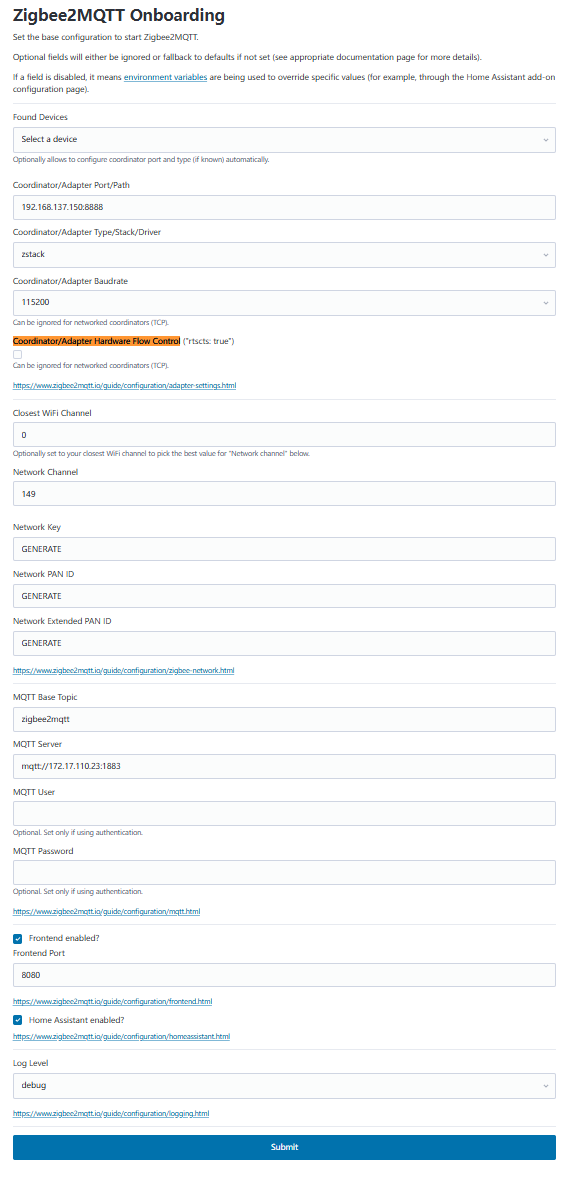
image

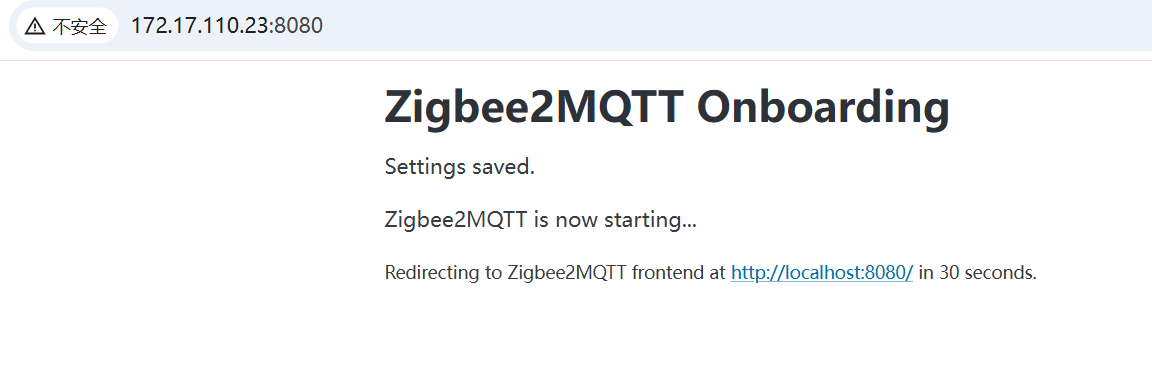
点击提交之后可以正常保存

image

下载mqttx windows的版本下载

https://mqttx.app/downloads

声明 欢迎转载,但请保留文章原始出处:) 博客园:https://www.cnblogs.com/chenxiaomeng/ 如出现转载未声明 将追究法律责任~谢谢合作