





惯性聚合 高效追踪和阅读你感兴趣的博客、新闻、科技资讯
阅读原文 在惯性聚合中打开

推荐订阅源

L
LINUX DO - 最新话题
cs.CV updates on arXiv.org
PCI Perspectives
PCI Perspectives
cs.AI updates on arXiv.org
K
KPMG report finds enterprise disconnect between AI and its ROI | CIO
H
Heimdal Security Blog
S
Security @ Cisco Blogs
N
News | PayPal Newsroom
J
Java Code Geeks
罗磊的独立博客
Security Archives - TechRepublic
N
News and Events Feed by Topic
V
V2EX
WordPress大学
WordPress大学
Google Online Security Blog
N
News and Events Feed by Topic
www.infosecurity-magazine.com
月光博客
月光博客
AI
AI
小众软件
小众软件
The GitHub Blog
The GitHub Blog
MongoDB | Blog
MongoDB | Blog
A
Arctic Wolf
CTFtime.org: upcoming CTF events
美团技术团队
Threat Intelligence Blog | Flashpoint
Exploit-DB.com RSS Feed
Hacker News - Newest:
Hacker News - Newest: "LLM"
T
Tailwind CSS Blog
S
Schneier on Security
博客园 - 三生石上(FineUI控件)
F
Full Disclosure
B
Blog RSS Feed
Forbes - Security
Forbes - Security
S
SegmentFault 最新的问题
钛媒体:引领未来商业与生活新知
钛媒体:引领未来商业与生活新知
人人都是产品经理
人人都是产品经理
云风的 BLOG
云风的 BLOG
Jina AI
Jina AI
Cisco Talos Blog
Cisco Talos Blog
U
Unit 42
Project Zero
Project Zero
H
Hacker News: Front Page
Y
Y Combinator Blog
Application and Cybersecurity Blog
The Cloudflare Blog
大猫的无限游戏
大猫的无限游戏
S
Secure Thoughts
The Hacker News
The Hacker News
Microsoft Azure Blog

博客园 - 陈晓猛

验证网络ipv6的可用性 docker compose对应的内容,创建thread网络后连接设备 ONVIF协议与RTSP协议 OpenClaw:接入minimax-2.5的新手指引 Windows 端 OpenClaw 安装教程(保姆级) 使用zigbee2mqtt模拟发送信息 HA上配置MQTT esphome模拟IOT设备连接到HA ESPHome模拟设备脚本 自制hash_v1和hash_v2种子文件 接口 CDN(动态 CDN/API 网关 CDN)测试用例 cf-cache-status共有几种状态分别会在什么情况下产生 接口接入cdn和网页接入cdn的区别 pip安装依赖包报错内容为User defined options,Native files 如何解决 MCP:Trae中集成Playwright 实现网页自动化测试 测试用例设计检查项 如何给Playwright 添加 MCP(Microsoft Playwright Component Testing) npm 无法加载文件npm.ps1 文档收集地址 Ugreen记录验证不同国家码对应的跳转链接 VScode在顶部生成作者信息 Cursor使用小技巧(待更新) Trae 接入 Claude 3.7:AI 编程工具界的“卷王”,完全免费 提高研发效能——基于 DeepSeek-V3的本地化实践 大模型&ai学习课程一些笔记 P图训练模型 python3安装crypto出错及解决方法 windows搭建syncthing中继服务器和发现服务器
error: command 'C:\Program Files (x86)\Microsoft Visual Studio\2022\BuildTools\VC\Tools\MSVC\14.44.35207\bin\HostX86\x64\cl.exe' failed with exit code 2 解决方案 - 陈晓猛
陈晓猛 · 2025-06-26 · via 博客园 - 陈晓猛

安装jenkins时出现了上面的错误 ,按照 ds给的步骤进行修复

这个错误表明在使用 Microsoft Visual C++ 编译器 (cl.exe) 编译 Python 扩展模块时失败了(退出码 2)。以下是详细的解决方案:


1. 核心原因

这是典型的 Python C/C++ 扩展编译失败 问题,常见于:

  • 安装需要编译的 Python 包(如 pycryptolxmljenkins 等)
  • 系统缺少必要的 VS Build Tools 组件或环境配置错误
  • 代码中存在语法错误或兼容性问题

2. 解决方案

① 安装完整的 VS Build Tools 组件

  1. 卸载现有 Build Tools
  2. 从 VS 官方下载页面 重新安装,勾选:
    • "C++ 桌面开发"
    • "Windows 10/11 SDK"
    • "C++ CMake 工具"

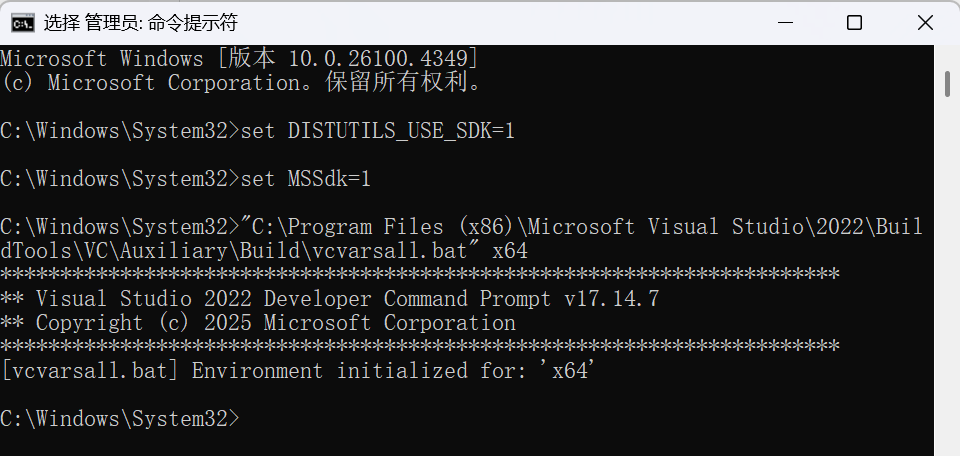
② 设置正确环境变量

在 管理员权限的终端 中运行:

:: 设置 VS 工具链路径
set DISTUTILS_USE_SDK=1
set MSSdk=1

:: 重新激活环境
"C:\Program Files (x86)\Microsoft Visual Studio\2022\BuildTools\VC\Auxiliary\Build\vcvarsall.bat" x64
③ 强制使用二进制轮子(wheel)

跳过源码编译:

pip install --only-binary=:all: 包名

 例如 jenkins

pip install --only-binary=:all: jenkins

④ 安装预编译版本

pip install 包名 --global-option="--no-compile"

3. 分步诊断

步骤 1:检查编译器是否有效

若报错则说明环境未配置正确。

步骤 2:验证 Python 环境

python -m pip debug --verbose

检查是否显示 VC++ 14.x 兼容标签。

步骤 3:查看完整错误日志

pip install 包名 -vvv > install.log 2>&1

搜索 error C2065error C2143 等具体编译错误。


4. 常见子错误及修复

错误类型解决方案
error C2065: 'xxx': undeclared identifier 升级 setuptoolspip install --upgrade setuptools
error LNK1104: cannot open file 'python310.lib' 安装对应 Python 版本的开发头文件
fatal error C1083: Cannot open include file: 'stdio.h' 重装 Windows SDK(通过 VS Installer)

5. 替代方案

如果问题持续:

1.使用 Conda 环境(自动处理依赖)

2.改用 Docker:

docker run -it python:3.10 pip install 包名

3.寻找纯 Python 实现的替代包

6. 验证修复

测试编译器工作状态:

# test_compiler.py
from setuptools import setup
from setuptools.dist import Distribution

class BinaryDistribution(Distribution):
    def has_ext_modules(self):
        return True

setup(distclass=BinaryDistribution)

运行:

python setup.py bdist_wheel

通过以上方法,90% 的 VS 编译问题可以解决。如果仍报错,建议:

  1. 提供完整的错误日志
  2. 说明您具体安装的包名和版本
  3. 确认 Python 版本与 VS Build Tools 的匹配性(例如 Python 3.10 需要 VS 2019/2022)

 ERROR: Could not find a version that satisfies the requirement jenkins (from versions: none)

1. 错误原因分析

  • ❌ 包名错误:PyPI 上没有名为 jenkins 的直接可用包。
  • ✅ 正确包名:实际维护的包是 python-jenkins(由 Jenkins 官方社区维护)。

2. 立即解决方案

安装正确的包:

1. 错误原因分析
❌ 包名错误:PyPI 上没有名为 jenkins 的直接可用包。
✅ 正确包名:实际维护的包是 python-jenkins(由 Jenkins 官方社区维护)。
2. 立即解决方案
安装正确的包:

声明 欢迎转载,但请保留文章原始出处:) 博客园:https://www.cnblogs.com/chenxiaomeng/ 如出现转载未声明 将追究法律责任~谢谢合作