









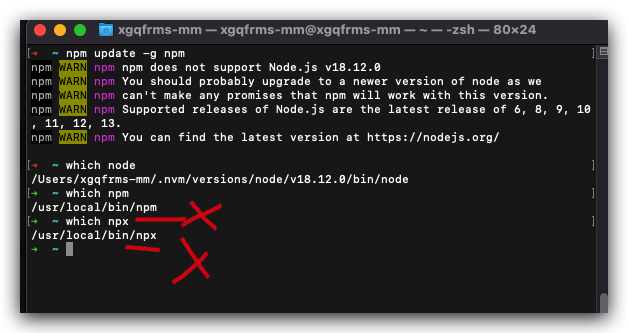
$ npm i -g npm

$ npm update -g npm
npm WARN npm npm does not support Node.js v18.12.0
npm WARN npm You should probably upgrade to a newer version of node as we
npm WARN npm can't make any promises that npm will work with this version.
npm WARN npm Supported releases of Node.js are the latest release of 6, 8, 9, 10, 11, 12, 13.
npm WARN npm You can find the latest version at https://nodejs.org/
# /usr/local/bin/node ❌ 全局安装的 node.JS 已经删除了, 使用 nvm 了
➜  ~ which node
/Users/xgqfrms-mm/.nvm/versions/node/v18.12.0/bin/node
➜  ~ which npm
/usr/local/bin/npm
➜  ~ which npx
/usr/local/bin/npx
删除
$ cd /usr/local/bin/

# bin
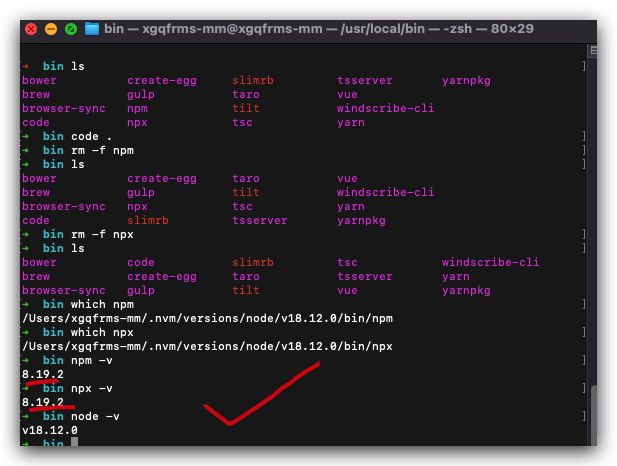
$ ls
bower          create-egg     slimrb         tsserver       yarnpkg
brew           gulp           taro           vue
browser-sync   npm            tilt           windscribe-cli
code           npx            tsc            yarn


# 打开 vscode
$ code .
# or, 打开 finder
$ open .


$ rm -f npm
$ rm -f npx

# npm 自动 match 使用 nvm 安装的 node.js 版本 ✅
$ which npm
/Users/xgqfrms-mm/.nvm/versions/node/v18.12.0/bin/npm
$ which npx
/Users/xgqfrms-mm/.nvm/versions/node/v18.12.0/bin/npx

$ npm -v
8.19.2
$ npx -v
8.19.2
$ node -v
v18.12.0
#!/usr/bin/env node
;(function () { // wrapper in case we're in module_context mode
  // windows: running "npm blah" in this folder will invoke WSH, not node.
  /* global WScript */
  if (typeof WScript !== 'undefined') {
    WScript.echo(
      'npm does not work when run\n' +
        'with the Windows Scripting Host\n\n' +
        "'cd' to a different directory,\n" +
        "or type 'npm.cmd <args>',\n" +
        "or type 'node npm <args>'."
    )
    WScript.quit(1)
    return
  }

  process.title = 'npm'

  var unsupported = require('../lib/utils/unsupported.js')
  unsupported.checkForBrokenNode()

  var log = require('npmlog')
  log.pause() // will be unpaused when config is loaded.
  log.info('it worked if it ends with', 'ok')

  unsupported.checkForUnsupportedNode()

  var npm = require('../lib/npm.js')
  var npmconf = require('../lib/config/core.js')
  var errorHandler = require('../lib/utils/error-handler.js')

  var configDefs = npmconf.defs
  var shorthands = configDefs.shorthands
  var types = configDefs.types
  var nopt = require('nopt')

  // if npm is called as "npmg" or "npm_g", then
  // run in global mode.
  if (process.argv[1][process.argv[1].length - 1] === 'g') {
    process.argv.splice(1, 1, 'npm', '-g')
  }

  log.verbose('cli', process.argv)

  var conf = nopt(types, shorthands)
  npm.argv = conf.argv.remain
  if (npm.deref(npm.argv[0])) npm.command = npm.argv.shift()
  else conf.usage = true

  if (conf.version) {
    console.log(npm.version)
    return errorHandler.exit(0)
  }

  if (conf.versions) {
    npm.command = 'version'
    conf.usage = false
    npm.argv = []
  }

  log.info('using', 'npm@%s', npm.version)
  log.info('using', 'node@%s', process.version)

  process.on('uncaughtException', errorHandler)
  process.on('unhandledRejection', errorHandler)

  if (conf.usage && npm.command !== 'help') {
    npm.argv.unshift(npm.command)
    npm.command = 'help'
  }

  var isGlobalNpmUpdate = conf.global && ['install', 'update'].includes(npm.command) && npm.argv.includes('npm')

  // now actually fire up npm and run the command.
  // this is how to use npm programmatically:
  conf._exit = true
  npm.load(conf, function (er) {
    if (er) return errorHandler(er)
    if (
      !isGlobalNpmUpdate &&
      npm.config.get('update-notifier') &&
      !unsupported.checkVersion(process.version).unsupported
    ) {
      const pkg = require('../package.json')
      let notifier = require('update-notifier')({pkg})
      const isCI = require('ci-info').isCI
      if (
        notifier.update &&
        notifier.update.latest !== pkg.version &&
        !isCI
      ) {
        const color = require('ansicolors')
        const useColor = npm.config.get('color')
        const useUnicode = npm.config.get('unicode')
        const old = notifier.update.current
        const latest = notifier.update.latest
        let type = notifier.update.type
        if (useColor) {
          switch (type) {
            case 'major':
              type = color.red(type)
              break
            case 'minor':
              type = color.yellow(type)
              break
            case 'patch':
              type = color.green(type)
              break
          }
        }
        const changelog = `https://github.com/npm/cli/releases/tag/v${latest}`
        notifier.notify({
          message: `New ${type} version of ${pkg.name} available! ${
            useColor ? color.red(old) : old
          } ${useUnicode ? '→' : '->'} ${
            useColor ? color.green(latest) : latest
          }\n` +
          `${
            useColor ? color.yellow('Changelog:') : 'Changelog:'
          } ${
            useColor ? color.cyan(changelog) : changelog
          }\n` +
          `Run ${
            useColor
              ? color.green(`npm install -g ${pkg.name}`)
              : `npm i -g ${pkg.name}`
          } to update!`
        })
      }
    }
    npm.commands[npm.command](npm.argv, function (err) {
      // https://genius.com/Lin-manuel-miranda-your-obedient-servant-lyrics
      if (
        !err &&
        npm.config.get('ham-it-up') &&
        !npm.config.get('json') &&
        !npm.config.get('parseable') &&
        npm.command !== 'completion'
      ) {
        console.error(
          `\n ${
            npm.config.get('unicode') ? '🎵 ' : ''
          } I Have the Honour to Be Your Obedient Servant,${
            npm.config.get('unicode') ? '🎵 ' : ''
          } ~ npm ${
            npm.config.get('unicode') ? '📜🖋 ' : ''
          }\n`
        )
      }
      errorHandler.apply(this, arguments)
    })
  })
})()
#!/usr/bin/env node

const npx = require('libnpx')
const path = require('path')

const NPM_PATH = path.join(__dirname, 'npm-cli.js')

npx(npx.parseArgs(process.argv, NPM_PATH))
https://github.com/web-full-stack/nextjs-ssr/issues/7
©xgqfrms 2012-2020
www.cnblogs.com/anonymous007 发布文章使用:只允许注册用户才可以访问!
原创文章,版权所有©️anonymous007, 禁止转载 🈲️,侵权必究⚠️!
此内容由惯性聚合(RSS阅读器)自动聚合整理,仅供阅读参考。 原文来自 — 版权归原作者所有。