






REM D:\APP\AutoRun\Program\AutoRun.bat 开机自动启动批处理脚本文件 2025年11月17日

REM D:\APP\AutoRun\Program\AutoRun.bat 开机自动启动批处理脚本文件@echo offcd /d D:\APP\AutoRun\Program\start D:\APP\AutoRun\Program\AutoHotkeyA32.exe D:\APP\AutoRun\Program\AutoRun.ahkexit; D:\APP\AutoRun\Program\AutoRun.ahk 开机自动启动AHK脚本文件; 开机自动启动项; ======================================================================; 1. 检测是否已拥有管理员权限if !A_IsAdmin { ; 2. 无权限时,以管理员身份重启脚本 MsgBox, 本脚本需要管理员权限才能运行,即将请求授权... Run *RunAs "%A_ScriptFullPath%" ; *RunAs 是提权关键参数 ExitApp ; 退出当前非管理员进程}; ======================================================================; 添加快捷方式到所有用户开始菜单程序启动文件夹,设置开机自动运行此脚本; ==============================; 仅需修改这2个参数!; ==============================TargetProgram := "D:\APP\AutoRun\Program\AutoRun.bat" ; 要自启的程序完整路径ShortcutName := "AutoRun-1.lnk" ; 快捷方式名称(必须带.lnk后缀); ==============================; 可选配置(按需修改); ==============================AllUsers := true ; false=仅当前用户(无需管理员),true=所有用户(需管理员); ==============================; 核心执行代码(无需修改); ==============================; 获取启动文件夹路径StartupFolder := AllUsers ? A_ProgramData "\Microsoft\Windows\Start Menu\Programs\Startup" : A_AppData "\Microsoft\Windows\Start Menu\Programs\Startup"ShortcutPath := StartupFolder "\" ShortcutName; 验证目标程序是否存在if !FileExist(TargetProgram) { MsgBox, 错误:找不到程序!`n路径:%TargetProgram%, 0x10 ; 0x10=错误图标 ExitApp}; 所有用户模式需要管理员权限,自动提权if AllUsers && !A_IsAdmin { Run *RunAs "%A_ScriptFullPath%" ; 以管理员身份重启脚本 ExitApp}; 创建快捷方式(通过WScript.Shell COM对象)try { Shell := ComObjCreate("WScript.Shell")Link := Shell.CreateShortcut(ShortcutPath)Link.TargetPath := TargetProgram ; 目标程序路径Link.WorkingDirectory := FileGetDirectory(TargetProgram) ; 工作目录(程序所在文件夹)Link.Save() ; 保存快捷方式; MsgBox, 快捷方式创建成功!`n位置:%StartupFolder%`n名称:%ShortcutName%, 0x40 ; 0x40=信息图标} catch e {; MsgBox, 创建失败!`n错误:%Message%, 0x10}; ======================================================================; 添加快捷方式到当前用户开始菜单程序启动文件夹,设置开机自动运行此脚本; ==============================; 仅需修改这2个参数!; ==============================TargetProgram := "D:\APP\AutoRun\Program\AutoRun.bat" ; 要自启的程序完整路径ShortcutName := "AutoRun-2.lnk" ; 快捷方式名称(必须带.lnk后缀); ==============================; 可选配置(按需修改); ==============================AllUsers := false ; false=仅当前用户(无需管理员),true=所有用户(需管理员); ==============================; 核心执行代码(无需修改); ==============================; 获取启动文件夹路径StartupFolder := AllUsers ? A_ProgramData "\Microsoft\Windows\Start Menu\Programs\Startup" : A_AppData "\Microsoft\Windows\Start Menu\Programs\Startup"ShortcutPath := StartupFolder "\" ShortcutName; 验证目标程序是否存在if !FileExist(TargetProgram) { MsgBox, 错误:找不到程序!`n路径:%TargetProgram%, 0x10 ; 0x10=错误图标 ExitApp}; 所有用户模式需要管理员权限,自动提权if AllUsers && !A_IsAdmin { Run *RunAs "%A_ScriptFullPath%" ; 以管理员身份重启脚本 ExitApp}; 创建快捷方式(通过WScript.Shell COM对象)try { Shell := ComObjCreate("WScript.Shell")Link := Shell.CreateShortcut(ShortcutPath)Link.TargetPath := TargetProgram ; 目标程序路径Link.WorkingDirectory := FileGetDirectory(TargetProgram) ; 工作目录(程序所在文件夹)Link.Save() ; 保存快捷方式; MsgBox, 快捷方式创建成功!`n位置:%StartupFolder%`n名称:%ShortcutName%, 0x40 ; 0x40=信息图标} catch e {; MsgBox, 创建失败!`n错误:%Message%, 0x10}; 辅助函数:获取文件所在目录FileGetDirectory(Path) { SplitPath, Path, , OutDir return OutDir}; ======================================================================; 添加注册表项目,设置开机自动运行此脚本Run,Reg add HKEY_LOCAL_MACHINE\SOFTWARE\Microsoft\Windows\CurrentVersion\Run /v AutoRun-3 /t REG_SZ /d "D:\APP\AutoRun\Program\AutoRun.bat" /fRun,Reg add HKEY_CURRENT_USER\SOFTWARE\Microsoft\Windows\CurrentVersion\Run /v AutoRun-4 /t REG_SZ /d "D:\APP\AutoRun\Program\AutoRun.bat" /fRun,regedit.exe /s "D:\APP\AutoRun\Program\AutoRun.Reg"; ======================================================================; 设置互斥体,阻止脚本重复运行Single(flag) { ;,返回1为重复,返回0为第一个运行 DllCall("CreateMutex", "Ptr",0, "int",0, "str", "Ahk_Single_" flag) return A_LastError=0xB7 ? true : false}#SingleInstance,Off ;关闭自带互斥功能if (Single("276193850")) { ;独一无二的字符串用于识别脚本,或者称为指纹? ; MsgBox,16,提示,程序已启动!`n请勿重复运行 ExitApp}; ======================================================================; 检查是否存在开机自动启动项配置文本文件,如果没有就创建一个示范配置文本文件。IniPath := A_ScriptDir "\..\开机自动启动项.txt"IfNotExist,% IniPath{ ; 配置文件内容 configContent = ( ; D:\APP\AutoRun\开机自动启动项.txt 配置文件D:\APP\TotalCMD\_SetHotkey-TCEV.exeNotepad.exeCalc.exeD:\APP\Maye-Lite\Maye-Lite.exeD:\APP\TotalCMD\TotalCMD.exeD:\APP\FastCopy\FastCopy.batD:\APP\Coodesker\Coodesker.exeD:\APP\QQ\QQ.exeD:\APP\Dexpot\Dexpot.exeC:\Program Files\zspace\极空间.exeC:\Program Files (x86)\滴答清单\TickTick.exeC:\Program Files\ynote-desktop\有道云笔记.exeC:\app\GoodSync\x64\GoodSync2Go.exe ) ; 写入配置文件 ; 为了支持中文文件夹目录,在文件末尾处追加(写入) ; 文本(如果有必要, 首先创建文件).指定编码或编码页, ; 例如 UTF-8, UTF-16 或 CP936.如果文件包含 UTF-8 或 ; UTF-16 字节顺序标记(BOM), 则忽略此参数和默认编码. FileAppend, % configContent,% IniPath, UTF-8}; ======================================================================; 逐行读取文本文件的内容, 每次读取一行并运行读到的程序。loop, Read,% IniPath{ loop, Parse, A_LoopReadLine, % A_Tab { ; MsgBox, Field number %A_Index% is %A_LoopField%. IfExist,% A_LoopField { Run,% A_LoopField } }}; ======================================================================; 等待30秒钟,让互斥体存在30秒钟,阻止另外的脚本重复运行Sleep,30000ExitAppWindows Registry Editor Version 5.00[HKEY_LOCAL_MACHINE\SOFTWARE\Microsoft\Windows\CurrentVersion\Run]"AutoRun-5"="\"D:\\APP\\AutoRun\\Program\\AutoRun.bat\" "[HKEY_CURRENT_USER\SOFTWARE\Microsoft\Windows\CurrentVersion\Run]"AutoRun-6"="\"D:\\APP\\AutoRun\\Program\\AutoRun.bat\" "REM D:\APP\AutoRun\Program\打开当前用户启动文件夹.batstart "" "shell:startup"exitREM D:\APP\AutoRun\Program\打开所有用户启动文件夹.batstart "" "shell:common startup"exit; D:\APP\AutoRun\开机自动启动项.txt 配置文件D:\APP\TotalCMD\_SetHotkey-TCEV.exeNotepad.exeCalc.exeD:\APP\Maye-Lite\Maye-Lite.exeD:\APP\TotalCMD\TotalCMD.exeD:\APP\FastCopy\FastCopy.batD:\APP\Coodesker\Coodesker.exeD:\APP\QQ\QQ.exeD:\APP\Dexpot\Dexpot.exeC:\Program Files\zspace\极空间.exeC:\Program Files (x86)\滴答清单\TickTick.exeC:\Program Files\ynote-desktop\有道云笔记.exeC:\app\GoodSync\x64\GoodSync2Go.exe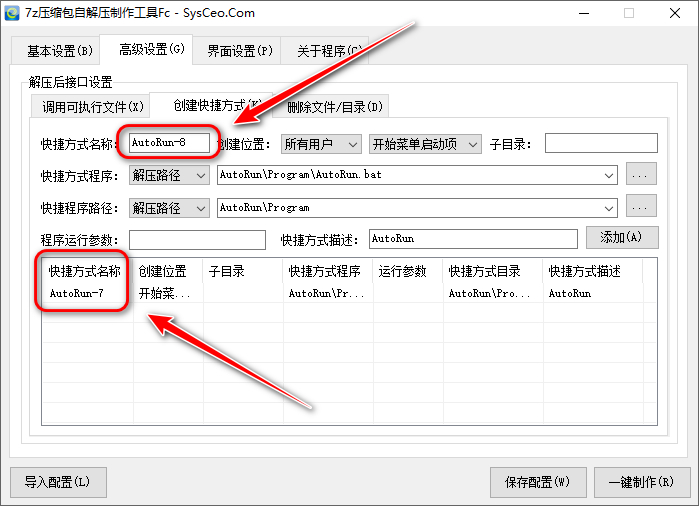
此内容由惯性聚合(RSS阅读器)自动聚合整理,仅供阅读参考。 原文来自 — 版权归原作者所有。