惯性聚合 高效追踪和阅读你感兴趣的博客、新闻、科技资讯
阅读原文 在惯性聚合中打开

推荐订阅源

TaoSecurity Blog
TaoSecurity Blog
Jina AI
Jina AI
雷峰网
雷峰网
月光博客
月光博客
The GitHub Blog
The GitHub Blog
WordPress大学
WordPress大学
B
Blog RSS Feed
美团技术团队
C
CXSECURITY Database RSS Feed - CXSecurity.com
小众软件
小众软件
Security Latest
Security Latest
Microsoft Azure Blog
Threat Intelligence Blog | Flashpoint
C
Cybersecurity and Infrastructure Security Agency CISA
Last Week in AI
Last Week in AI
A
Arctic Wolf
Latest news
Latest news
Attack and Defense Labs
I
Intezer
F
Fortinet All Blogs
罗磊的独立博客
MongoDB | Blog
MongoDB | Blog
Webroot Blog
Webroot Blog
S
Secure Thoughts
Help Net Security
Help Net Security
Apple Machine Learning Research
博客园_首页
V
Visual Studio Blog
P
Proofpoint News Feed
博客园 - 【当耐特】
P
Privacy International News Feed
V
Vulnerabilities – Threatpost
Stack Overflow Blog
Stack Overflow Blog
Know Your Adversary
Know Your Adversary
云风的 BLOG
云风的 BLOG
Hacker News: Ask HN
Hacker News: Ask HN
L
LINUX DO - 最新话题
H
Help Net Security
爱范儿
爱范儿
酷 壳 – CoolShell
酷 壳 – CoolShell
S
SegmentFault 最新的问题
Forbes - Security
Forbes - Security
T
Tailwind CSS Blog
量子位
奇客Solidot–传递最新科技情报
奇客Solidot–传递最新科技情报
T
Tenable Blog
Cloudbric
Cloudbric
N
News and Events Feed by Topic
cs.AI updates on arXiv.org
Hugging Face - Blog
Hugging Face - Blog

博客园 - midhillzhou

windows 11关闭防火墙 以使得 外部的开发板可以主动发起ping通电脑 uboot中调试景略以太网phy JL3111A2-NA windows上excel运行macro之后出现错误 在linux上移植sgdisk 使用gdb调试user程序 之 某个线程的调用栈 在uboot中修改tja 1103以太网phy from slave to master porting perf性能观测工具 porting 开源memtester uboot 2020版本下gpio命令的使用 + linux下的libgpiod lib库的移植使用 ubi文件系统的 制作 + 挂载 + 若干问题 i2c指令使用 + 仿照开源i2ctransfer实现的自己的i2ctransfer windows下outlook 撤回邮件 安装repo 使用lauterbach debug uboot之重定位 uboot中各种memory读写命令 uboot nand flash dump 环境变量 + 制作环境变量分区 + 代码结构详解 uboot bootm代码详解图 Beyond Compare 进行二进制文档的比对时,怎么去对齐(转载) notepad++分析log小技巧 使用继电器控制开发板上下电 uboot debug小技巧
在linux上移植phytool + 调试tja1103 以太网phy
midhillzhou · 2026-01-16 · via 博客园 - midhillzhou

1.移植phytool

由于在linux板子上没有phytool这个工具,先移植

1.1 下载代码

git clone https://github.com/wkz/phytool.git

1.2 设置环境变量

export CROSS_COMPILE=aarch64-none-linux-gnu-
export CC=${CROSS_COMPILE}gcc
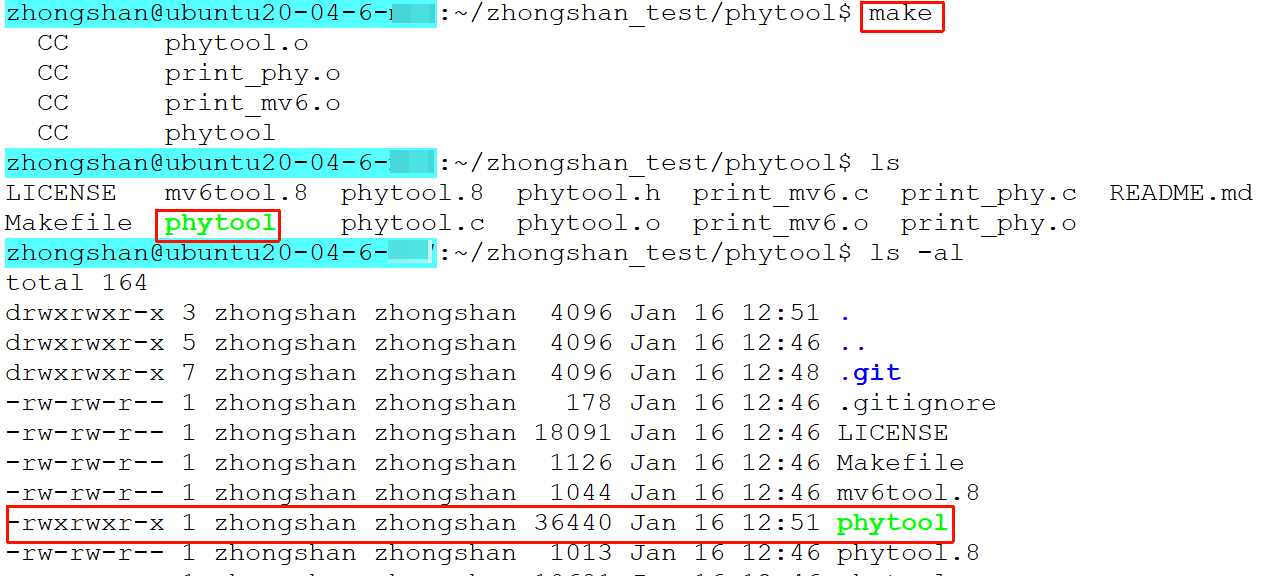
1.3 编译

image

生成的产物就是phytool,然后用scp命令将其copy到板子tmp目录下

scp ./phytool/phytool root@192.168.1.202:/tmp/

2.验证phytool移植的对不对

怎么验证呢?可以读一下phy的id寄存器8002h,8003h,看是否是和datasheet上的值是一样的

image

 下图中的eth0 是ifconfig里面的interface

26是因为目前我们phyad被硬件配置了0x1a = 26

1指MMD1。由于8000h-83ffh是被MMD1, MMD3, MMD30共享的,所以这里写1 or 3 or 30都是可以的。

image

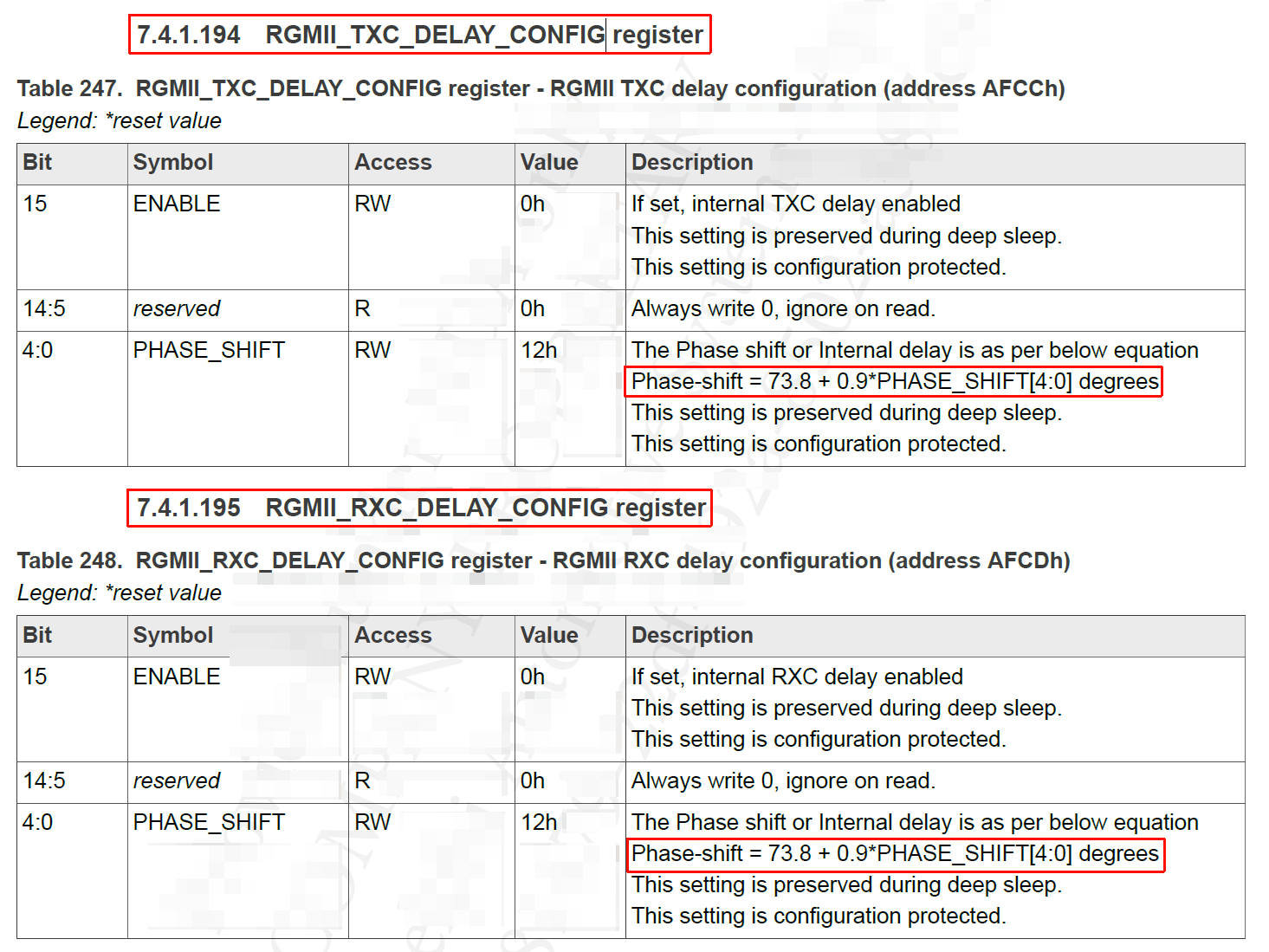
 3.查看tx/rx寄存器RGMII_TXC_DELAY_CONFIG和RGMII_RXC_DELAY_CONFIG

image

image

image

根据上图中的公式,计算下相位delay

0x12 = 18

phase-shift = 73.8 + 0.9 * 18 = 90°

所以相位应该是delay 1/4个周期,实际测试phy发出来的波形如下。

image

image

由于phy收到后,是在自己内部进行delay的,所以不能在总线上测量到,这里仍然测量一下,如下

image

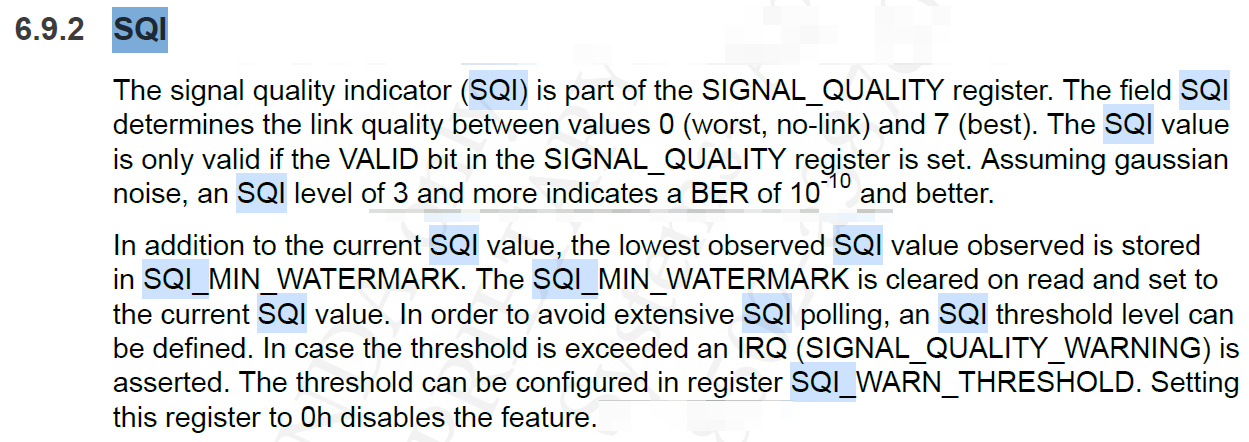
4.查看信号质量

image

image

 结果如下

image

5.动态的修改rx/tx delay值,并进行测量

image

image

 按如下顺序进行对rx/tx delay寄存器的热修改。

image

 测量的波形如下,可以发现

相对于上图中代码默认值0x8012的波形, 此时phy发出来的波形,0x8000配置值下,clk的时延变小了。

image