


惯性聚合 高效追踪和阅读你感兴趣的博客、新闻、科技资讯
阅读原文 在惯性聚合中打开

推荐订阅源

Recent Commits to openclaw:main
U
Unit 42
WordPress大学
WordPress大学
Microsoft Azure Blog
Martin Fowler
Martin Fowler
人人都是产品经理
人人都是产品经理
Microsoft Security Blog
T
The Blog of Author Tim Ferriss
博客园 - Franky
云风的 BLOG
云风的 BLOG
酷 壳 – CoolShell
酷 壳 – CoolShell
P
Palo Alto Networks Blog
NISL@THU
NISL@THU
cs.CL updates on arXiv.org
Vercel News
Vercel News
Threat Intelligence Blog | Flashpoint
P
Privacy & Cybersecurity Law Blog
C
Cyber Attacks, Cyber Crime and Cyber Security
J
Java Code Geeks
Google DeepMind News
C
Cisco Blogs
OSCHINA 社区最新新闻
OSCHINA 社区最新新闻
Spread Privacy
Spread Privacy
小众软件
小众软件
T
Threat Research - Cisco Blogs
Project Zero
Project Zero
博客园 - 三生石上(FineUI控件)
D
Darknet – Hacking Tools, Hacker News & Cyber Security
The Register - Security
The Hacker News
The Hacker News
F
Fortinet All Blogs
Security Latest
Security Latest
Cisco Talos Blog
Cisco Talos Blog
The GitHub Blog
The GitHub Blog
Stack Overflow Blog
Stack Overflow Blog
T
The Exploit Database - CXSecurity.com
量子位
Blog — PlanetScale
Blog — PlanetScale
奇客Solidot–传递最新科技情报
奇客Solidot–传递最新科技情报
P
Proofpoint News Feed
G
GRAHAM CLULEY
D
DataBreaches.Net
P
Privacy International News Feed
Y
Y Combinator Blog
Simon Willison's Weblog
H
Hackread – Cybersecurity News, Data Breaches, AI and More
I
InfoQ
CTFtime.org: upcoming CTF events
Recent Announcements
P
Proofpoint News Feed

博客园 - Fitz

测绘中2个角度相减对于跨360问题的算法总结 windows server2012 安装IIS6服务,编译器错误消息: CS0016: 未能写入输出文件“c:\*\App_Code.*.dll”--“拒绝访问。 ” - Fitz ollama 安装好之后,是不是还需要关闭一些配置? 赫尔默特变化 A=0的情况 libaom 在ubuntu 上用鸿蒙OHOS编译 相机标定 像元大小(例如 1.4 µm × 1.4 µm)具体的含义和用途 物理焦距、像素焦距、像元与相机内参(fx, fy)的意义与作用 如何使用像素坐标和相机内参来计算夹角 HarmonyOS Next Native C++ 开发入门 Ubuntu中用HarmonyOS Next的SDK编译libsodium,并在DevEco Studio中加载运行.a库 windows 编译rustdesk The authenticity of host '[ssh.github.com]:443([*]:443)' can't be established. ED25519 key fingerprint is matlab 云台控制 根据图像中目标位置,控制望远镜/摄像头转向目标方向 无深度方向估计 Ubuntu 安装conda 拍摄目标:采集 1000 张多样化的图片,覆盖目标的各种环境、角度、光照、尺寸和位置,提高模型的泛化能力。 android APK的MD5值获取有效办法 3D 汽车模拟器 Three.js
如何将带有线网卡和无线网卡的台式机作为网关/路由器
Fitz · 2025-09-20 · via 博客园 - Fitz

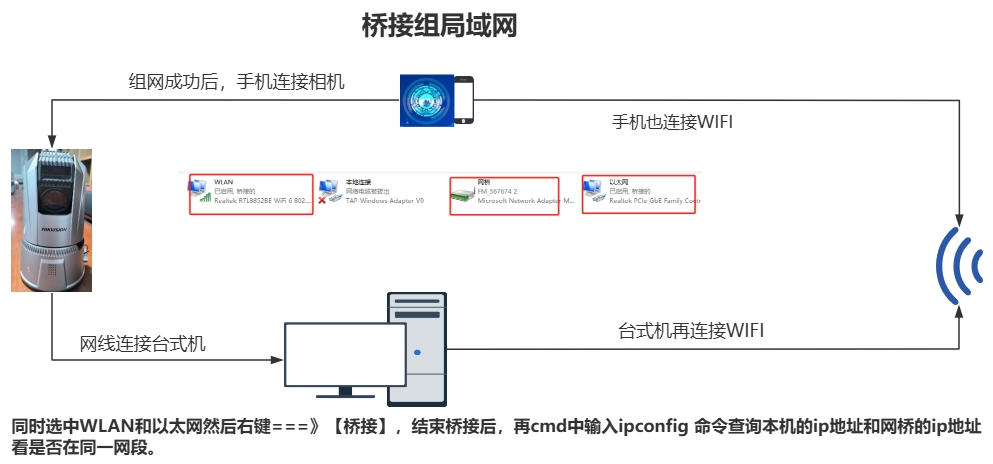
       目前的网络配置如下:海康网络摄像头通过网线直连台式机以太网口,并已通过海康SADP软件将其网络参数设置为静态IP地址 192.168.0.4,子网掩码 255.255.255.0,网关 192.168.0.1。台式机的有线网卡保持DHCP自动获取模式。 为实现手机通过Wi-Fi网络直接访问摄像头,需将台式机设置为网桥,使有线与无线网络处于同一局域网段。

         此方法通过在台式机上创建“网络桥”,将Wi-Fi和有线连接融合为单一网络接口,确保所有设备处于同一二层网络。

         操作步骤:

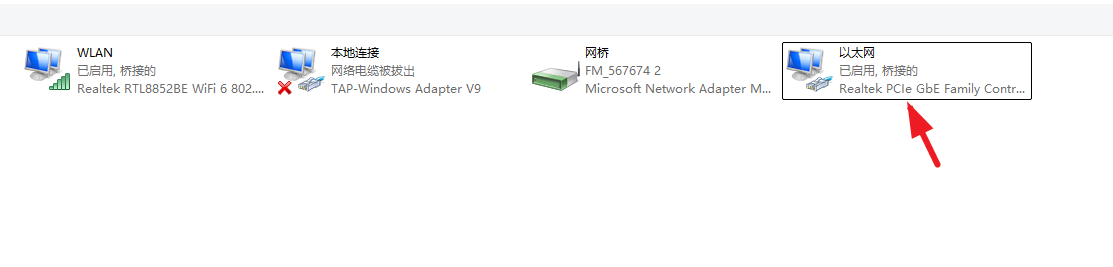
                1、台式机设置: 打开「控制面板」→「网络和 Internet」→「网络和共享中心」→「更改适配器设置」。

                 2、以太网(有线连接)设置ipv4 地址;192.168.0.*
55555555555555555

                3、按住 Ctrl 键并同时选中「WLAN(无线连接)」和「以太网(有线连接)」。 右键点击,选择「桥接」,系统将自动创建一个名为「网络桥」的新虚拟适配器。 等待系统自动为桥接接口分配IP地址(通常通过Wi-Fi路由器的DHCP获取)。

                4、手机连接Wi-Fi后,就能直连海康相机了。
888888888888888