

惯性聚合 高效追踪和阅读你感兴趣的博客、新闻、科技资讯
阅读原文 在惯性聚合中打开

推荐订阅源

Microsoft Azure Blog
Engineering at Meta
Engineering at Meta
CTFtime.org: upcoming CTF events
F
Fortinet All Blogs
博客园 - 叶小钗
T
Tailwind CSS Blog
Security Archives - TechRepublic
T
The Exploit Database - CXSecurity.com
Blog — PlanetScale
Blog — PlanetScale
T
Tenable Blog
人人都是产品经理
人人都是产品经理
D
DataBreaches.Net
A
Arctic Wolf
P
Proofpoint News Feed
S
SegmentFault 最新的问题
C
CERT Recently Published Vulnerability Notes
T
Threatpost
Y
Y Combinator Blog
WordPress大学
WordPress大学
L
LINUX DO - 热门话题
酷 壳 – CoolShell
酷 壳 – CoolShell
V
Vulnerabilities – Threatpost
AWS News Blog
AWS News Blog
小众软件
小众软件
U
Unit 42
云风的 BLOG
云风的 BLOG
美团技术团队
S
Securelist
C
Cybersecurity and Infrastructure Security Agency CISA
L
LangChain Blog
G
GRAHAM CLULEY
P
Proofpoint News Feed
I
Intezer
Security Latest
Security Latest
L
Lohrmann on Cybersecurity
NISL@THU
NISL@THU
Threat Intelligence Blog | Flashpoint
The Hacker News
The Hacker News
Cisco Talos Blog
Cisco Talos Blog
T
The Blog of Author Tim Ferriss
H
Heimdal Security Blog
T
Tor Project blog
MongoDB | Blog
MongoDB | Blog
The Cloudflare Blog
T
Troy Hunt's Blog
Know Your Adversary
Know Your Adversary
博客园 - 司徒正美
Google Online Security Blog
V
V2EX
Application and Cybersecurity Blog

博客园 - 唯一浩哥

Java集合系列-HashSet Java基础系列-单例的7种写法 Java基础系列-Lambda Java基础系列-SPI你认识吗 Java基础系列-时间日期API Java基础系列-RandomAccess Java基础系列-Optional 那些字段适不适合建索引? Mysql笔记 Spring知识点 Java基础系列-浅拷贝和深拷贝 前端-javascript知识点 前端-jquery知识点 Java基础系列-substring的原理 - 唯一浩哥 - 博客园 Java设计模式之《抽象工厂模式》及使用场景 - 唯一浩哥 - 博客园 Java基础系列-Enum深入解析 - 唯一浩哥 - 博客园 Java基础系列-Collector和Collectors - 唯一浩哥 - 博客园 Java基础系列-Stream - 唯一浩哥 - 博客园 Java并发编程系列-AbstractQueuedSynchronizer - 唯一浩哥 - 博客园
2026 年,macbook air 2015 升级硬盘注意事项
唯一浩哥 · 2026-01-24 · via 博客园 - 唯一浩哥

最近看到 macbook air 2015 可以升级 m.2硬盘,随买了 SN570 ,容量 1T,为了升级耗费了好多天,试了好多坑,现在把这几个坑记录下

1. 制作 macos 安装 U盘

  • 1.1 容量大于16G的好U盘
  • 1.2 关闭 WIFI
  • 1.3 使用磁盘工具抹除 U 盘,名称随便起 (我起的是 haoge)格式选:Mac OS扩展(日志式)方案:GUID 分区图
  • 1.4 打开终端 执行命令:
    sudo date 060100002023
  • 1.5 制作 U 盘命令:
    sudo /Applications/Install\ macOS\ Monterey.app/Contents/Resources/createinstallmedia --volume /Volumes/haoge
    • Monterey 是我安装的系统版本名称
    • haoge 是我的 U 盘名称

2. 安装新硬盘

3. 重装系统

  • 3.1 开机同时按住 option 按键,直到打开选择磁盘的界面
  • 3.2 现选磁盘工具进行新硬盘的抹除操作,名称 随便起 格式选择 APFS 方案:GUID 分区图(可能没方案选项)
  • 3.3 关闭 WIFI
  • 3.4 打开终端 执行命令:
    date 060100002023
  • 3.5 然后就是安装系统了,一步一步走就行

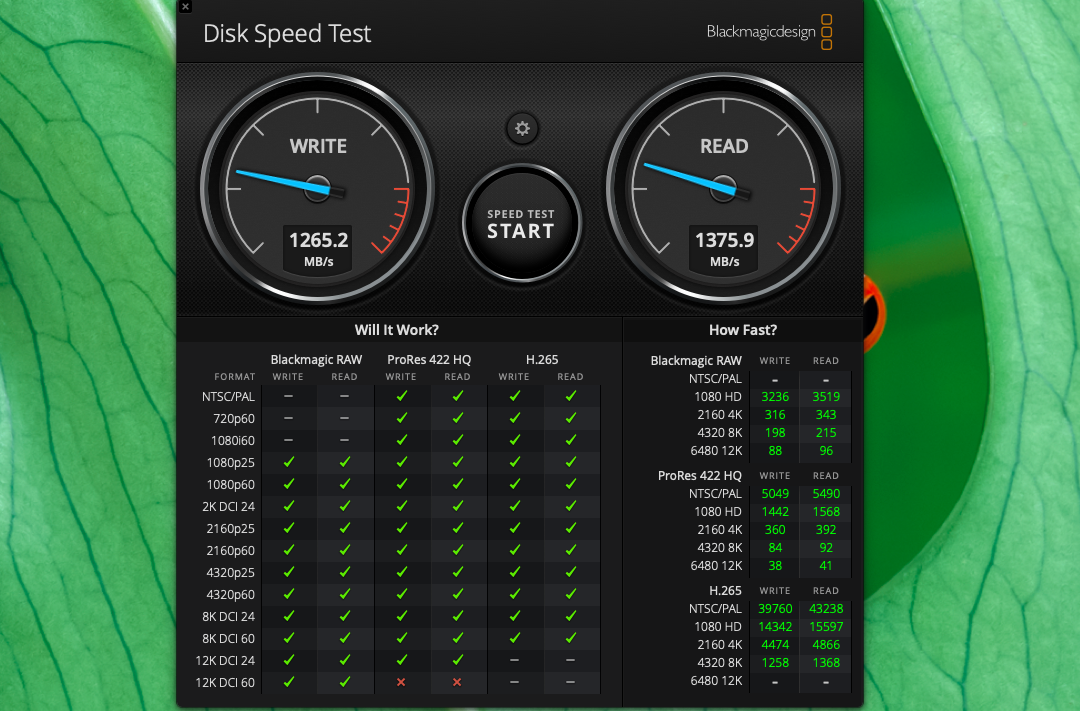
安装完,新硬盘测速效果相当不错了,老硬盘的测速没有截图,大概写是500-600M/s 读的话是 800-900M/s 新硬盘都有不小的提升
截屏2026-01-24 22.32