



惯性聚合 高效追踪和阅读你感兴趣的博客、新闻、科技资讯
阅读原文 在惯性聚合中打开

推荐订阅源

B
Blog RSS Feed
V2EX - 技术
V2EX - 技术
P
Privacy & Cybersecurity Law Blog
T
The Exploit Database - CXSecurity.com
美团技术团队
WordPress大学
WordPress大学
博客园 - 司徒正美
S
Securelist
奇客Solidot–传递最新科技情报
奇客Solidot–传递最新科技情报
博客园 - Franky
Attack and Defense Labs
Security Latest
Security Latest
L
LINUX DO - 最新话题
NISL@THU
NISL@THU
freeCodeCamp Programming Tutorials: Python, JavaScript, Git & More
cs.AI updates on arXiv.org
让小产品的独立变现更简单 - ezindie.com
腾讯CDC
Y
Y Combinator Blog
The Hacker News
The Hacker News
Security Archives - TechRepublic
IT之家
IT之家
T
Threatpost
Hugging Face - Blog
Hugging Face - Blog
Scott Helme
Scott Helme
S
SegmentFault 最新的问题
Cyberwarzone
Cyberwarzone
C
Cisco Blogs
阮一峰的网络日志
阮一峰的网络日志
U
Unit 42
B
Blog
Microsoft Azure Blog
P
Proofpoint News Feed
小众软件
小众软件
V
Vulnerabilities – Threatpost
J
Java Code Geeks
V
Visual Studio Blog
Cyber Security Advisories - MS-ISAC
A
Arctic Wolf
博客园 - 【当耐特】
Microsoft Security Blog
S
Security @ Cisco Blogs
雷峰网
雷峰网
Help Net Security
Help Net Security
The Last Watchdog
The Last Watchdog
Recent Announcements
G
Google Developers Blog
C
CERT Recently Published Vulnerability Notes
T
Troy Hunt's Blog
MyScale Blog
MyScale Blog

博客园 - daviyoung

Windows 11 22H2 安装 .NET Framework 3.5 完整教程 System.Threading.Timer 详细讲解 Agent 开发入门(一):从零构建你的第一个智能体 用 C# 开发一个解释器语言——基于《Crafting Interpreters》的实战系列(五)表达式求值 python使用plotly绘制图表 手把手搭建OPC UA服务器 图像处理库Pillow的使用:批量裁剪图片 python-docx库的使用:图片插入到word文档里 modbus(二)用NModbus4库实现Modbus tcp从站 Jenkins 容器化实践:Docker 部署与 CI/CD 流水线配置 用pycdc批量反编译pyc文件 以ENS 的 BaseRegistrarImplementation 合约为例,用web3.py调用合约 虚拟环境下安装包后,vs code仍然有下滑波浪线及显示找不到包(运行是正常的)的解决办法 Merkle Tree 用 C# 开发一个解释器语言——基于《Crafting Interpreters》的实战系列(四)可视化 语法树 Solidity开发ERC20智能合约claim token的功能 Solidity开发ERC20智能合约demo及部署到测试网 用 C# 开发一个解释器语言——基于《Crafting Interpreters》的实战系列(三)表达式的抽象语法树设计(Expr) 用 C# 开发一个解释器语言——基于《Crafting Interpreters》的实战系列(二)词法分析器
Streamlit实战
daviyoung · 2025-08-14 · via 博客园 - daviyoung

安装streamlit

测试安装

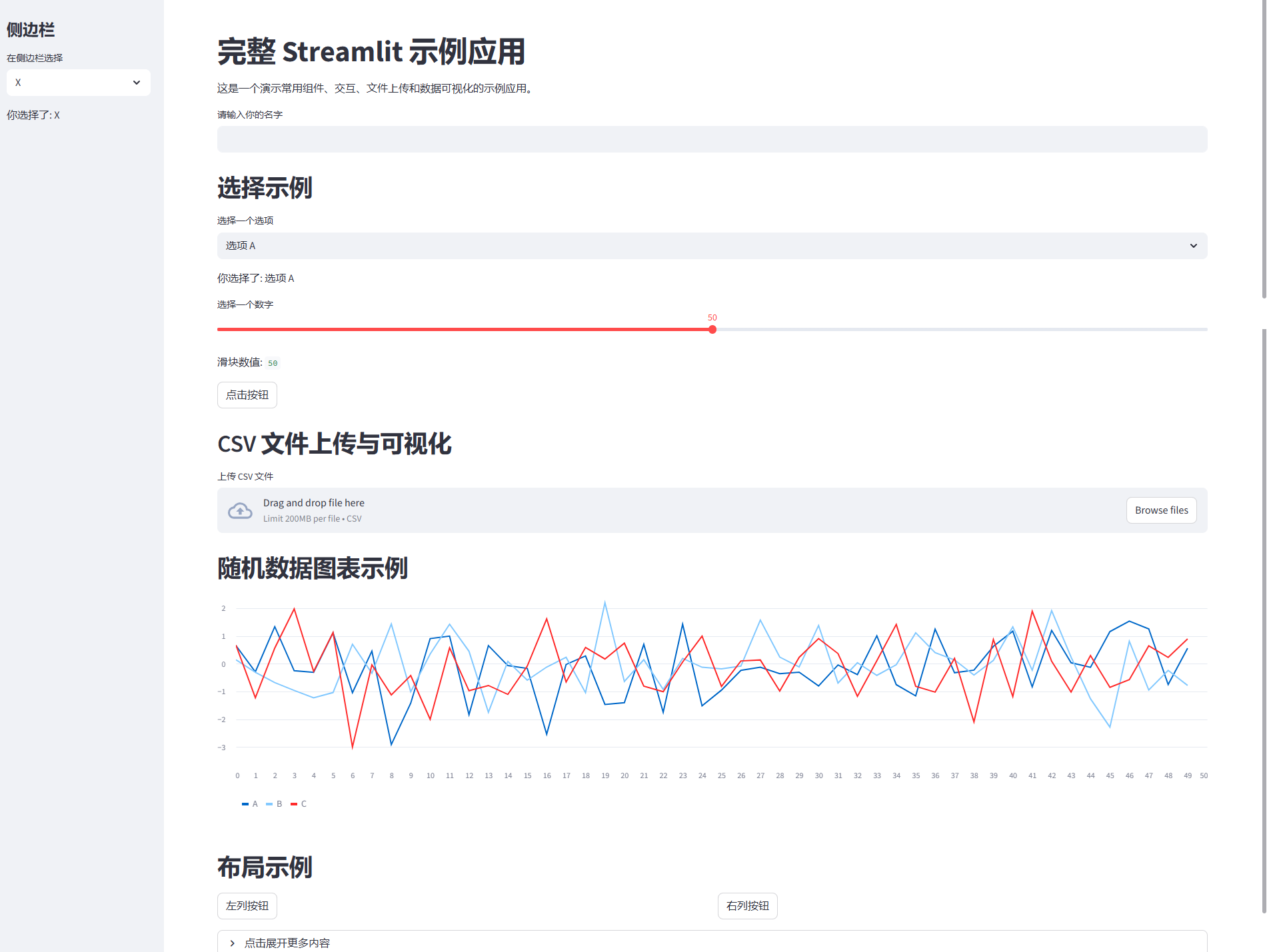
代码示例:

app.py

# app.py
import streamlit as st
import pandas as pd
import numpy as np

st.set_page_config(page_title="完整示例应用", layout="wide")

# -----------------------------
# 标题和介绍
# -----------------------------
st.title("完整 Streamlit 示例应用")
st.write("这是一个演示常用组件、交互、文件上传和数据可视化的示例应用。")

# -----------------------------
# 文本输入
# -----------------------------
name = st.text_input("请输入你的名字")
if name:
    st.write(f"你好, {name}!")

# -----------------------------
# 选择框和滑块
# -----------------------------
st.header("选择示例")
option = st.selectbox("选择一个选项", ["选项 A", "选项 B", "选项 C"])
st.write("你选择了:", option)

number = st.slider("选择一个数字", 0, 100, 50)
st.write("滑块数值:", number)

# -----------------------------
# 按钮交互
# -----------------------------
if st.button("点击按钮"):
    st.success("你点击了按钮!")

# -----------------------------
# 文件上传与数据可视化
# -----------------------------
st.header("CSV 文件上传与可视化")
uploaded_file = st.file_uploader("上传 CSV 文件", type="csv")

if uploaded_file is not None:
    df = pd.read_csv(uploaded_file)
    st.write("数据预览:", df.head())
    
    st.subheader("选择列绘制折线图")
    col = st.selectbox("选择列", df.columns)
    st.line_chart(df[col])

# -----------------------------
# 随机数据图表
# -----------------------------
st.header("随机数据图表示例")
df_random = pd.DataFrame(np.random.randn(50, 3), columns=["A", "B", "C"])
st.line_chart(df_random)

# -----------------------------
# 布局示例
# -----------------------------
st.header("布局示例")
col1, col2 = st.columns(2)
with col1:
    st.button("左列按钮")
with col2:
    st.button("右列按钮")

with st.expander("点击展开更多内容"):
    st.write("这里可以放隐藏信息或说明。")

# -----------------------------
# 侧边栏示例
# -----------------------------
st.sidebar.title("侧边栏")
sidebar_option = st.sidebar.selectbox("在侧边栏选择", ["X", "Y", "Z"])
st.sidebar.write("你选择了:", sidebar_option)

运行:streamlit run app.py

效果:
image