






把pcm文件转为mp3并播放,代码如下:
<!DOCTYPE html>
<html>
<head>
    <title>PCM转MP3转换器</title>
    <script src="https://cdnjs.cloudflare.com/ajax/libs/lamejs/1.2.1/lame.min.js"></script>
    <!-- <script src="./lame.min.js"></script> -->
    <style>
        .audio-player {
            margin-top: 20px;
            display: none;
        }
    </style>
</head>
<body>
    <h1>PCM转MP3转换器</h1>
    <input type="file" id="pcmFile" accept=".pcm">
    <button onclick="convertPcmToMp3()">Convert to MP3</button>

    <div class="audio-player" id="audioPlayer">
        <h3>转换后的MP3:</h3>
        <audio id="audio" controls></audio>
    </div>

    <script>
        function convertPcmToMp3() {
            const fileInput = document.getElementById('pcmFile');
            const file = fileInput.files[0];

            if (!file) {
                alert('Please select a PCM file first');
                return;
            }

            const reader = new FileReader();
            reader.onload = function(e) {
                const pcmData = new Int16Array(e.target.result);

                // Create MP3 encoder
                // Mp3Encoder 参数说明:
                // 参数1: 声道数 (1=单声道, 2=立体声)
                // 参数2: 采样率 (单位: Hz, 常用值: 44100=CD音质, 48000=专业音频)
                // 参数3: 比特率 (单位: kbps, 常用值: 128=标准音质, 192=高质量, 320=最高质量)
                const mp3encoder = new lamejs.Mp3Encoder(1, 48000, 128);
                const mp3Data = [];

                // Convert PCM to MP3
                // sampleBlockSize 设置为 1152 的原因:
                // 1. MP3 编码的基本单位是帧(frame),每帧包含 1152 个采样点
                // 2. 1152 是 576 的倍数(1152 = 576 * 2)
                // 3. 576 是 MP3 编码中的一个重要数值,它代表一个子带(subband)的采样点数
                // 4. 这个数值是 MP3 标准规定的,不能随意更改
                const sampleBlockSize = 1152;
                const mp3buf = new Int8Array(1152);

                for (let i = 0; i < pcmData.length; i += sampleBlockSize) {
                    const sampleChunk = pcmData.subarray(i, i + sampleBlockSize);
                    const mp3buf = mp3encoder.encodeBuffer(sampleChunk);
                    if (mp3buf.length > 0) {
                        mp3Data.push(mp3buf);
                    }
                }

                // Add end of stream
                const end = mp3encoder.flush();
                if (end.length > 0) {
                    mp3Data.push(end);
                }

                // Create blob and play
                const blob = new Blob(mp3Data, { type: 'audio/mp3' });
                const url = URL.createObjectURL(blob);

                // Show audio player and set source
                const audioPlayer = document.getElementById('audioPlayer');
                const audio = document.getElementById('audio');
                audio.src = url;
                audioPlayer.style.display = 'block';
            };

            reader.readAsArrayBuffer(file);
        }
    </script>
</body>
</html>
=== 5月23日新增===
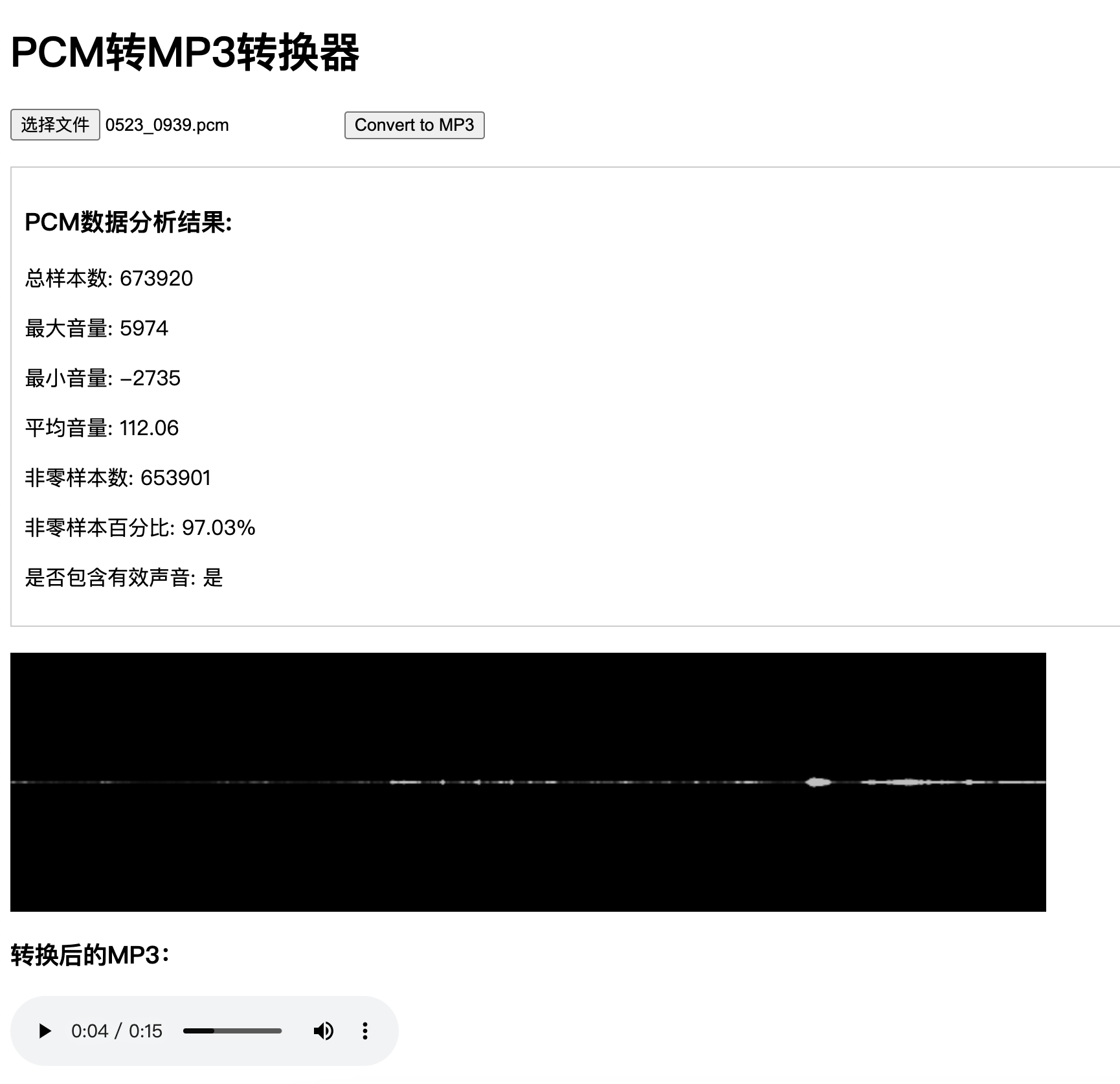
新增加了 分析PCM文件数据,分析是否有声音数据,已经生成声音波形图的功能,如下图所示:
源码地址: https://github.com/YalongYan/pcm2mp3
源码里有pcm文件 可以进行测试
此内容由惯性聚合(RSS阅读器)自动聚合整理,仅供阅读参考。 原文来自 — 版权归原作者所有。