





wget https://download-ib01.fedoraproject.org/pub/epel/7/x86_64/Packages/l/libzstd-1.5.5-1.el7.x86_64.rpm
wget https://download-ib01.fedoraproject.org/pub/epel/7/x86_64/Packages/l/llvm5.0-devel-5.0.1-7.el7.x86_64.rpm
wget https://download-ib01.fedoraproject.org/pub/epel/7/x86_64/Packages/l/llvm5.0-5.0.1-7.el7.x86_64.rpm
wget https://download-ib01.fedoraproject.org/pub/epel/7/x86_64/Packages/l/llvm5.0-libs-5.0.1-7.el7.x86_64.rpm

yum install -y libzstd-1.5.5-1.el7.x86_64.rpm
yum install -y centos-release-scl-rh llvm5*
yum install -y epel-release
wget --no-check-certificate  https://download.postgresql.org/pub/repos/yum/reporpms/EL-7-x86_64/pgdg-redhat-repo-latest.noarch.rpm

# 安装 PostgreSQL
sudo yum install -y postgresql15-server postgresql15-devel
# 初始化DB
sudo /usr/pgsql-15/bin/postgresql-15-setup initdb

# 开机启动|启动|重启|状态|停止 命令
sudo systemctl enable postgresql-15
sudo systemctl start postgresql-15
sudo systemctl restart postgresql-15
sudo systemctl status postgresql-15
sudo systemctl stop postgresql-15
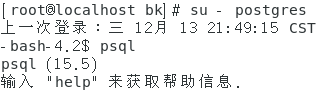
/* 切换至postgres用户下,执行psql进入到postgreSQL数据库,出现版本号,代表安装成功。 */
su - postgres
psql
/* 修改默认密码 */
ALTER USER postgres WITH PASSWORD 'command';

vim /var/lib/pgsql/15/data/pg_hba.conf
/* 编辑文件,最后一行添加 */
host    all             all             0.0.0.0/0               md5

vim /var/lib/pgsql/15/data/postgresql.conf
/* 修改listen_addresses值 */
listen_addresses = '*'
此内容由惯性聚合(RSS阅读器)自动聚合整理,仅供阅读参考。 原文来自 — 版权归原作者所有。