








本文主要介绍Windows在关闭时,如何正确、可靠的阻止系统关机以及关机前执行相应业务
Windows关机,默认会给应用几s的关闭时间,但有一些场景需要在关机/重启前执行更长时间的业务逻辑,确保下次开机时数据的一致性以及可靠性。我司目前业务也用到关机阻止,但这块之前并未梳理清楚,依赖BUG编程,导致后续维护项目时关机这块又会出现新问题。
统一整理,以下是实现这一需求的几种方法,
 1     public MainWindow()
 2     {
 3         InitializeComponent();
 4         Loaded += OnLoaded;
 5     }
 6
 7     private void OnLoaded(object sender, RoutedEventArgs e)
 8     {
 9         Loaded -= OnLoaded;
10         var source = PresentationSource.FromVisual(this) as HwndSource;
11         source?.AddHook(WndProc);
12     }
13     const int WM_QUERYENDSESSION = 0x11;
14     const int WM_ENDSESSION = 0x16;
15     private IntPtr WndProc(IntPtr hwnd, int msg, IntPtr wParam, IntPtr lParam, ref bool handled)
16     {
17         if (msg == WM_QUERYENDSESSION)
18         {
19             var handle = new WindowInteropHelper(this).Handle;
20             ShutdownBlockReasonCreate(handle, "应用保存数据中,请等待...");
21             // 可以在这里执行你的业务逻辑
22             bool executeSuccess = ExecuteShutdownWork();
23             // 返回0表示阻止关机,1表示允许关机
24             handled = true;
25             return executeSuccess ? (IntPtr)1 : (IntPtr)0;
26         }
27         return (IntPtr)1;
28     }
29
30     private bool ExecuteShutdownWork()
31     {
32         Thread.Sleep(TimeSpan.FromSeconds(20));
33         //测试,默认返回操作失败
34         return false;
35     }
36
37     [DllImport("user32.dll")]
38     private static extern bool ShutdownBlockReasonCreate(IntPtr hWnd, [MarshalAs(UnmanagedType.LPWStr)] string reason);
39     [DllImport("user32.dll")]
40     private static extern bool ShutdownBlockReasonDestroy(IntPtr hWnd);
通过Hook循环windows窗口消息,WndProc接收到WM_QUERYENDSESSION时表示有关机调用,详细的可以查看官网文档:(WinUser.h) WM_QUERYENDSESSION消息 - Win32 apps | Microsoft Learn
WndProc返回1表示业务正常,0表示取消、阻止关机。这里我们默认操作失败,阻止关机
拿到每个应用的关机确认结果,再广播WM_ENDSESSION、执行真正的关闭
拿到窗口句柄,可以通过ShutdownBlockReasonCreate设置阻止关机原因,ShutdownBlockReasonDestroy清理关机阻止原因,详见:ShutdownBlockReasonCreate 函数 (winuser.h) - Win32 apps | Microsoft Learn
阻止进行中的效果:
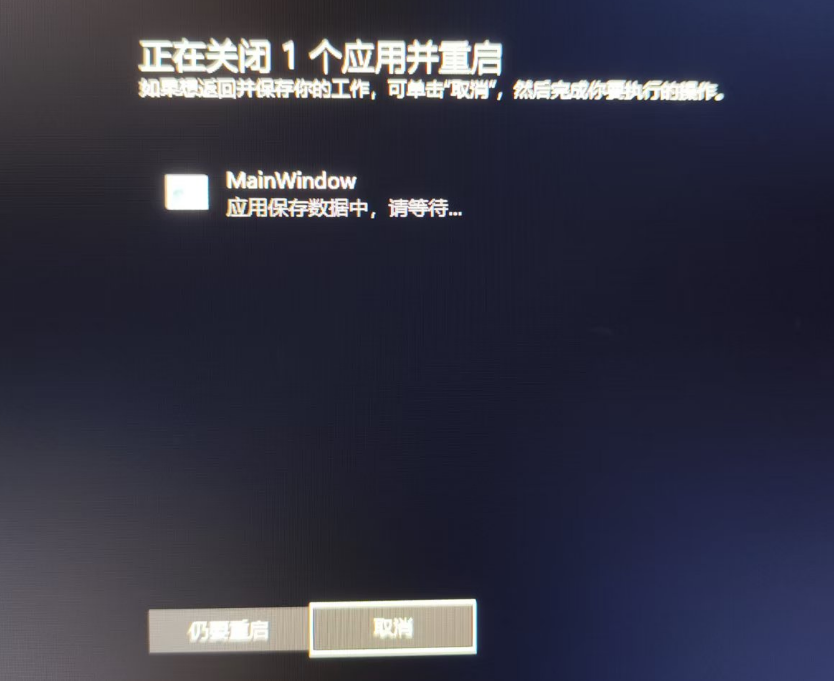
上面demo运行20s之后,系统会退出关机状态、返回登录界面
 1     public partial class App : Application
 2     {
 3         public App()
 4         {
 5             SystemEvents.SessionEnding += SystemEvents_SessionEnding;
 6             Application.Current.Exit += Current_Exit;
 7         }
 8         private void Current_Exit(object sender, ExitEventArgs e)
 9         {
10             SystemEvents.SessionEnding -= SystemEvents_SessionEnding;
11         }
12         private void SystemEvents_SessionEnding(object sender, SessionEndingEventArgs e)
13         {
14             if (e.Reason == SessionEndReasons.SystemShutdown)
15             {
16                 var handle = new WindowInteropHelper(Application.Current.MainWindow).Handle;
17                 ShutdownBlockReasonDestroy(handle);
18                 ShutdownBlockReasonCreate(handle, "应用保存数据中,请等待...");
19
20                 var executeSuccess = ExecuteShutdownWork();
21                 e.Cancel = !executeSuccess;
22             }
23         }
24         private bool ExecuteShutdownWork()
25         {
26             //Test
27             Thread.Sleep(TimeSpan.FromSeconds(200));
28             return false;
29             try
30             {
31                 // XXX
32                 return true;
33             }
34             catch (Exception e)
35             {
36                 return false;
37             }
38         }
39
40         [DllImport("user32.dll")]
41         private static extern bool ShutdownBlockReasonCreate(IntPtr hWnd, [MarshalAs(UnmanagedType.LPWStr)] string reason);
42         [DllImport("user32.dll")]
43         private static extern bool ShutdownBlockReasonDestroy(IntPtr hWnd);
44     }
也可以监听SessionEndReasons.SystemShutdown关机事件。实际上也是基于消息机制,但封装了细节、提供更高级抽象
这里e.Cancel,false表示不取消用户请求、不关机,true表示取消用户请求、
因为需要设置关机阻止原因,SystemEvents.SessionEnding也是要依赖窗口的。当然,因为依赖窗口会导致勾子失败,下面我们会聊
SessionEndReasons还有另一选项Logoff注销,也是可以阻止的。当然因为系统并未关机,注销时加的逻辑与关机大家要根据具体业务区分下
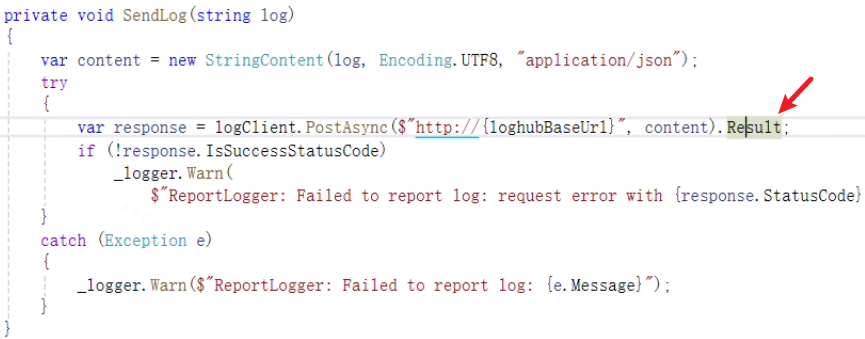
对于这类限定UI线程同步执行场景,我的解决办法是,减少逻辑、去除发送后台日志。
一些窗口启动后,需要立即Hide窗口:
1     public MainWindow()
2     {
3         InitializeComponent();
4         //在构造中设置Hide或者Show之后立即设置Hide,均会导致关机阻止失败
5         Hide();
6     }
在构造中Hide或者Show之后立即Hide,均会导致关机阻止失败。错误demo,可见 kybs0/ShutdownPreventDemo
我的理解是,ShutdownBlockReasonCreate 函数
 1     public MainWindow()
 2     {
 3         InitializeComponent();
 4         Loaded += MainWindow_Loaded;
 5     }
 6     private void MainWindow_Loaded(object sender, RoutedEventArgs e)
 7     {
 8         Loaded -= MainWindow_Loaded;
 9         //如果启动后需要立即隐藏窗口,请放在Loaded之后
10         Hide();
11     }
设置Visibility也没问题 Visibility=Visibility.Collapsed; 验证ok
所以,完全可以在主窗口内提前设置:
 1     public partial class MainWindow : Window
 2     {
 3         public MainWindow()
 4         {
 5             InitializeComponent();
 6             Loaded += MainWindow_Loaded;
 7         }
 8         private void MainWindow_Loaded(object sender, RoutedEventArgs e)
 9         {
10             Loaded -= MainWindow_Loaded;
11             var currentMainWindow = Application.Current.MainWindow;
12             var handle = new WindowInteropHelper(currentMainWindow).Handle;
13             ShutdownBlockReasonDestroy(handle);
14             ShutdownBlockReasonCreate(handle, "应用保存数据中,请等待...");
15
16             //窗口Hide,并不影响上面的ShutdownBlockReasonDestroy
17             Hide();
18         }
19         [DllImport("user32.dll")]
20         private static extern bool ShutdownBlockReasonCreate(IntPtr hWnd, [MarshalAs(UnmanagedType.LPWStr)] string reason);
21         [DllImport("user32.dll")]
22         private static extern bool ShutdownBlockReasonDestroy(IntPtr hWnd);
23     }
上面代码也注释了,设置完关机原因、再去Hide。关机事件触发后,是能正常保障阻止机制的。验证ok
这里也推荐大家使用SystemEvents.SessionEnding方式,可以不受MainWindow窗口的勾子入口限定
关机重启是有时间限制的,我试了下,在设置关机阻止原因情况下,应用最多只能持续60秒左右。
超过60s后系统取消关机、回登录界面,然后当前阻止的进程会在执行完Hook后自动关闭(其它进程不会关闭)
如果Hook勾子内我们执行的业务太过耗时,可能不一定能执行完。建议只执行更少、必须的业务
另外,关机时应用关闭是有顺序的。如果想提高一点应用关机时应用能应对的时间,略微提升关机前业务执行的成功率,可以对进程添加关闭优先级:
1         public MainWindow()
2         {
3             InitializeComponent();
4
5             // 在应用程序启动时调用
6             SetProcessShutdownParameters(0x4FF, 0);
7         }
8         [DllImport("kernel32.dll")]
9         static extern bool SetProcessShutdownParameters(uint dwLevel, uint dwFlags);
0x100表示最低优先级,确保你的程序最先被关闭
0x4FF表示最高优先级,确保你的程序最后被关闭
详细的参考文档: SetProcessShutdownParameters 函数 (processthreadsapi.h) - Win32 apps | Microsoft Learn
以上demo,可从仓库获取 ShutdownPreventDemo: 阻止关机demo
此内容由惯性聚合(RSS阅读器)自动聚合整理,仅供阅读参考。 原文来自 — 版权归原作者所有。