惯性聚合 高效追踪和阅读你感兴趣的博客、新闻、科技资讯
阅读原文 在惯性聚合中打开

推荐订阅源

云风的 BLOG
云风的 BLOG
Security Archives - TechRepublic
V
Vulnerabilities – Threatpost
C
CXSECURITY Database RSS Feed - CXSecurity.com
P
Proofpoint News Feed
G
GRAHAM CLULEY
P
Privacy International News Feed
The Hacker News
The Hacker News
Forbes - Security
Forbes - Security
U
Unit 42
N
News and Events Feed by Topic
D
Darknet – Hacking Tools, Hacker News & Cyber Security
C
Cyber Attacks, Cyber Crime and Cyber Security
C
Cisco Blogs
A
About on SuperTechFans
cs.CV updates on arXiv.org
D
Docker
I
Intezer
Spread Privacy
Spread Privacy
The Last Watchdog
The Last Watchdog
V2EX - 技术
V2EX - 技术
S
Security @ Cisco Blogs
F
Full Disclosure
S
Secure Thoughts
M
MIT News - Artificial intelligence
Microsoft Security Blog
G
Google Developers Blog
aimingoo的专栏
aimingoo的专栏
W
WeLiveSecurity
cs.CL updates on arXiv.org
Project Zero
Project Zero
Recorded Future
Recorded Future
Cyberwarzone
Cyberwarzone
S
Security Affairs
AWS News Blog
AWS News Blog
H
Help Net Security
The GitHub Blog
The GitHub Blog
Hacker News: Ask HN
Hacker News: Ask HN
Vercel News
Vercel News
P
Proofpoint News Feed
Cyber Security Advisories - MS-ISAC
The Register - Security
S
Schneier on Security
F
Fortinet All Blogs
C
CERT Recently Published Vulnerability Notes
L
LINUX DO - 最新话题
T
Tor Project blog
T
The Exploit Database - CXSecurity.com
MongoDB | Blog
MongoDB | Blog
Webroot Blog
Webroot Blog

博客园 - 丁少华

React UI 库推荐 Loop Engineering Vue 3 UI 组件库 Neon白嫖免费pgsql 域名利用cloudflare免费图床 nginx反代CloudflarePages提示502 vite使用shadcn vite使用biome Window下Nginx winserver2022安装不上软件 mac已损坏无法打开 代码高亮 命令运行器之task 命令运行器之just windows开启wsl 白嫖Redis 白嫖MongoDB vercel无服务函数 无服务器函数完全指南 在线 mock 方案 解释型语言和编译型语言 何时该使用monorepo monorepo前端专属吗 CentOS9上Let’s Encrypt自动续签 Windows给文件夹别名 ai 常识 nestjs逆向工程Prisma与DTO nestjs的orm之Prisma
Cursor锁区问题
丁少华 · 2025-12-21 · via 博客园 - 丁少华

前言

现在 Cursor 对 国区 进行了锁区,即使你开了会员,好的/新的 模型都不可用了,如果开了 Auto 模式,它回复也是使用的一些其它一些低端模型完成的。

100

我被锁了吗?

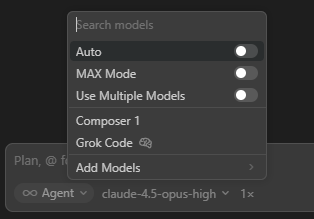
表现1
关闭Auto,手动选择模型的时候,发现只有这几个弱智模型,那就是实锤被锁了
img

表现2
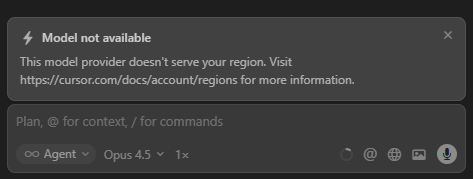
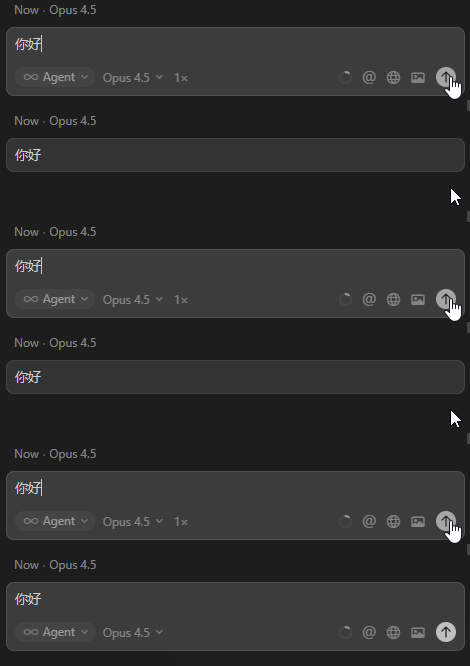
另外若你能看到很多模型,选择了其中之一(如我这儿是 Claude Opus),可消息怎么也发不出去,甚至还可能被提示“Model not available”,这也是被锁的表现
img
QQ20251221-120357

这总情况多发生在:

  • 开启了科学>系统代理 模式
  • 曾经成功解锁,模型列表被缓存下来了

解决方式1

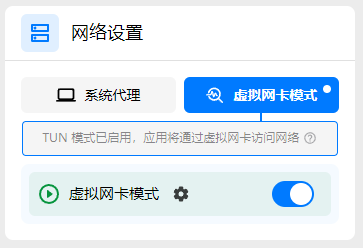
不要使用系统代理模式,而开启 科学>TUN(也叫虚拟网卡)模式即可,这种模式下相当于从路由器那里就可以科学冲浪了。
image

解决方式2

方式1会导致与公司的飞连冲突,导致飞连处于不可用状态!
所以我们需要:

  • (若你开启了话)关掉 科学工具>系统代理和TUN,且规则默认普通(无须全局代理)即可!
  • 另外 飞连也使用默认的 极速模式即可,不要全局代理模式!

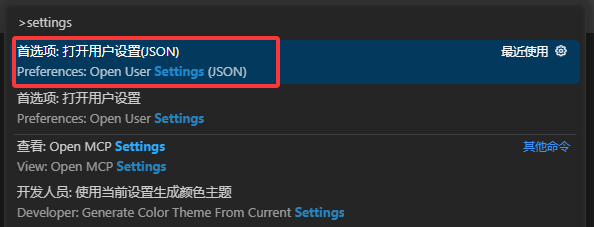
最后,在 Cursor 工具中按快捷键 command/ctr + shift + p 搜索 settings.json
image

在文件结尾处,添加如下代码即可

{
  // ...
  "http.proxy": "http://127.0.0.1:7897",
  "http.proxyStrictSSL": false,
  "http.proxySupport": "override",
  "http.noProxy": [],
  "cursor.general.disableHttp2": true
}

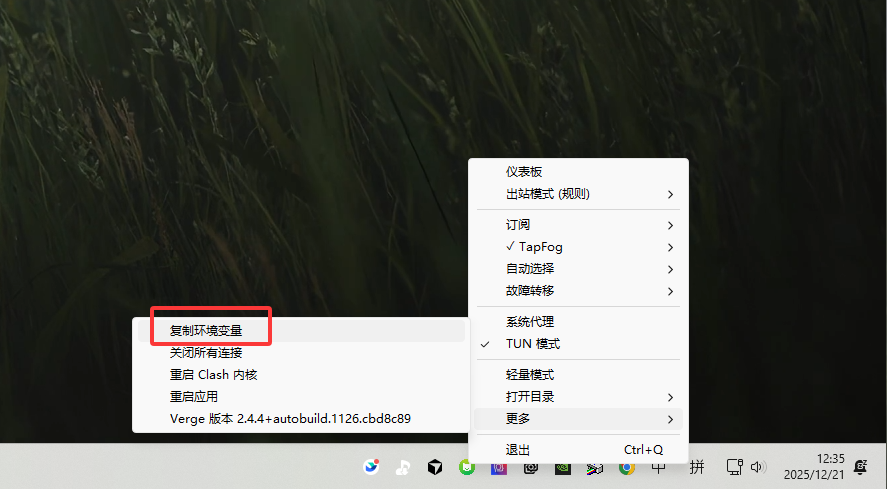
注意:你的http.proxy 端口号在这里查看(软件不同,界面可能不同)
image