


惯性聚合 高效追踪和阅读你感兴趣的博客、新闻、科技资讯
阅读原文 在惯性聚合中打开

推荐订阅源

Simon Willison's Weblog
Help Net Security
Help Net Security
P
Privacy International News Feed
T
Threat Research - Cisco Blogs
C
Cisco Blogs
C
CERT Recently Published Vulnerability Notes
NISL@THU
NISL@THU
L
LINUX DO - 热门话题
Security Latest
Security Latest
A
Arctic Wolf
G
GRAHAM CLULEY
月光博客
月光博客
S
Securelist
D
Docker
J
Java Code Geeks
T
Troy Hunt's Blog
T
Tenable Blog
让小产品的独立变现更简单 - ezindie.com
SecWiki News
SecWiki News
S
Security @ Cisco Blogs
量子位
freeCodeCamp Programming Tutorials: Python, JavaScript, Git & More
L
LINUX DO - 最新话题
Recent Commits to openclaw:main
aimingoo的专栏
aimingoo的专栏
博客园 - 【当耐特】
H
Heimdal Security Blog
The Hacker News
The Hacker News
博客园 - 三生石上(FineUI控件)
Application and Cybersecurity Blog
N
Netflix TechBlog - Medium
Vercel News
Vercel News
Forbes - Security
Forbes - Security
B
Blog RSS Feed
H
Hackread – Cybersecurity News, Data Breaches, AI and More
IT之家
IT之家
B
Blog
MongoDB | Blog
MongoDB | Blog
博客园 - 聂微东
Google DeepMind News
S
Secure Thoughts
Threat Intelligence Blog | Flashpoint
C
Check Point Blog
云风的 BLOG
云风的 BLOG
CTFtime.org: upcoming CTF events
T
The Blog of Author Tim Ferriss
L
Lohrmann on Cybersecurity
F
Full Disclosure
D
Darknet – Hacking Tools, Hacker News & Cyber Security
P
Proofpoint News Feed

博客园 - Lunais

恢复 git stash drop 丢失的内容 Git技巧:彻底重置本地仓库与远程同步,同时保留Stash内容 信源编码和信道编码区别 Leetcode scanf 一组数据差值之和最大 5G 3gpp协议 eclipse调试配置 find查找 浮点类型(float、double)在内存中的存储 yield [基础函数]memset用法 python2处理表格文件按照规则多行输出(中文路径,print) linux系统objdump输出动态库.so文件和静态库.a中符号表 python复制删除文件&修改目录&执行bat(wins) Linux C下的正则表达式 kill eclipse C语言之表达式运算整体提升 查找函数对比:findall,search,match Linux backtrace()
git本地协同
Lunais · 2020-03-26 · via 博客园 - Lunais

一.脚本下载

init.sh

#!/bin/bash
cd code
for dir in $(ls)
do
  cd $dir
  git config --local receive.denycurrentbranch ignore
  echo $dir
  cd ..
done

gitShare.sh

#!/bin/bash
git clone serveName@serveIp:/gitWareHousePath

二.操作步骤如下:

1、gitRemote.sh下载代码,这个脚本可能更新

2、执行init.sh脚本设置每个仓库,修改git默认的拒绝push操作

3、客户端通过命令获取本机的公钥,发送给服务端

#sublime-text ~/.ssh/id_rsa.pub

4、服务器端通过命令将客户端的公钥加到自己认证文件中

#sublime-text ~/.ssh/authorized_keys

5、客户端可以通过脚本gitShare.sh获取服务器端代码

更新代码: git pull

提交代码: git push

6、服务器端可以看到提交记录,但是要看到最新代码需要执行git reset --hard。

7、服务器开启命令:

#service sshd start 

三. 原理说明

1、主机0充当服务器,负责和远端仓库交互。注意要开启ssh服务

2、主机1、2、3...等充当客户端,将公钥发给服务器,通过gitShare.sh脚本拉取代码,通过git pull/push完成代码更新和推送操作

3、主机0也可以充当客户端,和其他客户端主机一样操作
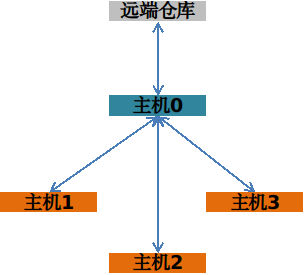
image.png

server需要更新远端仓库代码:

那么需要先git reset --hard,将分支节点拉到最新,然后再git pull --rebase即可,如果有冲突就解决掉后git rebase --continue

client更新server更新后的代码:

使用git pull --rebase