





组件支持:
v-model 双向绑定el-input 原生属性透传customInput
index.vue. // 组件页面
index.js. 全局注册使用
index.vue
<template>
  <el-input
    v-bind="$attrs"
    v-on="$listeners"
    :value="value"
    @input="handleInput"
    @change="handleChange"
    :placeholder="placeholder"
    :type="type"
    clearable
    :disabled="disabled"
    show-word-limit
  >
    <!-- 透传所有具名插槽和默认插槽 -->
    <template v-for="(slot, name) in $slots" :slot="name">
      <slot :name="name"></slot>
    </template>
  </el-input>
</template>
<script>
import _ from 'lodash'; // 引入 lodash
// import { debounce, throttle } from '@/utils/index'; // 导入自定义函数
export default {
  name: "CustomInput",
  props: {
    value: {
      type: [String, Number],
      default: "",
    },
    // 防抖配置
    debounce: {
      type: [Number, Boolean],
      default: false,
    },

    // 节流配置
    throttle: {
      type: [Number, Boolean],
      default: false,
    },
    // 去除首尾空格
    autoTrim: {
      type: Boolean,
      default: false,
    },
    placeholder: {
      type: String,
      default: "请输入",
    },
    clearable: {
      type: Boolean,
      default: true,
    },
    type: {
      type: String,
      default: "text",
    },
    disabled: {
      type: Boolean,
      default: false,
    },
    // 是否显示字数统计
    showWordLimit: {
      type: Boolean,
      default: false,
    },
  },
  data() {
    return {
      // 存储防抖/节流函数的引用
      debouncedInput: null,
      throttledInput: null,
    };
  },
  created() {
    // 初始化防抖函数
    if (this.debounce) {
      const delay = typeof this.debounce === "number" ? this.debounce : 500;
      this.debouncedInput = _.debounce(this.emitInput, delay);
    }

    // 初始化节流函数
    if (this.throttle) {
      const interval = typeof this.throttle === "number" ? this.throttle : 500;
      this.throttledInput = _.throttle(this.emitInput, interval);
    }
  },
  beforeDestroy() {
    // 组件销毁前取消防抖/节流
    if (this.debouncedInput) this.debouncedInput.cancel();
    if (this.throttledInput) this.throttledInput.cancel();
  },
  computed: {
    // maxlength() {
    //   return this.$attrs.maxlength;
    // }
  },
  mounted() {},
  methods: {
    // 输入事件处理
    handleInput(val) {
      if (this.debounce) {
        this.debouncedInput(val); // 防抖处理
      } else if (this.throttle) {
        this.throttledInput(val); // 节流处理
      } else {
        this.emitInput(val); // 无防抖节流
      }
    },
    // 失去焦点时触发(确保最终值被更新)
    handleChange(val) {
      this.emitInput(val, true);
    },

    // 触发 input 事件更新值
    emitInput(val, isChange = false) {
      // 如果是 change 事件触发,直接更新
      if (isChange) {
        this.$emit('input', val);
        return;
      }

      // 否则根据配置更新
       const finalValue = this.autoTrim ? val.trim() : val;
      this.$emit('input', finalValue);
    },
  },
};
</script>
index.js.
import CustomInput from './index.vue';

CustomInput.install = function(Vue) {
  Vue.component(CustomInput.name, CustomInput);
};

export default CustomInput;
//main.js 注册全局。vue.use(custominput)
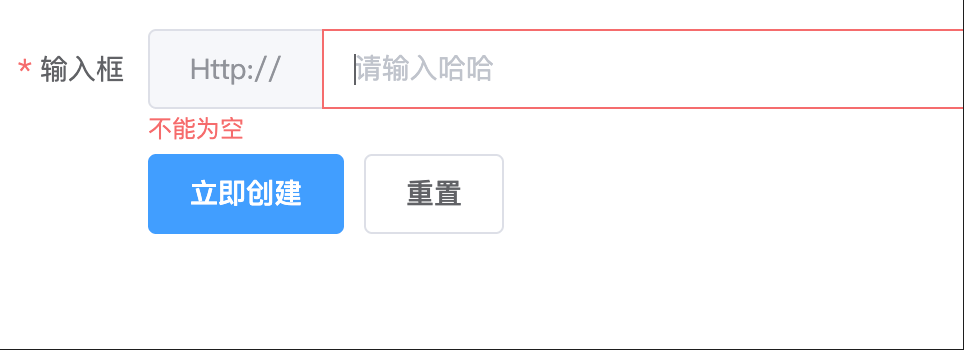
页面使用
     <el-form-item label="输入框" prop="name">
        <my-input
          v-model="ruleForm.name"
          placeholder="请输入哈哈"
        >
           <i slot="suffix" class="el-input__icon el-icon-date"></i>
      </my-input>
      </el-form-item>
关键点解析:
$slots: 这是一个对象,包含了父组件传递给当前组件的所有插槽。v-for="(slot, name) in $slots": 遍历 $slots 对象,name 是插槽名称(如 prefix、suffix),slot 是插槽内容。:slot="name": 将遍历出的插槽内容,以其原始名称透传到内部的 el-input 上。v-bind="$attrs": 这是实现 Props 透传最关键的一步。它会将父组件传递给 MyInput 但没有在 props 中声明的所有属性,全部绑定到内部的 el-input 上。例如 placeholder, disabled, maxlength, type 等 el-input 支持的原生属性,你都无需在 MyInput 的 props 中重新定义,直接就能用。
v-on="$listeners": 这是事件转发的关键。它会将父组件在 MyInput 上监听的所有事件(如 blur, focus, change),全部转发到内部的 el-input 上。这样,父组件使用 @blur 就和直接使用 el-input 的体验一致。
此内容由惯性聚合(RSS阅读器)自动聚合整理,仅供阅读参考。 原文来自 — 版权归原作者所有。