惯性聚合 高效追踪和阅读你感兴趣的博客、新闻、科技资讯
阅读原文 在惯性聚合中打开

推荐订阅源

T
Threatpost
CTFtime.org: upcoming CTF events
T
The Blog of Author Tim Ferriss
S
SegmentFault 最新的问题
OSCHINA 社区最新新闻
OSCHINA 社区最新新闻
博客园 - 司徒正美
T
Tailwind CSS Blog
The Cloudflare Blog
The Last Watchdog
The Last Watchdog
PCI Perspectives
PCI Perspectives
博客园 - 聂微东
Stack Overflow Blog
Stack Overflow Blog
TaoSecurity Blog
TaoSecurity Blog
云风的 BLOG
云风的 BLOG
C
Cybersecurity and Infrastructure Security Agency CISA
O
OpenAI News
Recorded Future
Recorded Future
GbyAI
GbyAI
www.infosecurity-magazine.com
Y
Y Combinator Blog
D
Darknet – Hacking Tools, Hacker News & Cyber Security
量子位
博客园 - 叶小钗
V
Vulnerabilities – Threatpost
F
Full Disclosure
Recent Announcements
Vercel News
Vercel News
S
Schneier on Security
H
Heimdal Security Blog
Cisco Talos Blog
Cisco Talos Blog
V2EX - 技术
V2EX - 技术
cs.AI updates on arXiv.org
B
Blog RSS Feed
宝玉的分享
宝玉的分享
Exploit-DB.com RSS Feed
P
Privacy & Cybersecurity Law Blog
T
Threat Research - Cisco Blogs
G
Google Developers Blog
C
Cyber Attacks, Cyber Crime and Cyber Security
爱范儿
爱范儿
IT之家
IT之家
大猫的无限游戏
大猫的无限游戏
C
Check Point Blog
N
Netflix TechBlog - Medium
S
Security @ Cisco Blogs
cs.CV updates on arXiv.org
Microsoft Azure Blog
H
Hackread – Cybersecurity News, Data Breaches, AI and More
Threat Intelligence Blog | Flashpoint
Cyberwarzone
Cyberwarzone

博客园 - zhaotianff

解决IIS服务器typecho上传附件后无法访问的问题 Visual Studio编译过程中拷贝文件的一些实用小技巧 Jenkins快速入门教程 .NET是什么?为什么要选择.NET? 如何在WPF中实现类似DevOps的自动化流程 一文带你搞懂医疗器械设计开发全生命周期 Windows如何清除本机记录的git用户名和密码 HL7协议详解 医疗行业 GDT 数据格式详解 一文带你搞懂C# 异步编程(async/await)底层原理 如何在C#中使用Chromium headless(无头模式)浏览器 不同.NET版本中的WPF新增功能 如何在WPF中使用 Fluent 主题 Windows平台下的各种原生UI框架介绍 C#如何Hook托管函数 WinDbg 用户层调试进阶教程 Windows编程的一些基础理论 推荐一款优秀的Windows经典文件管理器项目-WinFile Windows如何阻止应用程序联网 如何在WPF中捕获窗口外的事件 如何查看Windows进程的启动来源 Visual Studio 2026新解决方案格式slnx详解 我的微软MVP申请通过了 WPF MVVM实战系列教程(八、Prism DialogService, 对话框服务) WPF MVVM实战系列教程(七、Prism模块化) WPF 性能优化实战指南 WPF MVVM实战系列教程(六、Prism区域导航) WPF MVVM实战系列教程(五、Prism中的MVVM) WPF MVVM实战系列教程(四、Prism中的依赖注入) 微软 IDE 新纪元:Visual Studio 2026 初体验 WPF MVVM实战系列教程(三、创建Bootstrapper/启动器) WPF MVVM实战系列教程(二、使用Visual Studio 创建Prism项目) WPF MVVM实战系列教程(一、Prism框架介绍)
Windows 7无法安装VMWare Tools的解决办法
zhaotianff · 2025-12-02 · via 博客园 - zhaotianff

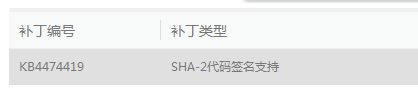
安装失败的原因是因为缺少这个更新

image

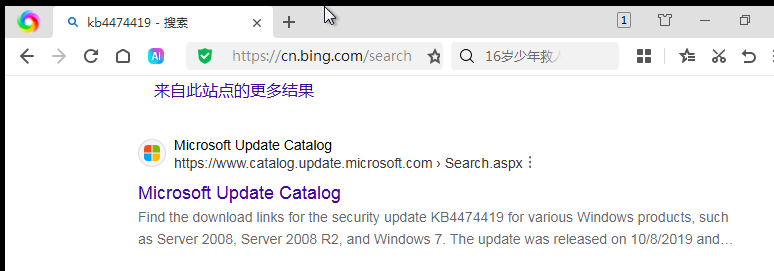
可以直接在虚拟机中访问Bing,并搜索这个补丁包的编号 ,找到微软的官方下载地址,下载安装即可

image

也可以直接访问下面这个地址:

x64:https://catalog.s.download.windowsupdate.com/c/msdownload/update/software/secu/2019/09/windows6.1-kb4474419-v3-x64_b5614c6cea5cb4e198717789633dca16308ef79c.msu

x86:https://catalog.s.download.windowsupdate.com/c/msdownload/update/software/secu/2019/09/windows6.1-kb4474419-v3-x86_0f687d50402790f340087c576886501b3223bec6.msu

如果虚拟机无法直接上网,只能使用光盘镜像工具制作镜像,再使用VMWare进行加载并进行安装。

这里不做详细介绍